Reading view

There are new articles available, click to refresh the page.

Looking Back at Wiki Loves Monuments Iran 2025

By: Arian

As we get closer to the next Wiki Loves Monuments competition in Iran, we wanted to take a moment to look back at the 2025 edition.

A year has passed since photographers across Iran once again took part in Wiki Loves Monuments Iran. The 2025 edition was organized by the Iranian Wikimedians User Group, with the help of volunteers and members of the Wikimedia community. The competition invited people to photograph Iran’s registered cultural and historical monuments and share their images freely on Wikimedia Commons.

We now have some distance from the competition and its results. This gives us a good chance to look at what happened, what we learned, and what we want to take with us into the next edition.

Dayr-e Gachin Caravanserai, first place in Wiki Loves Monuments Iran 2025 and first place internationally. Photo by Hossein Pourakbarian, CC BY-SA 4.0.

Wiki Loves Monuments Iran 2025

The Iranian competition ran from 1 to 31 October 2025.

During that month, participants contributed 2,513 eligible photographs. In comparison, the 2024 competition received 2,722 eligible photographs.

This was a small decrease, but the number of uploads tells only part of the story.

Iran has more than 33,000 registered monuments, spread across the country. Some are famous and already have many photographs. Others are much less known, and many still need better documentation on Wikimedia projects.

The goal of Wiki Loves Monuments is not simply to collect as many photographs as possible. We want to create a useful and freely available visual record of cultural heritage. A good photograph can illustrate a Wikipedia article, help people learn about a monument, or preserve a view of a place that may change in the future.

This was also an important lesson from our 2024 competition. Each edition helps us understand a little better how we can improve the contest and how we can encourage people to document more of Iran’s cultural heritage.

Selecting Iran’s finalists

After the competition ended, the national jury reviewed the photographs and selected the ten images that would represent Iran in the international round.

The first-place photograph showed Dayr-e Gachin Caravanserai, photographed by Hossein Pourakbarian.

Second place went to Mohammad Ataei for a photograph of the historic district of Gorgan, and third place went to Hadi Dehghanpour for a photograph of Arak Bazaar.

Historic district of Gorgan, second place in Wiki Loves Monuments Iran 2025. Photo by Mohammad Ataei Mohammadi, CC BY-SA 4.0.

The ten selected photographs covered different parts of Iran’s heritage. They included caravanserais, historic urban areas, mosques, a bazaar, a castle, a monastery and other monuments.

These ten photographs then moved on to the international stage of Wiki Loves Monuments.

An exceptional international result

The 2025 international competition brought together photographs from 56 national contests. In total, almost 228,000 images were contributed by around 4,000 photographers around the world. Each national competition could send up to ten photographs to the international round.

The final result was especially memorable for Iran.

Four photographs from Iran were selected among the international winners, including both first and second place.

The Iranian winners were:

  • 1st place: Dayr-e Gachin Caravanserai, by Hossein pourakbarian
  • 2nd place: Mehmandust Tower, by Mehdi Akbari
  • 5th place: Arak Bazaar, by Hadi Dehghanpour
  • 22nd place: Seyyed Mosque in Isfahan, by Siavash Banaei

The full international results are available on Wikimedia Commons.

Seeing an Iranian photograph take first place was already something to celebrate. Having photographs from Iran in both first and second place made the result even more special.

The first-place photograph of Dayr-e Gachin Caravanserai had also won first place in the Iranian competition. It was chosen as the best image first by the national jury and later by the international jury.

But another result was just as interesting for us.

The photograph of Mehmandust Tower, which finished second internationally, had been ranked sixth in the Iranian competition.

Mehmandust Tower, sixth place in the Iranian competition and second place internationally. Photo by Darabad andromeda (Mehdi Akbari), CC BY-SA 4.0.

This is a good example of why each country sends ten photographs to the international round instead of only its national winner. Different juries can see different strengths in a photograph. An image that places sixth in one jury may become one of the strongest photographs in the international competition.

The same happened, to a smaller degree, with other Iranian finalists. The photograph of Arak Bazaar was third nationally and fifth internationally. The photograph of Seyyed Mosque was fourth nationally and later finished 22nd in the international results.

Arak Bazaar, third place nationally and fifth place internationally. Photo by Dehghanpourpix (Hadi Dehghanpour), CC BY-SA 4.0.
Seyyed Mosque in Isfahan, fourth place nationally and 22nd place internationally. Photo by Siabanaei (Siavash Banaei), CC BY-SA 4.0

For us, this showed the strength of the national top ten as a group, not only the strength of the first-place photograph.

More than the winning photographs

The international results were a great achievement for the photographers and for Wiki Loves Monuments Iran. But the winning images are only a small part of what the competition produced.

The 2,513 eligible photographs from the Iranian competition are now part of Wikimedia Commons.

They are freely licensed. They can be used on Wikipedia and other Wikimedia projects. They can also be reused outside Wikimedia by anyone who follows the terms of their licenses.

Many of these photographs will never win an award, but that does not make them less useful.

A clear photograph of a little-known monument can be more valuable to Wikipedia than another beautiful photograph of a landmark that already has hundreds of images. A photograph can also document a building, detail, landscape or condition that may not look the same ten or twenty years from now.

This is one of the reasons Wiki Loves Monuments continues to matter.

What we learned from 2025

Looking back, one lesson is clear: the success of Wiki Loves Monuments cannot be measured only by the number of uploads.

Iran received fewer eligible photographs in 2025 than in 2024, with 2,513 compared with 2,722. At the same time, the photographs selected by the national jury had an exceptional result internationally.

This does not mean that the number of contributions is unimportant. We still want more people to take part, and we want to document more monuments. But we also want to help participants create photographs that are useful for Wikimedia projects.

The international results also reminded us of the importance of having a strong and varied national selection. The ten photographs sent to the international round should represent different photographers, places, styles and ways of looking at cultural heritage.

Another important goal is to encourage more photography of less-documented monuments.

With more than 33,000 registered monuments in Iran, there is still a great deal of work to do. Famous places naturally attract photographers, but Wiki Loves Monuments can have an even greater long-term impact when participants visit places that have few photographs or no useful images on Wikimedia Commons.

We also want to keep making the connection between photography and open knowledge clearer.

Uploading a photograph is an important first step. Correctly identifying the monument, adding useful information, using the right monument ID, and eventually adding the photograph to Wikipedia articles can make that contribution much more useful.

Looking toward the next edition

As the next Wiki Loves Monuments Iran approaches, we want to build on what we learned from both 2024 and 2025.

We want to reach new photographers while welcoming returning participants. We want to encourage people to explore monuments that receive less attention. We want more high-quality photographs, but also more photographs that fill real gaps in Wikimedia Commons and Wikipedia.

Most of all, we want to continue building a free visual record of Iran’s cultural heritage.

The international success of the 2025 competition gave us something special to celebrate. Four Iranian photographs were among the international winners. Two of them took the first and second places in the world.

But the lasting result of the competition is much bigger than four photographs.

It is the thousands of freely licensed images that are now available to everyone.

The Iranian Wikimedians User Group would like to thank every photographer who participated, the members of the national jury, the volunteers who helped organize the competition, and the international Wiki Loves Monuments community.

As we prepare for the next edition, we hope even more people will join us in photographing, documenting and sharing Iran’s cultural heritage.

There are more than 33,000 monuments to document.

There is still a lot to photograph.

Free Photography Has No License to Be Bad

Every August 19, the world celebrates the camera as a tool of connection — and for the free knowledge movement, it’s also a reminder of what a single photograph can unlock. On Wikimedia Commons, a well-lit image of a market stall, a sacred hill, or a rare frog isn’t just decoration. It’s the visual backbone that lets millions of Wikipedia readers actually see the subject they came to learn about.

Copyleft was never a synonym for “low quality”

There’s a persistent myth that free-licensed photography is a compromise, that the “good” images live behind stock-photo paywalls, and Commons gets the leftovers. Our community’s work says otherwise. Across campaigns like Wiki Loves Africa, Wiki Loves Earth, and Wiki Loves Monuments, Malagasy wikimedia contributors have uploaded more than 7,000 photographs to Wikimedia Commons; many shot with the same care, composition, and technical rigor as a commissioned assignment. Free licensing describes who can use an image, not how well it was made.

Draky Man (CC-BY 4.0)

The real ROI of a free photograph

For a professional photographer, “return on investment” usually means a sale. But contributing to free knowledge pays out differently and almost certainly further. A single well-tagged image uploaded once can illustrate an article read in dozens of languages, get pulled into news graphics, textbooks, museum panels, and other Wikimedia projects, and keep circulating indefinitely without another transaction. For our Malagasy contributors, individual campaign contributions have gone on to be reused across as many as 46 different language editions of Wikipedia and its sister projects: a reach no single print sale or stock license could match in a such tight timeframe, and without any marketing budget. That’s the ROI that matters here: not one payment, but compounding, borderless visibility and most importantly a meaningful added value to the global knowledge.

Photo of a Madagascar Hoopoe in Isalo National Park
Anai171 (CC-BY-SA 4.0)

That’s the ROI that matters here: meaningful added value to the world’s shared knowledge.

A two-way exchange, not a donation

Framing this as simple generosity undersells it. Contributing quality images to Commons is a genuine exchange:

  • The global community gains verifiable, freely reusable visual documentation of places, cultures, and species that were previously invisible or poorly represented online, closing real gaps in the world’s shared reference library.
  • The contributor gains a public, permanent portfolio with real analytics of reuse and reach, skill-building through structured campaigns and peer feedback, and a credited body of work that follows their name across every project it touches.

It’s less a donation and more a long-term investment both sides keep drawing value from.

Fitax212 (CC0 1.0)

Madagascar is bringing professional-level work to the table

What stands out in our community’s activity isn’t just volume: it’s intent. Wiki Loves Earth contributors documented Madagascar’s biodiversity with the eye of field photographers. Wiki Loves Folklore campaigns paired careful photography with multilingual article-writing, treating imagery as genuine documentation tool, not an afterthought.

Then comes the real richness of being part of a community. With proper support, new contributors gain lasting skills on composition, licensing, and metadata: the fundamentals that separate a snapshot from a usable, professional-grade Commons file.

This World Photography Day, We want to remind that free knowledge photos never had license to be anything less than good. It never was.


Wikimedia Community User Group Madagascar contributes to Wikipedia and its sister projects.
Learn more on Meta-Wiki, Facebook and Linkedin

Iris, a Photo History Explorer

By: Nick Heer

Tyler Hall (finally) released Iris, and it is excellent:

And somewhere along the way the whole emotional center of the thing shifted. I set out to build an anti-Photos utility — a search engine for a hard drive. What I actually ended up with is a memory keeper. Open a photo today and Iris tells you the date, surfaces “16 items on this day,” drops a pin on the map, and lists the people in the frame with their ages quietly calculated from their birthdays. That is not a utility. That is the opposite of anti-anything.

I have been testing Iris for a couple of months and I think it is delightful. It reads all the photo libraries you point it at — your system library, whether that is in iCloud or local, and any folders you want like the one that contains your Lightroom edits, for example — and makes them accessible in a single, giant view.

But that is not the coolest part. No, that is that it lets you explore your tens- or hundreds-of-thousands of photos in a way that treats each of them as little memory boxes. So often, it is not just a picture of your kid, or your dog, or your dinner; it is a time you would like to remember. There are a bunch of things in each file that can bring you back to that moment. Photos does a poor job of that; Iris, on the other hand, is made for exactly that, something Hall takes seriously. How many apps are there with a manifesto?

Iris is great, old-school, indie Mac software.

⌥ Permalink

⌥ I Regret the Blood Pact I Have Made With iCloud Photos

By: Nick Heer

Sometimes, I do not recognize a trap until I am already in it. Photos in iCloud is one such situation.

When Apple launched iCloud Photo Library in 2014, I was all-in. Not only is it where I store the photos I take on my iPhone, it is where I keep the ones from my digital cameras and my film scans, and everything from my old iPhoto and Aperture libraries. I have culled a bunch of bad photos and I try not to hoard, but it is more-or-less a catalogue of every photo I have taken since mid-2007. I like the idea of a centralized database of my photos, available on all my devices, that is functionally part of my backup strategy.1

But, also, it is large. When I started putting photos in there eleven years ago with a 200 GB plan, I failed to recognize it would become an albatross. iCloud Storage says it is now 1.5 TB and, between the amount of other stuff I have in iCloud and my Family Sharing usage, I have just 82 GB of available space. 2 TB seemed like such a large amount of space until I used 1.9 of it.

Apple’s next iCloud tier is a generous 6 TB, but it costs another $324 per year. I could buy a new 6 TB hard disk annually for that kind of money. While upgrading tiers is, by far, the easiest way to solve this problem, it only kicks that can down that road, the end of which currently has whatever two terabytes’ worth of cans looks like.

A better solution is to recognize I do not need instant access to all 95,000 photos in my library, but iCloud has no room for this kind of nuance. The iCloud syncing preference is either on or off for the entire library.

Unfortunately, trying to explain what goes wrong when you try to deviate from Apple’s model of how photo libraries ought to work will become a bit of a rant. And I will preface this by saying this is all using Photos running on MacOS Ventura, which is many years behind the most recent version of MacOS. It is not possible for me to use the latest version of Photos to make these changes because upgraded libraries cannot be opened by older versions of Photos. However, in my defense, I will also note that the version on Ventura is Photos 8.0 and these are the kinds of bugs and omissions inexcusable after that many revisions.

So: the next best thing is to create a separate Photos library — one that will remain unsynced with iCloud. Photos makes this pretty easy by launching while holding the Option (⌥) key. But how does one move images from one library to the other? Photos is a single-window application — you cannot even open different images in new windows, let alone run separate libraries in separate windows. This should be possible, but it is not.

As a workaround, Apple allows you to import images from one Photos library into another — but not if the source library is synced with iCloud. You therefore need to turn off iCloud sync before proceeding, at which point you may discover that iCloud is not as dependable as you might have expected.

I have “Download Originals to this Mac” enabled, which means that Photos should — should — retain a full copy of my library on my local disk. But when I unchecked the “iCloud Photos” box in Settings, I was greeted by a dialog box informing me that I would lose 817 low-resolution local copies, something which should not exist given my settings, though reassuring me that the originals were indeed safe in iCloud. There is no way to know which photos these are nor, therefore, any way to confirm they are actually stored at full resolution in iCloud. I tried all the usual troubleshooting steps. I repaired my library, then attempted to turn off iCloud Photos; now I had 850 low-resolution local copies. I tried a neat trick where you select all the pictures in your library and select “Play Slideshow”, at which point my Mac said it was downloading 733 original images, then I tried turning off iCloud Photos again and was told I would lose around 150 low-resolution copies.

You will note none of these numbers add or resolve correctly. That is, I have learned, pretty standard for Photos. Currently, it says I have 94,529 photos and 898 videos in the “Library” view, but if I select all the items in that view, it says there are a total of 95,433 items selected, which is not the same as 94,529 + 898. It is only a difference of six items but, also, it is an inexplicable difference of six.

At this point, I figured I would assume those 150 photos were probably in iCloud, sacrifice the low-resolution local copies, and prepare for importing into the second non-synced library I had created. So I did that, switched libraries, and selected my main library for import. You might think reading one Photos library from another stored on the same SSD would be pretty quick. Yes, there are over 95,000 items and they all have associated thumbnails, but it takes only a beat to load the library from scratch in Photos.

It took over thirty minutes.

After I patiently waited that out, I selected a batch of photos from a specific event and chose to import them into an album, so they stay categorized. Oh, that is right — just because you are importing across Photos libraries, that does not mean the structure will be retained. There is no way, as far as I can tell, to keep the same albums across libraries; you need to rebuild them.

After those finished importing, I pulled up my main library again to do the next event. You might expect it to retain some memory of the import source I had only just accessed. No — it took another thirty minutes to load. It does this every time I want to import media from my main library. It is not like that library is changing; it is no longer synced with iCloud, remember. It just treats every time it is opened as the first time.

And it was at this point I realized the importer did not display my library in an organized or logical fashion. I had expected it to be sorted old-to-new since that is how Photos says it is displayed, but I saw photos from many different years all jumbled together. It is almost in order, at times, but then I would notice sequential photos scattered all over.

My guess — and this is only a guess — is that it sub-orders by album, but does no further sorting after that. This is a problem for me given a quirk in my organizational structure. In addition to albums for different events, I have smart albums for each of my cameras and each of my iPhone’s individual lenses. But that still does not excuse the importer’s inability to sort old-to-new. The event I spotted early on and was able to import was basically a fluke. If I continued using this cross-library importing strategy, I would not be able to keep track of which photos I could remove from my main library.

There is another option, which is to export a selection of unmodified originals from my primary library to a folder on disk, and then switch libraries, and import them. This is an imperfect solution. Most obviously, it requires a healthy amount of spare disk space, enough to store the selected set of photos thrice, at least temporarily: once in the primary library, once in the folder, and once in the new library. It also means any adjustments made using the Photos app will be discarded — but, then again, importing directly from the library only copies the edited version of a photo without any of its history or adjustments preserved.

What I would not do, under any circumstance — and what I would strongly recommend anyone avoiding — is to use the Export Photos option. This will produce a bunch of lossy-compressed photos, and you do not want that.

Anyway, on my first attempt of trying the export-originals-then-import process, I exported the 20,528 oldest photos in my library to a folder. Then I switched to the archive library I had created, and imported that same folder. After it was complete, Photos said it had imported 17,848 items, a difference of nearly 3,000 photos. To answer your question: no, I have no idea why, or which ones, or what happened here.

This sucks. And it particularly sucks because most data is at least kind of important, but photos are really important, and I cannot trust this application to handle them.

There is this quote that has stuck with me for nearly twenty years, from Scott Forstall’s introduction to Time Machine (31:30) at WWDC 2006. Maybe it is the message itself or maybe it is the perfectly timed voice crack on the word “awful”, but this resonated with me:

When I look on my Mac, I find these pictures of my kids that, to me, are absolutely priceless. And in fact, I have thousands of these photos.

If I were to lose a single one of these photos, it would be awful. But if I were to lose all of these photos because my hard drive died, I’d be devastated. I never, ever want to lose these photos.

I have this library stored locally and backed up, or at least I though I did. I thought I could trust iCloud to be an extra layer of insurance. What I am now realizing is that iCloud may, in fact, be a liability. The simple fact is that I have no idea the state my photos library is currently in: which photos I have in full resolution locally, which ones are low-resolution with iCloud originals, and which ones have possibly been lost.

The kindest and least cynical interpretation of the state of iCloud Photos is that Apple does not care nearly enough about this “absolutely priceless” data. (A more cynical explanation is, of course, that services revenue has compromised Apple’s standards.) Many of these photos are, in fact, priceless to me, which is why I am questioning whether I want iCloud involved at all. I certainly have no reason to give Apple more money each month to keep wrecking my library.

I will need to dedicate real, significant time to minimizing my iCloud dependence. I will need to check and re-check everything I do as best I can, while recognizing the difficulty I will have in doing so with the limited information I have in my iCloud account. This is undeniably frustrating. I am glad I caught this, however, as I sure had not previously thought nearly as much as I should have about the integrity of my library. Now, I am correcting for it. I hope it is not too late.


  1. It is no longer the sole place I store my photos. I have everything stored locally, too, and that gets backed up with Backblaze. Or, at least, I think I have everything stored locally. ↥︎

⌥ Moraine Luck

By: Nick Heer

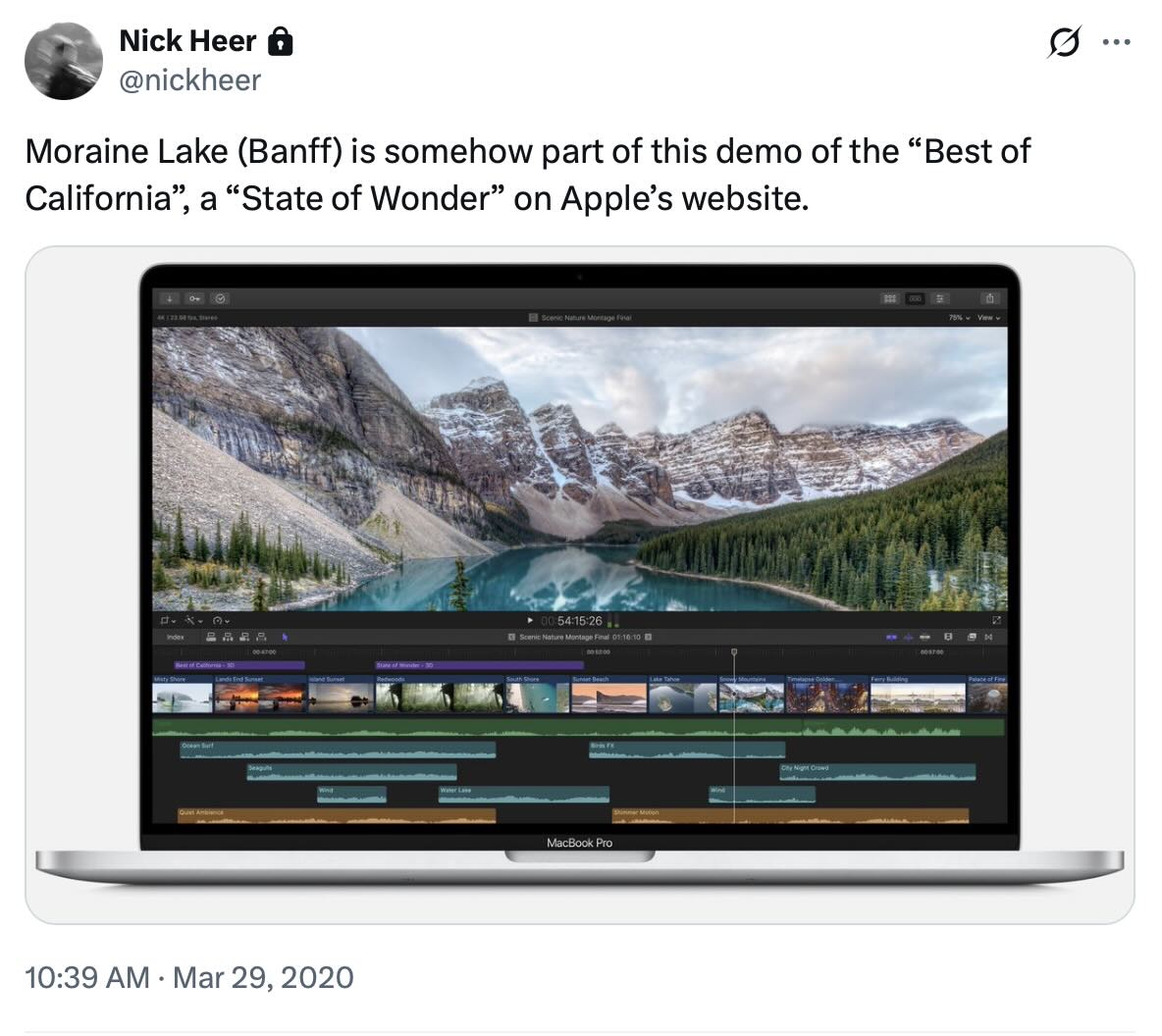
You have seen Moraine Lake. Maybe it was on a postcard or in a travel brochure, or it was on Reddit, or in Windows Vista, or as part of a “Best of California” demo on Apple’s website. Perhaps you were doing laundry in Lucerne. But I am sure you have seen it somewhere.

Moraine Lake is not in California — or Switzerland, for that matter. It is right here in Alberta, between Banff and Lake Louise, and I have been lucky enough to visit many times. One time I was particularly lucky, in a way I only knew in hindsight. I am not sure the confluence of events occurring in October 2019 is likely to be repeated for me.

In 2019, the road up to the lake would be open to the public from May until about mid-October, though the closing day would depend on when it was safe to travel. This is one reason why so many pictures of it have only the faintest hint of snow capping the mountains behind — it is only really accessible in summer.

I am not sure why we decided to head up to Lake Louise and Moraine Lake that Saturday. Perhaps it was just an excuse to get out of the house. It was just a few days before the road was shut for the season.

We visited Lake Louise first and it was, you know, just fine. Then we headed to Moraine.

I posted a higher-quality version of this on my Glass profile.
A photo of Moraine Lake, Alberta, frozen with chunks of ice and rocks on its surface.

Walking from the car to the lakeshore, we could see its surface was that familiar blue-turquoise, but it was entirely frozen. I took a few images from the shore. Then we realized we could just walk on it, as did the handful of other people who were there. This is one of several photos I took from the surface of the lake, the glassy ice reflecting that famous mountain range in the background.

I am not sure I would be able to capture a similar image today. Banff and Lake Louise have received more visitors than ever in recent years, to the extent private vehicles are no longer allowed to travel up to Moraine Lake. A shuttle bus is now required. The lake also does not reliably freeze at an accessible time and, when it does, it can be covered in snow or the water line may have receded. I am not arguing this is an impossible image to create going forward. I just do not think I am likely to see it this way again.

I am very glad I remembered to bring my camera.

PetaPixel’s Google Pixel 10 Pro Review

By: Nick Heer

If you, thankfully, missed Google’s Pixel 10 unveiling — and even if you did not — you will surely appreciate PetaPixel’s review of the Pro version of the phone from the perspective of photographers and videographers. This line of phones has long boasted computational photography bonafides over the competition, and I thought this was a good exploration of what is new and not-so-new in this year’s models.

Come for Chris and Jordan; stay for Chris’ “pet” deer.

⌥ Permalink

⌥ Delicious Wabi-Sabi

By: Nick Heer

Brendan Nystedt, reporting for Wired on a new generation of admirers of crappy digital cameras from the early 2000s:

For those seeking to experiment with their photography, there’s an appeal to using a cheap, old digital model they can shoot with until it stops working. The results are often imperfect, but since the camera is digital, a photographer can mess around and get instant gratification. And for everyone in the vintage digital movement, the fact that the images from these old digicams are worse than those from a smartphone is a feature, not a bug.

Om Malik attributes it to wabi-sabi:

Retromania? Not really. It feels more like a backlash against the excessive perfection of modern cameras, algorithms, and homogenized modern image-making. I don’t disagree — you don’t have to do much to come up with a great-looking photo these days. It seems we all want to rebel against the artistic choices of algorithms and machines — whether it is photos or Spotify’s algorithmic playlists versus manually crafted mixtapes.

I agree, though I do not see why we need to find just one cause — an artistic decision, a retro quality, an aesthetic trend, a rejection of perfection — when it could be driven by any number of these factors. Nailing down exactly which of these is the most important factor is not of particular interest to me; certainly, not nearly as much as understanding that people, as a general rule, value feeling.

I have written about this before and it is something I wish to emphasize repeatedly: efficiency and clarity are necessary elements, but are not the goal. There needs to be space for how things feel. I wrote this as it relates to cooking and cars and onscreen buttons, and it is still something worth pursuing each and every time we create anything.

I thought about this with these two articles, but first last week when Wil Shipley announced the end of Delicious Library:

Amazon has shut off the feed that allowed Delicious Library to look up items, unfortunately limiting the app to what users already have (or enter manually).

I wasn’t contacted about this.

I’ve pulled it from the Mac App Store and shut down the website so nobody accidentally buys a non-functional app.

Delicious Library was many things: physical and digital asset management software, a kind of personal library, and a wish list. But it was also — improbably — fun. Little about cataloguing your CDs and books sounds like it ought to be enjoyable, but Shipley and Mike Matas made it feel like something you wanted to do. You wanted to scan items with your Mac’s webcam just because it felt neat. You wanted to see all your media on a digital wooden shelf, if for no other reason than it made those items feel as real onscreen as they are in your hands.

Delicious Library became known as the progenitor of the “delicious generation” of applications, which prioritized visual appeal as much as utility. It was not enough for an app to be functional; it needed to look and feel special. The Human Interface Guidelines were just that: guidelines. One quality of this era was the apparently fastidious approach to every pixel. Another quality is that these applications often had limited features, but were so much fun to use that it was possible to overlook their restrictions.

I do not need to relitigate the subsequent years of visual interfaces going too far, then being reeled in, and then settling in an odd middle ground where I am now staring at an application window with monochrome line-based toolbar icons, deadpan typography, and glassy textures, throwing a heavy drop shadow. None of the specifics matter much. All I care about is how these things feel to look at and to use, something which can be achieved regardless of how attached you are to complex illustrations or simple line work. Like many people, I spend hours a day staring at pixels. Which parts of that are making my heart as happy as my brain? Which mundane tasks are made joyful?

This is not solely a question of software; it has relevance in our physical environment, too, especially as seemingly every little thing in our world is becoming a computer. But it can start with pixels on a screen. We can draw anything on them; why not draw something with feeling? I am not sure we achieve that through strict adherence to perfection in design systems and structures.

I am reluctant to place too much trust in my incomplete understanding of a foreign-to-me concept rooted in another country’s very particular culture, but perhaps the sabi is speaking loudest to me. Our digital interfaces never achieve a patina; in fact, the opposite is more often true: updates seem to erase the passage of time. It is all perpetually new. Is it any wonder so many of us ache for things which seem to freeze the passage of time in a slightly hazier form?

I am not sure how anyone would go about making software feel broken-in, like a well-worn pair of jeans or a lounge chair. Perhaps that is an unattainable goal for something on a screen; perhaps we never really get comfortable with even our most favourite applications. I hope not. It would be a shame if we lose that quality as software eats our world.

❌