Jason and Myke tell the story of Apple’s origin. It emerged from the unique environment of the Santa Clara valley suburbs of the ’70s thanks to the particular genius of its two co-founders and some surprising help they got along the way.
Though I was familiar with much of this, I cannot think of many better people to tell it than Jason Snell. I have already seen one thinkpiece after another about what a fifty year-old — ish — Apple means in the grand scope, and there is definitely a place for that. Today’s Apple is a long way from this origin story, of course, but what a story it is.
This gives me an excuse to explain why I am fascinated by this one computer company. Though this story is great, that is not why, nor is it the history of successfully bringing the graphical user interface to the market, nor the ’90s–’00s turnaround. Those are all parts of it. But the main reason I am fascinated by Apple is that it has built such a distinct identity for itself. It has not always stuck to it but, if anything, I think that helps reinforce the existence of an Apple-y identity. Some might attribute that to a particular way of marketing itself which, while true, also emphasizes how important that identity is: when its messaging does not match the products, services, experience, or expected corporate behaviour, it is noticeable.
This is all a bit mythical, to be sure. The garage-era Steves probably would not imagine Apple celebrating its fiftieth birthday by being the second most valuable corporation in the world, nor would they think it would hire Paul McCartney for its employee party. To me, one of those things feels more Apple-y than the other. It feels right for the company to celebrate with a music legend; it probably does not need to be quite so rich or powerful to do that, though. Apple has long been a really, really big corporation, and that — in itself — does not feel very Apple-y to me. That, too, is fascinating.
The Unicode Consortium would like to remind you to work closely with them if you are introducing a new symbol for your currency:
Such public usage leads to a need for the symbol to be encoded in the Unicode Standard and supported in commercial software and services. Standardization of a new character and subsequent support by vendors takes time: typically, at least one year, and often longer. All too often, however, monetary authorities announce creation of a new currency symbol anticipating immediate public adoption, then later discover there will be an unavoidable delay before the new symbol is widely supported in products and services.
I had no idea so many currency symbols had been introduced recently. Then again, before I read this, I had not given much thought to the one we use: $.
The most widely accepted theory does in fact involve Spanish coinage, and it goes like this: in the colonies, trade between Spanish Americans and English Americans was lively, and the peso, or peso de ocho reales, was legal tender in the US until 1857. It was often shortened, so historians tell us, to the initial ‘P’ with an ‘S’ hovering beside it in superscript. Gradually, thanks to the scrawl of time-pressed merchants and scribes, that ‘P’ merged with the ‘S’ and lost its curve, leaving the vertical stroke like a stake down the centre of the ‘S’. A Spanish dollar was more or less worth an American dollar, so it’s easy to see how the sign might have transferred.
Not only the explanation for why all the world’s dollars have the same symbol, but also why we share it with the peso.
Apple’s MacBooks haven’t always been monolithic, barely repairable slabs of aluminum, glass, and glue. They used to be almost delightful in their repairable features, from their batteries to their Wi-Fi cards. Powerbooks, iBooks, and especially early MacBooks showed what happens when Apple applies its design skills directly to repairability and maintenance, instead of to thinness above all. Today we’re going to take a look at the best repairability features that Apple has ditched.
These four complaints range from the somewhat quaint — swappable Wi-Fi cards — to the stuff I actually miss, which is everything else. RAM and disk upgrades are a gimme since the cost-per-gigabyte (generally) declines over time, and I would love easily swappable batteries. But right now, nearly four years into owning this MacBook Pro, I would also really like to be able to swap in a new keyboard in the future. Not only are the keycaps unintentionally becoming polished, some oft-used keys feel a little mushy. Not much, and barely enough to notice, but I imagine their clickiness will not improve over time.
One quibble, emphasis mine:
[…] I have an old 2012 MacBook Air running Linux. I swapped the HDD for an SSD, maxed out the RAM, and dropped in a new battery, and I see no reason it wouldn’t easily keep rolling for another 10 years.
Unlikely. The 2012 MacBook Air only came with an SSD; a standard hard disk was not an option.
In a WWDC 2011 session, Dan Schimpf explained some of the goals of the refreshed design for Aqua in Mac OS X Lion were “meant to focus the user attention on the active window content”. This sentiment was echoed by John Siracusa in his review of Lion for Ars Technica:
Apple says that its goal with the Lion user interface was to highlight content by de-emphasizing the surrounding user interface elements.
[…] a fresh modern look where controls are clearer, smarter and easier to understand, and streamlined toolbars put the focus on your content without compromising functionality.
Then, when it revealed the Big Sur redesign in 2020, it explained:
The entire experience feels more focused, fresh, and familiar, reducing visual complexity and bringing users’ content front and centre.
And you will never guess what it promised in 2025 with the announcement of MacOS Tahoe and Liquid Glass, as introduced by Alan Dye:
Our goal is a beautiful new design that brings joy and delight to every user experience. One that’s more personal, and puts greater focus on your content — all while still feeling instantly familiar.
It is not just Apple, either. Here is Microsoft’s Jensen Harris at Build 2011 describing a key goal for the company’s then-new Metro design language:
Metro-style apps have room to breathe. They’re not about the chrome, they’re about the content. […] For years, Windows was always about adding stuff. We added bars, and panes, and doodads, and widgets, and gadgets, and bars — and stuff everywhere. And that’s how we defined our U.I., based on what new widgets we added. Now, we’ve receded into the background, and the app is sitting out there on the stage.
And later, as Microsoft rolled out app updates with its Fluent Design language, it described them in familiar terms:
With the updated OneDrive, your content takes center stage. The improved visual design reduces clutter and distractions, allowing you to focus on what’s important – your content.
This is a laudable goal if the opposite is, I assume, increasing the amount of clutter in user interfaces and making them more distracting. Nobody wants that. Then again, while the objective may be quite reasonable, there are surely different ways of achieving it — but Apple has embraced a single strategy: make the interface blend into the document. (I will be focusing on MacOS here as it is the platform I am most familiar with.)
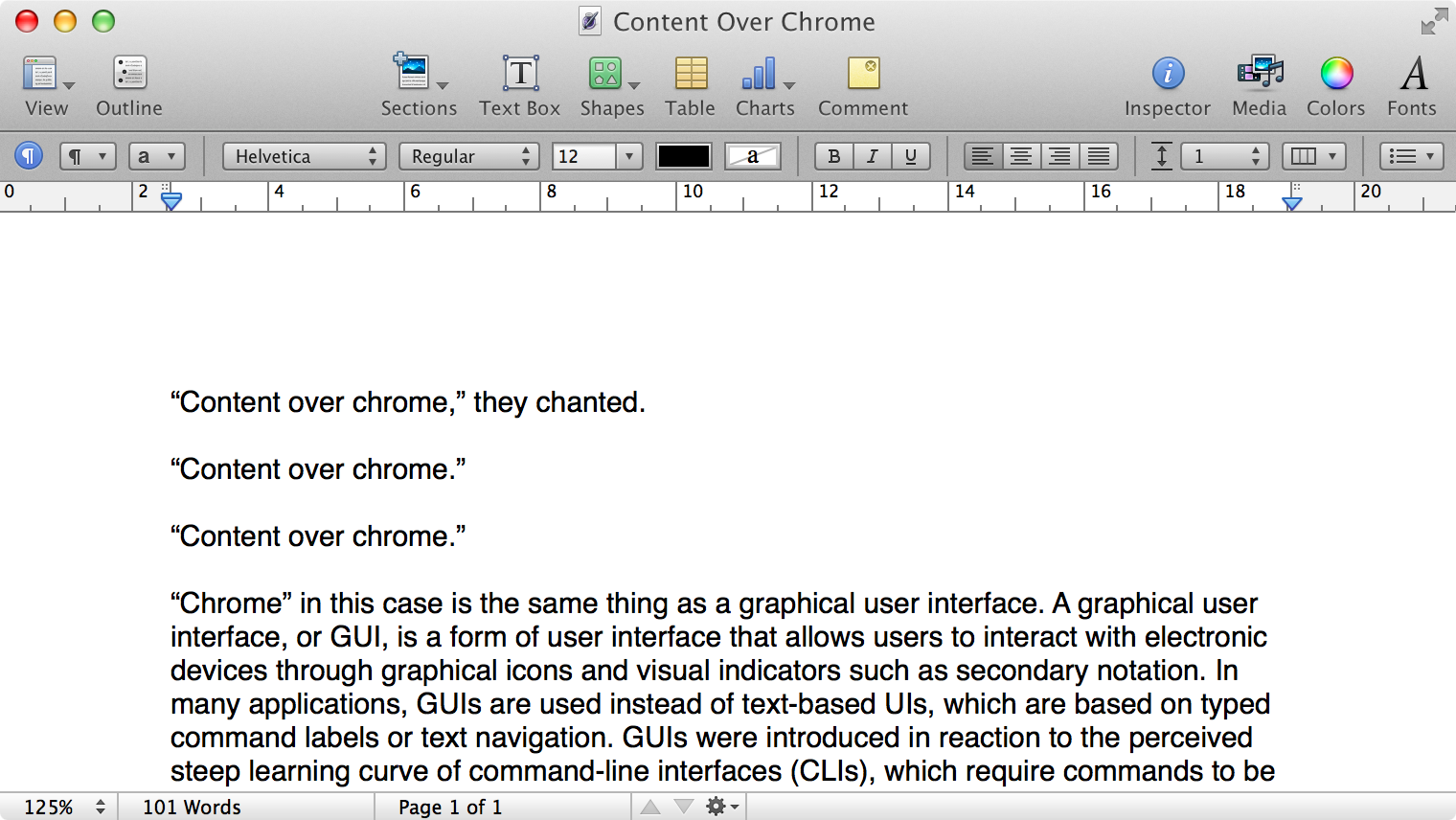
Here is what a Pages document looks like running under Mac OS X Lion:
Click to expand (except on mobile).
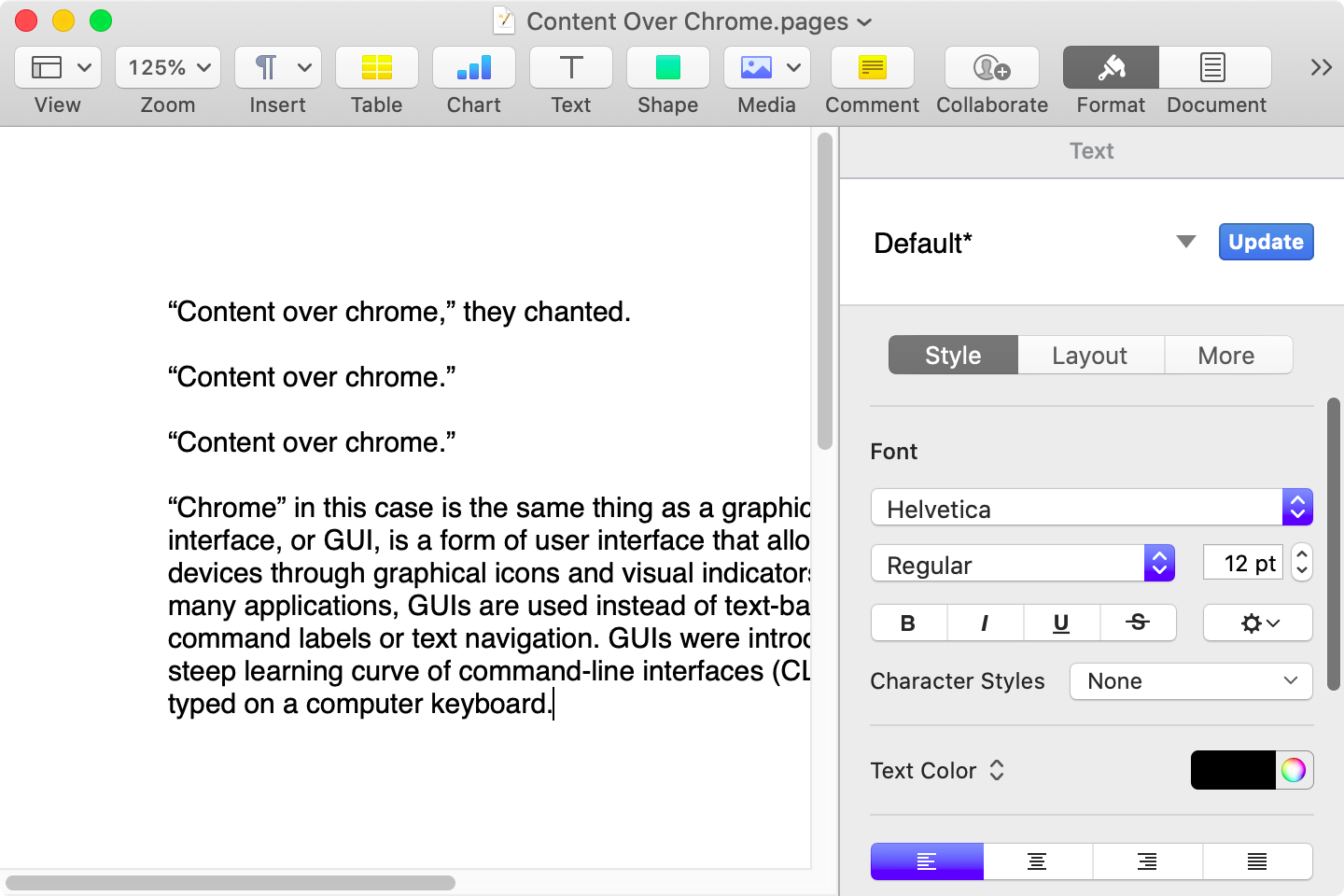
Here is that same document in a newer version of Pages running on MacOS Catalina, with the Yosemite-era design language that replaced the one that came before:
Click to expand (except on mobile).
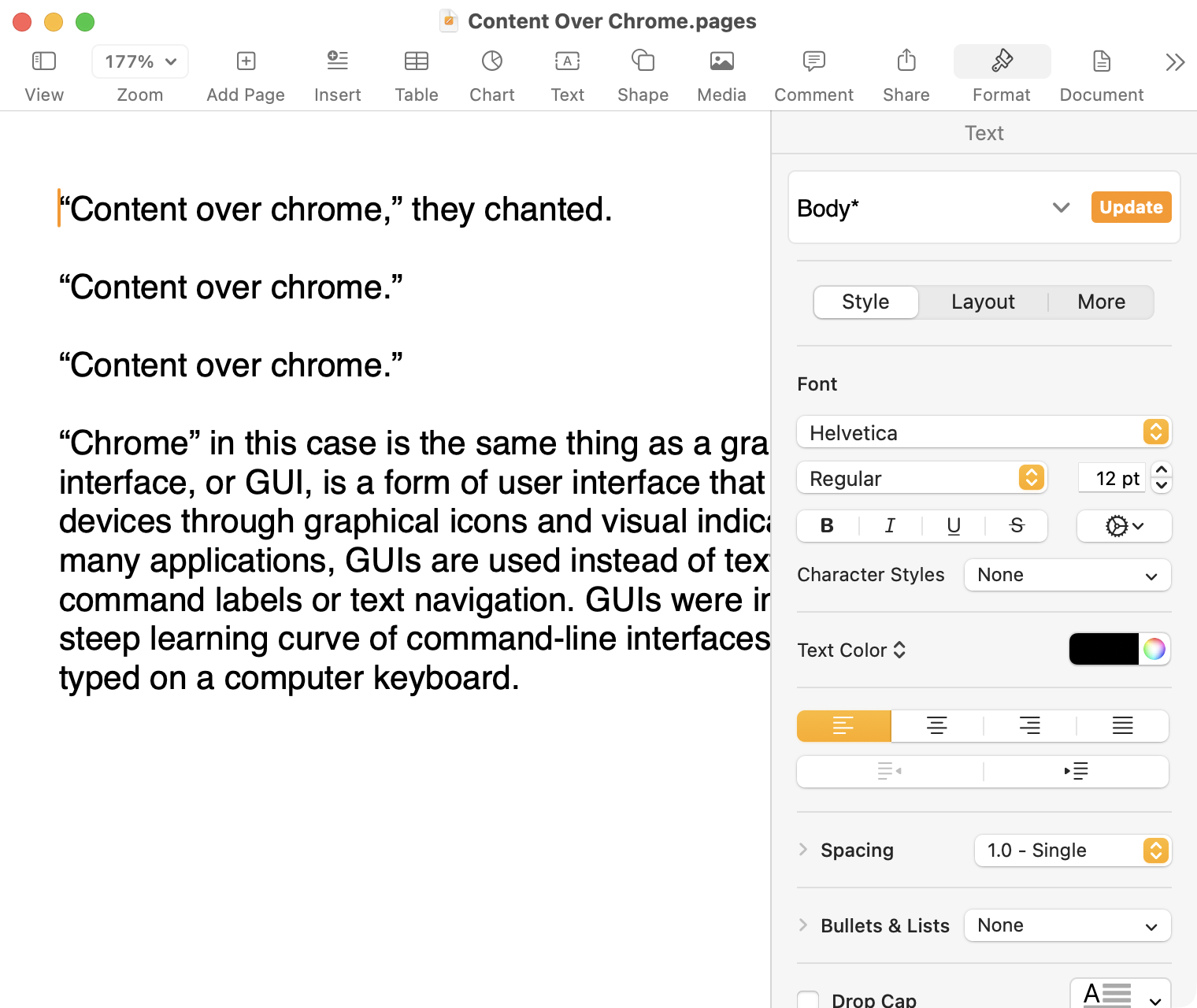
Here it is in the last version of Pages on MacOS Tahoe, using the design language introduced with Big Sur:
Click to expand (except on mobile).
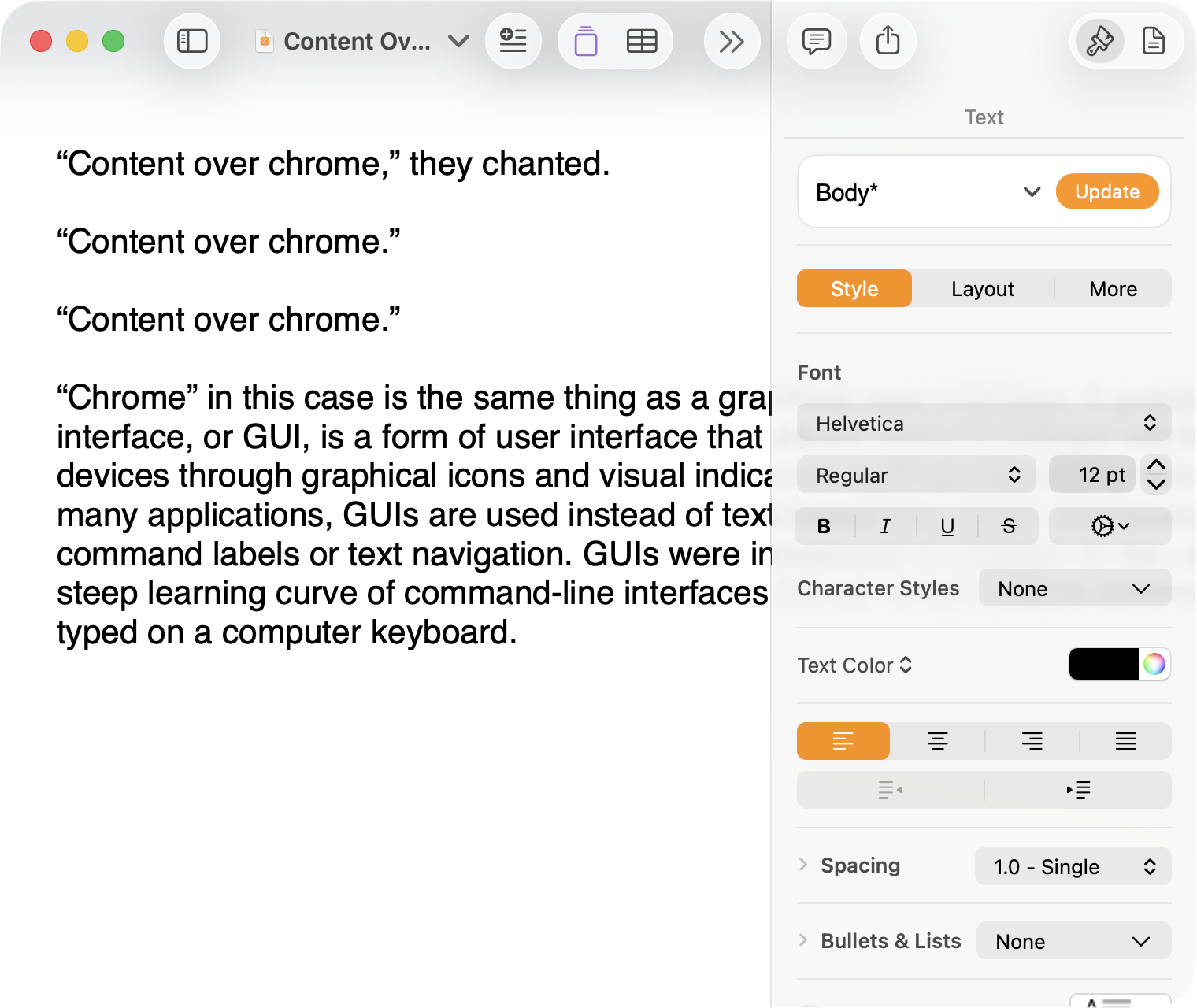
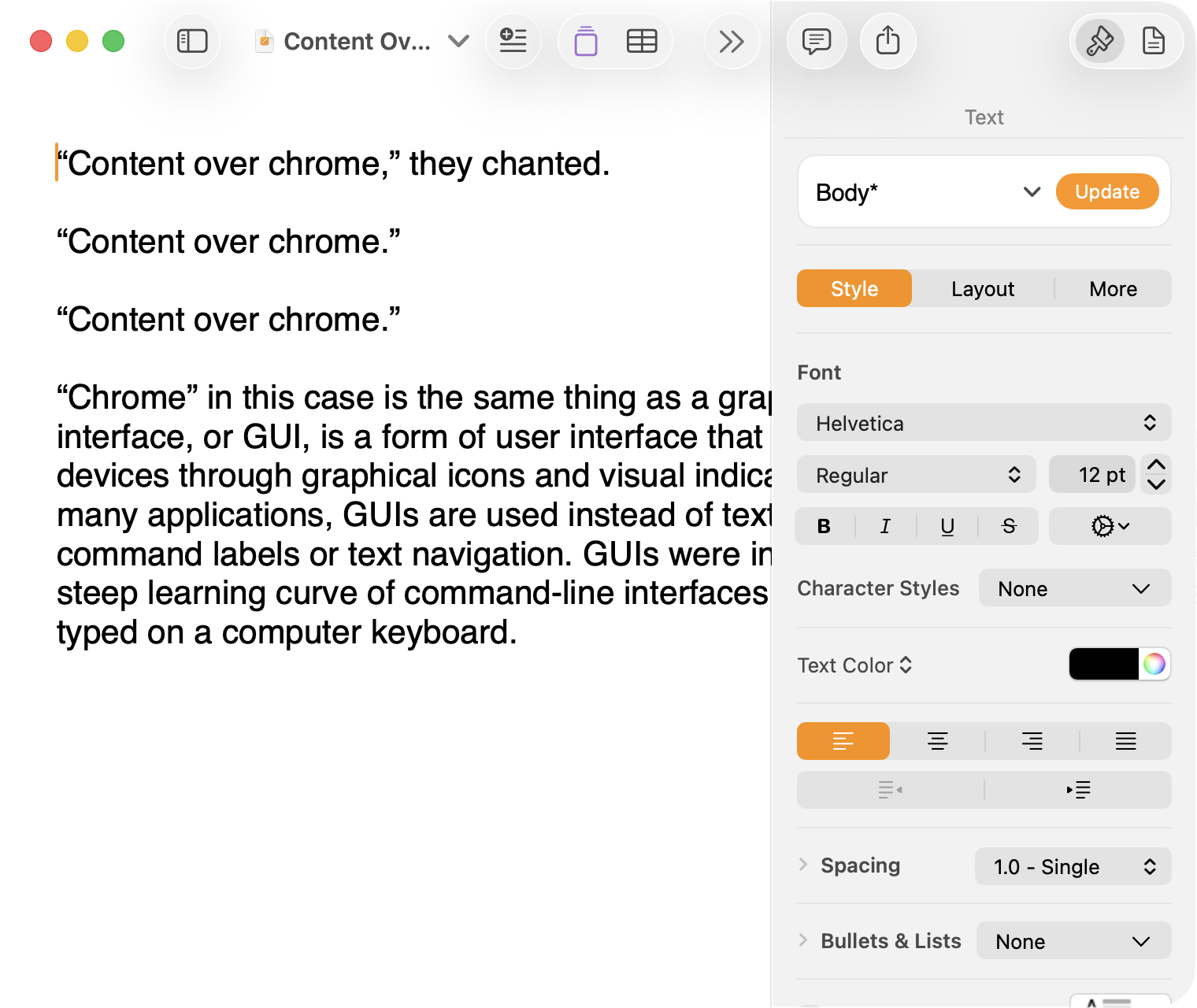
And, finally, the newest version of Pages on MacOS Tahoe using the current Liquid Glass visual design language:
Click to expand (except on mobile).
There are welcome improvements in newer versions of this comparison, like the introduction of the “Format” panel on the right-hand side, which makes better use of widescreen landscape-oriented displays, and allows for larger controls. While I admire the density of the Lion-era screenshot, the mini-sized controls in that formatting menu are harder to click.1
Overall, however, what Apple has done to Pages over this period of time is representative of a broader trend of minimizing the delineation of user interface elements from each other and the document itself. This is the only tool in the toolbox, and I am skeptical it achieves what Apple intends.
Compare again the two more recent screenshots against the ones that came before, and focus on the toolbar at the top of each. In the older two, there is a well-defined separation between the toolbar — the window itself — and the document. In the Big Sur visual language, however, the toolbar is the same bright white as the document. By Tahoe and the Liquid Glass language, there is barely a distinction; the buttons simply float over the document. And, bizarrely, that degrades further with the “Reduce Transparency” accessibility preference enabled:
Click to expand (except on mobile).
(Also, no, your eyes do not deceive you: the icons in the drop cap menu, barely visible in the lower-right, are indeed pixellated.)
For me, this means a constant distraction from my document because the whole window has a similar visual language. As the toolbar and its buttons become one with the document, they lose their ability to fade into the background. In the two older examples, the contrast of the well-defined toolbar allows me to treat them as an entirely separate thing I do not need to pay attention to.
This is further justified by the lower contrast within those two older toolbars. In Lion, the grey background and moderately saturated colours are a quiet reminder of tools that are available without them being intrusive. The mix of shapes is a sufficient differentiator, something Apple threw away in the following screenshot. By making all the buttons literal and with the same bright background, the toolbar becomes a little more distracting — but at least it does not blend into the document. Without the context of the previous screenshot, the colours of each icon seem almost random, and I find the yellow-on-white “Table” button difficult to distinguish at a glance from the black-on-yellow-on-white “Comment” button.
The Big Sur-era design language is, frankly, an atrocious regression. The heterogeneous shapes may have returned, but in the form of monochromatic medium-grey icons set against a uniform white background. The icons are not bad, per se — though putting “Add Page” and “Insert” next to each other in this default toolbar layout, both represented by a plus sign, is a little confusing. But I will bet you would not guess that some of these are buttons, while others are pop-up buttons with a submenu.
Finally, there is Liquid Glass which, in its default form, has more contrast than the previous example; with “Reduce Transparency” enabled, which is how I use MacOS, it has even less. The buttons themselves have a greater amount of internal contrast with bigger, darker grey icons on a white background. This is preferential within the context of the toolbar compared to the thin, small, and low-contrast buttons in the past example, but it also means this toolbar has similar contrast to the document itself.
I would not go so far as to argue that Pages ’09 has a perfect user interface and that everything since has been a regression. The average colours used for the icon fill in both older toolbars generally fails accessibility contrast checks which, remarkably, the Big Sur design will pass. The icons in Pages ’09 rely on dark outlines and unique shapes to have sufficient contrast with the toolbar background. However, Apple has since discarded most variables it could change to design these interfaces. Every button contains an icon of a single uniform colour, within barely defined holding containers of the same shape, and without text labels by default.
This monochromatic look means any splash of colour is distracting. The yellow accent used in Pages is garish — though, thankfully, something that can mostly be mitigated by changing the Theme Colour in System Settings, under Appearance. (Unfortunately, the yellow background remains on the “Update” button in the most recent version of Pages regardless of the system accent colour.) But perhaps you also noticed the purple icon in the Liquid Glass screenshot above. Here is the full toolbar:
Click to expand (except on mobile).
Those purple icons signify features that are part of Apple Creator Studio, a paid subscription to Pages and other applications that allows you to — in the order they are presented above — generate an image, artificially boost the resolution of an image, and access a stock image library. If you would like to insert one of your own images into your Pages document, that feature has been moved to the paperclip icon. Yes, it is a menu and not a button, despite lacking the disclosure triangle of the zoom menu right beside it, and it also reminds you about the “Content Hub” and “Generate Image” features. In Pages under Lion, colour was used in the icons to help guide the user as they complete a task — click the green thing to add a shape; click the darker yellow thing to add a table. Colour is not being used in the newer version to signify these are A.I. features, as the “Writing Tools” icon remains dark grey. In this version, the coloured icons are there to guide the user to premium add-ons regardless of whether they are currently paying for them.
I decided to focus on Pages for this comparison because it has lived so many different lives in MacOS. However, it is perhaps an imperfect representation for the rest of the system. Across Mac OS X Lion, for example, the toolbars of first-party applications like Finder and Preview almost exclusively use monochromatic icons. This has been true since Mac OS X Leopard, which also introduced barely differentiated folder icons. Some toolbars in Tiger, introduced two years prior, featured icons inside uniform capsule shapes. These were questionable ideas at the time, but they still retained defining characteristics. The capsules, for example, may have had a uniform shape, but contained within were full-colour icons. Most importantly, they were all clearly controls that were differentiated from the document.
Perhaps Apple has some user studies that suggest otherwise, but I cannot see how dialling back the lines between interface and document is supposed to be beneficial for the user. It does not, in my use, result in less distraction while I am working in these apps. In fact, it often does the opposite. I do not think the prescription is rolling back to a decade-old design language. However, I think Apple should consider exploring the wealth of variables it can change to differentiate tools within toolbars, and to more clearly delineate window chrome from document.
These screenshots are a bit limited as, to capture a high-resolution interface, I switched my mid-2012 MacBook Air to a 720 × 450 display output, which shrank the available space for Pages in the Lion and Catalina screenshots. ↥︎
This article is about covert agent communication channel websites used by the CIA in many countries from the late 2000s until the early 2010s, when they were uncovered by counter intelligence of the targeted countries circa 2010-2013.
This is a pretty clever scheme in theory, but seems to have been pretty sloppy in practice. That is, many of the sites seem to share enough elements allowing an enterprising person to link the seemingly unrelated sites — even, as it turns out, years later and after they have been pulled offline. That apparently resulted in the deaths of, according to Foreign Policy, dozens of people.
Greg Storey begins this piece with a well-known quote from Plato’s “Phaedrus”, in which the invention of writing is decried as “an elixir not of memory, but of reminding”. Storey compares this to a criticism of large language models, and writes:
Even though Plato thought writing might kill memory, he still wrote it down.
If anything, I think Storey’s error in attribution actually reinforces the lesson we can draw from it. If we relied on the pessimism of Socrates, we might not know what he said today; after all, human memory is faulty. Because Plato bothered to write it down, we can learn from it. But the ability to interpret it remains ours.
What struck me most about this article, though, is this part:
The real threat to creativity isn’t a language model. It’s a workplace that rewards speed over depth, scale over care, automation over meaning. If we’re going to talk about what robs people of agency, let’s start there. […]
Thanks to new technologies — from writing to large language models, from bicycles to jets — we are able to dramatically increase the volume of work done in our waking hours and that, in turn, increases the pressure to produce even more. The economic term for this is “productivity”, which I have always disliked. It distills everything down to the ratio of input effort compared to output value. In its most raw terms, it rewards the simplistic view of what a workplace ought to be, as Storey expresses well.
When people wistfully proclaim that they wish for the next major macOS version to be a “Snow Leopard update”, they’re wishing for the wrong thing. No major update will solve Apple’s quality issues. Major updates are the cause of quality issues. The solution would be a long string of minor bug fix updates. What people should be wishing for are the two years of stability and bug fixes that occurred after the release of Snow Leopard. But I fear we’ll never see that again with Tim Cook in charge.
I read an article today from yet another person pining for a mythical Snow Leopard-style MacOS release. While I sympathize with the intent of their argument, it is largely fictional and, as Johnson writes, it took until about two years into Snow Leopard’s release cycle for it to be the release we want to remember:
It’s an iron law of software development that major updates always introduce more bugs than they fix. Mac OS X 10.6.0 was no exception, of course. The next major update, Mac OS X 10.7.0, was no exception either, and it was much buggier than 10.6.8 v1.1, even though both versions were released in the same week.
What I desperately miss is that period of stability after a few rounds of bug fixes. As I have previously complained about, my iMac cannot run any version of MacOS newer than Ventura, released in 2022. It is still getting bug and security fixes. In theory, this should mean I am running a solid operating system despite missing some features.
It is not. Apple’s engineering efforts quickly moved toward shipping MacOS Sonoma in 2023, and then Sequoia last year. It seems as though any bug fixes were folded into these new major versions and, even worse, new bugs were introduced late in the Ventura release cycle that have no hope of being fixed. My iMac seizes up when I try to view HDR media; because this Extended Dynamic Range is an undocumented enhancement, there is no preference to turn it off. Recent Safari releases have contained several bugs related to page rendering and scrolling. Weather sometimes does not display for my current location.
Ventura was by no means bug-free when it shipped, and I am disappointed even its final form remains a mess. My MacBook Pro is running the latest public release of MacOS Sequoia and it, too, has new problems late in its development cycle; I reported a Safari page crashing bug earlier this week. These are on top of existing problems, like how there is no way to change the size of search results’ thumbnails in Photos.
Alas, I am not expecting many bugs to be fixed. It is, after all, nearly April, which means there are just two months until WWDC and the first semi-public builds of another new MacOS version. I am hesitant every year to upgrade. But it does not appear much effort is being put into the maintenance of any previous version. We all get the choice of many familiar bugs, or a blend of hopefully fewer old bugs plus some new ones.
Enron is not really back. Someone managed to grab the Enron.com URL and put up an inspirational faux corporate video and a Shopify merch store. It is all very funny.
Brendan Nystedt, reporting for Wired on a new generation of admirers of crappy digital cameras from the early 2000s:
For those seeking to experiment with their photography, there’s an appeal to using a cheap, old digital model they can shoot with until it stops working. The results are often imperfect, but since the camera is digital, a photographer can mess around and get instant gratification. And for everyone in the vintage digital movement, the fact that the images from these old digicams are worse than those from a smartphone is a feature, not a bug.
Retromania? Not really. It feels more like a backlash against the excessive perfection of modern cameras, algorithms, and homogenized modern image-making. I don’t disagree — you don’t have to do much to come up with a great-looking photo these days. It seems we all want to rebel against the artistic choices of algorithms and machines — whether it is photos or Spotify’s algorithmic playlists versus manually crafted mixtapes.
I agree, though I do not see why we need to find just one cause — an artistic decision, a retro quality, an aesthetic trend, a rejection of perfection — when it could be driven by any number of these factors. Nailing down exactly which of these is the most important factor is not of particular interest to me; certainly, not nearly as much as understanding that people, as a general rule, value feeling.
I have written about this before and it is something I wish to emphasize repeatedly: efficiency and clarity are necessary elements, but are not the goal. There needs to be space for how things feel. I wrote this as it relates to cooking and cars and onscreen buttons, and it is still something worth pursuing each and every time we create anything.
I thought about this with these two articles, but first last week when Wil Shipley announced the end of Delicious Library:
Amazon has shut off the feed that allowed Delicious Library to look up items, unfortunately limiting the app to what users already have (or enter manually).
I wasn’t contacted about this.
I’ve pulled it from the Mac App Store and shut down the website so nobody accidentally buys a non-functional app.
Delicious Library was many things: physical and digital asset management software, a kind of personal library, and a wish list. But it was also — improbably — fun. Little about cataloguing your CDs and books sounds like it ought to be enjoyable, but Shipley and Mike Matas made it feel like something you wanted to do. You wanted to scan items with your Mac’s webcam just because it felt neat. You wanted to see all your media on a digital wooden shelf, if for no other reason than it made those items feel as real onscreen as they are in your hands.
Delicious Library became known as the progenitor of the “delicious generation” of applications, which prioritized visual appeal as much as utility. It was not enough for an app to be functional; it needed to look and feel special. The Human Interface Guidelines were just that: guidelines. One quality of this era was the apparently fastidious approach to every pixel. Another quality is that these applications often had limited features, but were so much fun to use that it was possible to overlook their restrictions.
I do not need to relitigate the subsequent years of visual interfaces going too far, then being reeled in, and then settling in an odd middle ground where I am now staring at an application window with monochrome line-based toolbar icons, deadpan typography, and glassy textures, throwing a heavy drop shadow. None of the specifics matter much. All I care about is how these things feel to look at and to use, something which can be achieved regardless of how attached you are to complex illustrations or simple line work. Like many people, I spend hours a day staring at pixels. Which parts of that are making my heart as happy as my brain? Which mundane tasks are made joyful?
This is not solely a question of software; it has relevance in our physical environment, too, especially as seemingly every little thing in our world is becoming a computer. But it can start with pixels on a screen. We can draw anything on them; why not draw something with feeling? I am not sure we achieve that through strict adherence to perfection in design systems and structures.
I am reluctant to place too much trust in my incomplete understanding of a foreign-to-me concept rooted in another country’s very particular culture, but perhaps the sabi is speaking loudest to me. Our digital interfaces never achieve a patina; in fact, the opposite is more often true: updates seem to erase the passage of time. It is all perpetually new. Is it any wonder so many of us ache for things which seem to freeze the passage of time in a slightly hazier form?
I am not sure how anyone would go about making software feel broken-in, like a well-worn pair of jeans or a lounge chair. Perhaps that is an unattainable goal for something on a screen; perhaps we never really get comfortable with even our most favourite applications. I hope not. It would be a shame if we lose that quality as software eats our world.
Keeping URIs so that they will still be around in 2, 20 or 200 or even 2000 years is clearly not as simple as it sounds. However, all over the Web, webmasters are making decisions which will make it really difficult for themselves in the future. Often, this is because they are using tools whose task is seen as to present the best site in the moment, and no one has evaluated what will happen to the links when things change. The message here is, however, that many, many things can change and your URIs can and should stay the same. They only can if you think about how you design them.
Links give greater meaning to our webpages. Without the link, we would lose this significant grammatical tool native the web. And as links die out and rot on the vine, what’s at stake is our ability to communicate in the proper language of hypertext.
A dead link may not seem like it means very much, even in the aggregate. But they are. One-way links, the way they exist on the web where anyone can link to anything, is what makes the web universal. In fact, the first name for URL’s was URI’s, or Universal Resource Identifier. It’s right there in the name. And as Berners-Lee once pointed out, “its universality is essential.”
In 2018, Google announced it was deprecating its URL shortener, with no new links being created after March 2019. All existing shortened links would, however, remain active. It announced this in a developer blog post which — no joke — returns a 404 error at its original URL, which I found via 9to5Google. Google could not bother to redirect posts from just six years ago to their new valid URLs.
Google’s URL shortener was in the news again this month because the company has confirmed it will turn off these links in August 2025 except for those created via Google’s own apps. Google Maps, for example, still creates a goo.gl short link when sharing a location.
In principle, I support this deprecation because it is confusing and dangerous for Google’s own shortened URLs to have the same domain as ones created by third-party users. But this is a Google-created problem because it designed its URLs poorly. It should have never been possible for anyone else to create links with the same URL shortener used by Google itself. Yet, while it feels appropriate for a Google service to be unreliable over a long term, it also should not be ending access to links which may have been created just about five years ago.
By the way, the Sophos link on the word “dangerous” in that last paragraph? I found it via a ZDNet article where the inline link is — you guessed it — broken. Sophos also could not bother to redirect this URL from 2018 to its current address. Six years ago! Link rot is a scourge.
The latest charge comes from SourceFed, a stray pop culture web and video site. It uploaded a short YouTube video on Thursday charging Google with deliberately altering search recommendations — through its function that automatically offers suggestions as a query is typed — to give positive treatment to Clinton.
Google vehemently denied the charges. “Google Autocomplete does not favor any candidate or cause,” a rep wrote. “Claims to the contrary simply misunderstand how Autocomplete works.”
A spokesperson for Google explained the search engine’s autocomplete feature will “not show a predicted query that is offensive or disparaging”, which is understandable. Eight years later, that appears to be how Google continues to work. A search for donald trump cr offers just one autocompleted suggestion: crypto. Another, for donald trump fe, presents no autocompletion suggestions even though he is a convicted felon. One can see why Google would choose to err on the safe side.
Mike Masnick, Techdirt, after a series of similar claims spread over the past few weeks:
The key point here is that some of this stuff just happens. It’s part of how algorithms work. Sometimes they make mistakes. Sometimes you disagree with why they do things. And people need to stop overreacting to it all. Most of the examples discussed in this article were just normal things that happen all the time, but which got a ton of extra attention because everyone’s on edge and amped up.
That doesn’t mean people shouldn’t be on the lookout for stuff, but don’t immediately jump to conclusions and assume malfeasance.
It is reasonable to want to hold technology companies to a high standard and expect them to be more competent, especially when it comes to election-related topics. In some cases, systems are being triggered as they should, but they are poorly explained to users by generic error messages. Others are just broken. None of this should be surprising in an era where even the largest platforms seem to be so fragile as to be held together by the software equivalent of thumbtacks and glue sticks.
SoftBank Corp. announced that it has developed voice-altering technology to protect employees from customer harassment.
The goal is to reduce the psychological burden on call center operators by changing the voices of complaining customers to calmer tones.
The company launched a study on “emotion canceling” three years ago, which uses AI voice-processing technology to change the voice of a person over a phone call.
Call center agents who have to deal with angry or perplexed customers all day tend to have through-the-roof stress levels and a high turnover rate as a result. About 53% of U.S. contact center agents who describe their stress level at work as high say they will probably leave their organization within the next six months, according to CMP Research’s 2023-2024 Customer Contact Executive Benchmarking Report.
Some think this is a problem artificial intelligence can fix. A well-designed algorithm could detect the signs that a call center rep is losing it and do something about it, such as send the rep a relaxing video montage of photos of their family set to music.
Here we have examples from two sides of the same problem: working in a call centre sucks because dealing with usually angry, frustrated, and miserable customers sucks. The representative probably understands why some corporate decision made the customer angry, frustrated, and miserable, but cannot really do anything about it.
So there are two apparent solutions here — the first reconstructs a customer’s voice in an effort to make them sound less hostile, and the second shows call centre employees a “video montage” of good memories as an infantilizing calming measure.
Brian Merchant wrote about the latter specifically, but managed to explain why both illustrate the problems created by how call centres work today:
If this showed up in the b-plot of a Black Mirror episode, we’d consider it a bit much. But it’s not just the deeply insipid nature of the AI “solution” being touted here that gnaws at me, though it does, or even the fact that it’s a comically cynical effort to paper over a problem that could be solved by, you know, giving workers a little actual time off when they are stressed to the point of “losing it”, though that does too. It’s the fact that this high tech cost-saving solution is being used to try to fix a whole raft of problems created by automation in the first place.
A thoughtful exploration of how A.I. is really being used which, combined with the previously linked item, does not suggest a revolution for anyone involved. It looks more like cheap patch on society’s cracking dam.
Based on what I can surmise from the upload dates, this collection of computer brochures has been around for years, but I was only recently made aware of it thanks to the latest issue of Web Curios. What a lovely collection of history in both technology and a very particular era in design.
At this point, I couldn’t quite believe what I was seeing because I was under the impression that the first emoji were created by an anonymous designer at SoftBank in 1997, and the most famous emoji were created by Shigetaka Kurita at NTT DoCoMo in 1999. But the Sharp PI-4000 in my hands was released in 1994, and it was chock full of recognisable emoji. Then down the rabbit hole I fell. 🕳️🐇
This article may start with this discovery from 1994, but it absolutely does not end there. What a fascinating piece of well-documented and deeply researched history.

 Login
Login