Reading view

There are new articles available, click to refresh the page.

Rootkits - how deep the rabbit hole is?

Rootkits are malicious software designed to gain unauthorized access to a computer system and hide their presence. Therefore attackers can use rootkits to conceal their presence on a compromised system and make it possible to return undetected at some later date.

A rootkit usually hides by intercepting and altering communications at the interfaces between various system components, so rootkits are a form of man in the middle attack.

Rootkits allow an attacker to maintain command and control over a system without the owner’s knowledge. Typically they enable remote file execution, system configuration changes, can log keystrokes or network activity and other forms of spying on user activities. If they are hidden in device or file system drivers, they can hide files, they can hide processes, disable security policies, etc.

First generation rootkits just modified system files on the target system. Typical example was modified UNIX login program, that stole login credentials of a victim. Later rootkits started to modify static OS components and dynamic OS objects loaded in memory.

Bootkit

Bootkit is a malware and specific type of rootkit, designed to infect a computer and to load their malicious code into memory before the operating system initializes. Bootkits usually target the system's bootloader, kernel boot files, Master Boot Record (MBR), or Basic Input/Output System (BIOS)/Unified Extensible Firmware Interface (UEFI). By targeting the pre-boot environment, bootkits can bypass standard security measures and remain hidden. They often have the ability to survive reinstallation of an operating system, so they are hard to remove.

Bootkits were popular in 1980s and 1990s, but the technology of bootkits is also implemented in various governmental and commercial remote surveillance tools (“Nice Boots!” - A Large-Scale Analysis of Bootkits and New Ways to Stop Them).
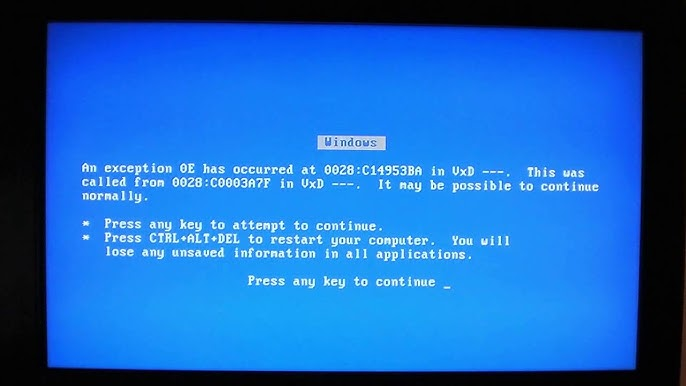
CIH - Chernobyl virus

CIH - Chernobyl virus

The first bootkit was CIH (Chernobyl virus), which appeared in 1998. It was developed by a Taiwanese student Chen Ing-hau (hence the name CIH) and targeted Windows 9x systems. The malware corrupted the MBR and overwrote parts of the BIOS, rendering the system unbootable.

Another known bootkit/computer virus was Stoned. It was created in 1987 and infected computers by booting from an infected floppy disks (that was also the vector of its spreading).

Around 2007 security researchers identified more advanced Alureon bootkit (also known as TDSS or TDL-4), that infected MBR of the computer and was used to intercept network traffic and to steal banking and other sensitive user data.

In 2007 appeared IceLord (also known as ICLord Bioskit), which was the first BIOS based proof-of-concept bootkit. In 2011 the first BIOS bootkit appeared in the wild. It was called Mebromi and targeted Chinese computers. The first UEFI bootkit that was sold on cybercrime forums (BlackLotus) was discovered in 2022.

As mentioned, the technology of bootkits is often implemented in various governmental and commercial remote surveillance tools. One of the reasons is, that bootkits can be used to bypass encryption, typicaly by intercepting passwords or encryption keys entered during boot.

This was shown by security researcher Joanna Rutkowska in her Evil Maid proof-of-concept tool (developed in 2009), that targeted systems using TrueCrypt (version 6.x) full disk encryption software. The tool replaced the original bootloader with a malicious version, which logged the user's encryption passphrase when it was entered during the next legitimate boot.

Evil Maid attack is a name of physical attack scenario where an attacker with physical access to a device (for instance laptop) manipulates it to compromise security, usually while the legitimate owner is absent. The name comes from the hypothetical scenario of a "maid" in a hotel tampering with a guest's computer. The mentioned application Evil Maid, developed by Joanna Rutkowska, is a bootkit, that was developed to perform an Evil Maid attack against TrueCrypt. The malware intercepted TrueCrypt's password that was typed in by the user, and stored it in a particular location on the disk and then passed it on to TrueCrypt. The attacker could later extract the stored password the next time they have physical access to the computer, thus bypassing encryption protection.

According to some media reports, this is how the Israeli secret service obtained the access to the data on a computer of a Syrian diplomat who had left his computer unattended in a hotel room in London in 2006. The data obtained that way had proved that Syria was building the secret Al-Kibar nuclear facility in the desert (in IAEA documents it is also referred as Dair Alzour). The nuclear facility was subsequently bombed in Operation Orchard (also known as Operation Outside the Box) on September 6th 2007.

Al Kibar facility - before and after bombing

Al Kibar facility - before and after bombing

From this we can clearly see how bootkits (and rootkits) could be utilized for cyberattacks and spying.

How deep the rootkit can go?

Rootkits can hide at different parts of the system, or, to be more specific, in different so called protection rings.

Protection rings, also called hierarchical protection domains, are mechanisms to protect data and functionality from faults (by improving fault tolerance) and malicious behaviour.

Rings in computer systems are arranged in a hierarchy from most privileged (most trusted, usually numbered zero) to least privileged (least trusted, usually with the highest ring number). On most operating systems, Ring 0 is the level with the most privileges and interacts most directly with the physical hardware.

Computer operating systems provide different levels of access to resources, and correctly gating access between rings can improve security by preventing programs from one ring or privilege level from misusing resources intended for programs in another.

Example, spyware running as a user program in Ring 3 should be prevented from turning on a web camera without informing the user, since hardware access is reserved for Ring 0 (kernel mode).

Modern operating systems are using only Ring 0 (kernel mode) and Ring 3 (user mode). However, there are even lower rings, that - if attacked - could compromise the entire systems (operating system and user applications). So let's take a look into the different levels of rootkits to see how stealthy they could get.

Ring 3 rootkits

Ring 3 rootkits, also called user mode rootkits are running at the user-space level. They run with the lowest level of privileges within the operating system and can perform a damage at the user space of the infected user.

Ring 3 rootkits mitigation

Since Ring 3 rootkits do not have kernel-level access they are easier to detect and remove. Good strategy against this malicious software is application sandboxing (in order to minimize damage within the infected user space) and regular backuping/snapshoting of the complete user space in order to prevent complete data loss.

Also, good strategy of a user could be to use different isolated environments for different tasks. For instance, for web browsing user should use one isolated environment, for banking another, and so on. So in case web browsing environment gets compromised, infection is limited to this environment only and would not affect environment used for online banking.

Ring 0 rootkits

Ring 0 rootkits, known also as kernel mode rootkits reside in the core of the operating system (so called kernel space). They have the highest level of privileges within the operating system. They are usually hard to remove, since they operate at the highest privilege level (Ring 0) and could be deeply integrated into the operating system.

They can hide files, processes, or network activity and modify system calls. Often the removal requires specialized tools or reinstalling the complete operating system.

Ring 0 rootkits mitigation

However, good strategy against this malicious software is running the operating system in virtual compartment and to use different isolated environments for different tasks. Additionally, if system enables virtual machine level snapshots, that can assure that the whole system could be easily returned to a last known good state.

In that case virtualisation technology provides the isolation of different virtual machines. One example of solution against that type of threats is provided by QubesOS. QubesOS is a security focused desktop operating system that provide security and segmentation of applications through isolation with virtualization services.
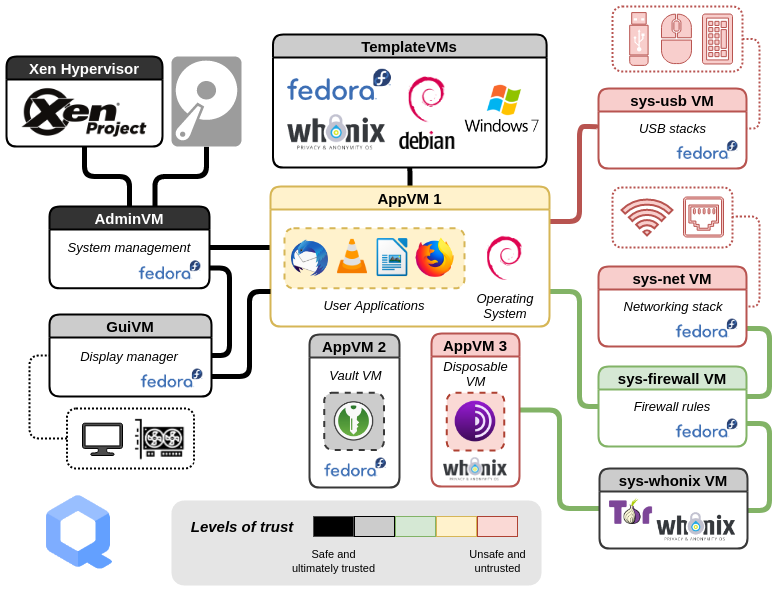
QubesOS architecture

QubesOS architecture

In QubesOS, the user has several isolated environments, which are used for different tasks. If one of the virtual compartments gets compromised, the malicious software would get access to only the data and applications inside that environment. Isolation is provided by hardware controllers (some virtual compartments can have limited access to the hardware, for instance to microphone or camera), and with virtualisation, where the user's digital life is divided into security domains with different levels of trust. Unfortunately, QubesOS is quite complex and is less suitable for regular users, because it has quite steep learning curve.
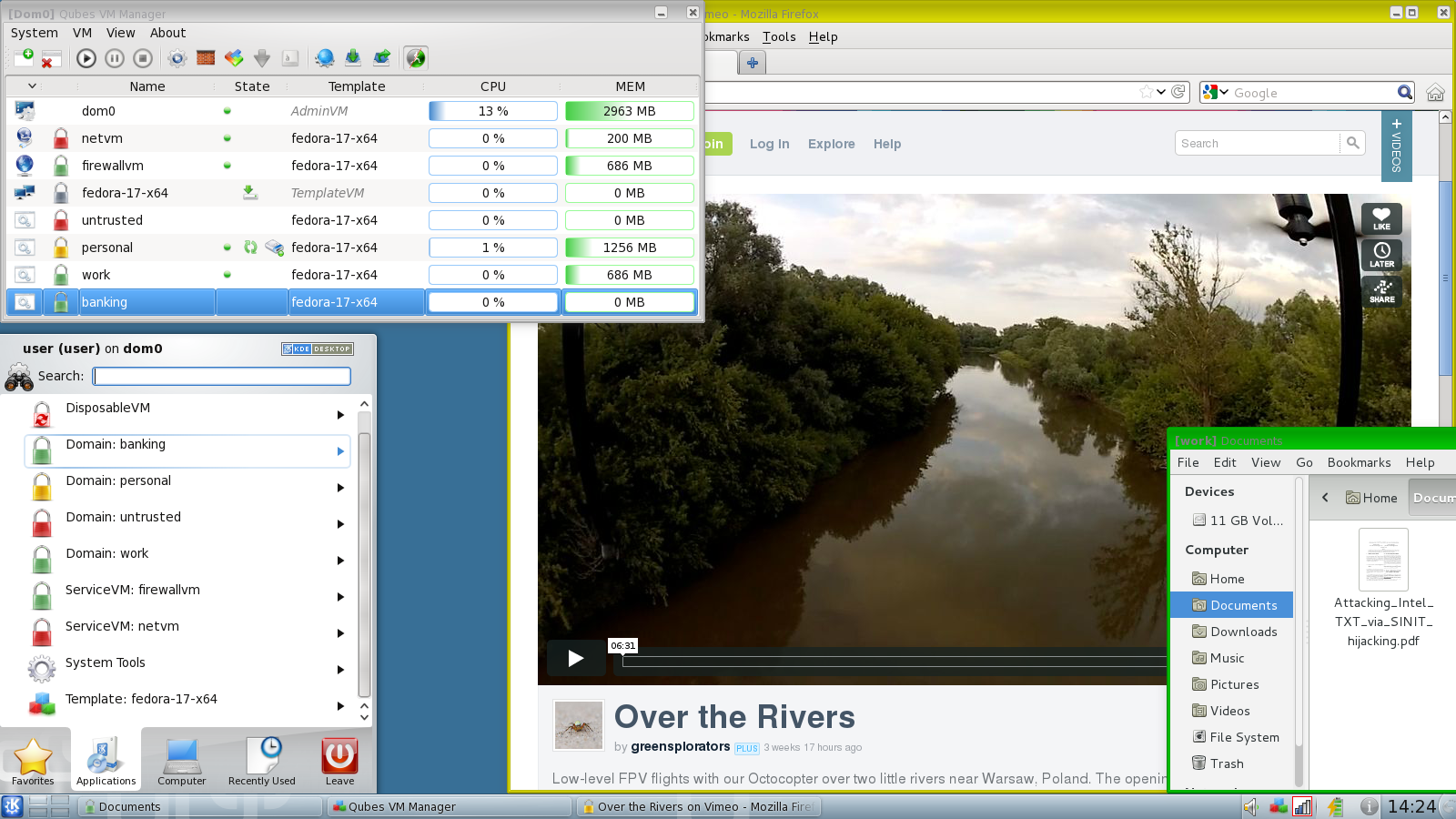
QubesOS

QubesOS

Ring -1 rootkits

Ring -1 rootkits, also known as hypervisor rootkits operate at the hypervisor level, below the operating system. Hypervisor is a software code used to run and manage one or more virtual machines on a computer. Because they run at a privilege level higher than the operating system's kernel, they are called Ring -1.

Those rootkits exploit virtualization features in modern CPUs to run the rootkit as a hypervisor beneath the operating system. Usually they can intercept and manipulate hardware-level instructions and can virtualize the operating system to control it entirely. Basically they create virtual environment and confine operating system into it, while the compromised operating system believes it is running directly on the hardware. They are extremely challenging to detect (and remove), because they can manipulate the operating system from outside its own context.

In 2006, a Polish security researcher Joanna Rutkowska conceptualized Ring-1 malware, called Blue Pill. It exploited virtualization extension AMD-V to act as a hypervisor, and was able to place the operating system in a virtualized environment without the operating system being aware of it. While operating system thinks it is operating on bare-metal hardware, in reality, it's running in a hypervisor and is being being monitored and manipulated by the Blue Pill rootkit.

While Blue Pill initially used AMD-V virtualisation extension, other researchers (for instance, Dino Dai Zovi, also in 2006) has shown, that Intel VT-x virtualisation extension could also be exploited. Similarly, researchers from Microsoft and the University of Michigan in 2006 developed a proof-of-concept malware designed as a virtualization-based rootkit, called SubVirt.

Ring -1 rootkits mitigation

One solution against Ring-1 rootkits is to disable hardware virtualization in BIOS/UEFI, however in that case user will be limited running virtual environments on their system.

Another solution is to use trusted boot mechanisms. Those mechanisms perform hypervisor integrity checks (by verifying its cryptographic signature) and can help to ensure that unauthorized hypervisors cannot load during the boot process. Those mechanisms are provided by the open source BIOS/UEFI project called Dasharo (with Heads payload), however more about that will be explained later.

Ring -2 rootkits

Ring -2 rootkits are a mix of so called SMM rootkits and BIOS/UEFI bootkits (also called UEFI implants). Usually Ring-2 rootkits utilize SMM and UEFI compromise. While SMM rootkits operate dynamically within the CPU’s SMM environment they usually use UEFI rootkit technology to embedd malicious code in the firmware layer to achieve persistence.

It also needs to be noted, that SMM and UEFI contain security vulnerabilities (for instance some SMM's contained complete USB stack), which is briefly explained by Ron Minnich in his talk Replace Your Exploit-Ridden Firmware with Linux.

SMM rootkits

SMM rootkits run at the System Management Mode (SMM). SMM operates in a protected memory space called SMRAM (System Management RAM), which is inaccessible to the operating system and most security tools. SMM is the most privileged mode in the modern x86_64 processors. It gives an execution environment with full access to every (physical) resource of the computer. In addition, SMM is a non-pre-emptive mode meaning that it cannot be interrupted by normal hardware/software interrupts. This allows completely stealth code execution from the execution context of the operating system.

SMM has its own private memory space and execution environment which is generally invisible to the outside environment (operating system) and is immune to memory protection mechanisms. Since SMM can directly interact with hardware, it is bypassing the operating system and hypervisors. Therefore SMM rootkits can remain persistent across reboots because they are embedded in firmware or manipulate SMRAM configurations, which are reloaded during system startup. SMM rootkits are often not persistent on its own and usually utilize UEFI compromise to gain persistance.

In 2005 Sherri Sparks and Jamie Butler presented a proof of concept SMM rootkit Shadow Walker, which demonstrated that it was possible to control the view of memory regions seen by the operating system and other processes. Shadow Walker was capable of hiding both its own code and changes to operating system's components and was able to fool both signature and heuristic based scans.

In 2008 Shawn Embleton, Sherri Sparks and Cliff Zou presented their development of a proof-of-concept SMM rootkit (see: SMM rootkits: a new breed of OS independent malware. They implemented a chipset level keylogger and a network backdoor capable of directly interacting with the network card to send logged keystrokes to a remote machine via UDP. The rootkit was able to hide its memory footprint and requires no changes to the existing operating system (i. e. was OS independent).

There is also an interesting proof-of-concept demonstration by Jussi Hietanen how injecting shellcode to a Ring0/Ring3 context that can be achieved from the SMM (described in the article System Management Mode (SMM) rootkit. The rootkit's capability was to infect a Windows usermode process, access the full memory space and persist between OS reinstalls.

BIOS/UEFI rootkits

Another class of Ring -2 rootkits is called BIOS/UEFI rootkits, because they specifically target the BIOS (Basic Input/Output System) or its modern equivalent, UEFI (Unified Extensible Firmware Interface).

As mentioned on the beginning, the first rootkit/bootkit targeting BIOS was CIH (Chernobyl virus) in 1998, and in 2007 a Chinese researcher know under nickname icelord developed proof-of-concept bootkit ICLord Bioskit that has demonstrated that BIOS rootkits were feasible and powerful. Another interesting proof-of-concept firmware rootkit was developed in 2012 by security researcher Jonathan Brossard, which presented Rakshasa, that was able to persist in UEFI/BIOS firmware.

Probably the first known Ring -2 rootkit used in the wild was Mebromi, discovered in 2011, that targeted mostly the computers in China.

Notable research on UEFI rootkits has also been done by Andrea Allievi in 2012, who developed one of the first UEFI bootkit concepts (for Windows 8). Also, in 2013, Sebastien Kaczmarek from Quakerslabs presented Dreamboot), which was also Windows 8 x64 experimental bootkit (however Andrea Allievi later accused Quakerslabs that they stolen the project in the year 2013 without mentioning him.

Rootkit/bootkit technology is often used by government spying tools. One of the fist known examples of that thype of rootkit was used by the Hacking Team group, which infected UEFI/BIOS to keep their malware tool called Remote Control System persistently installed in their targets’ systems. It was first discovered in 2015. (Just a sidenote - Hacking Team Group was trying to sell their malware to the Slovenian police and secret service). Similar tool, FinSpy (also known as FinFisher or Wingbird), is also used for cybersepionage. It is being used at least from 2011, but in 2021 thy employed UEFI bootkit technology to preserve

In 2021 security researcher by Kaspersky discovered MoonBounce rootkit, that injected its malicious code into the SPI flash chip on computer motherboard, targeting UEFI firmware. This means that the rootkit does not leave any traces on a hard drive, and is capable of persisting in the system even if disk is formatted or even replaced. It is linked to Chinese APT41 hacker group and is used for cyberespionage.

Probably the most known Ring -2 rootkit used for cyberespionage in the wild is LoJax. It was discovered by security researchers from ESET in 2018. LoJax embedded itself into UEFI firmware to execute at system startup and was operating in SMM, bypassing OS-level detection. LoJax can persist in the UEFI even if the operating system is reinstalled or its hard drives are replaced. When infection is successful, attackers can use LoJax to track the system's location, remotely access the system and install additional malware on it. The researchers found out, that LoJax was - similar to Hacking Team's malware - used for cyberespionage.

Researchers found out that LoJax targeted organizations in the Balkans and countries in Central and Eastern Europe.

Mac EFI Rootkit

Mac EFI Rootkit

UEFI bootkit concept that could be applied to various operating systems, but those rootkits in the past mostly targeted Windows systems. Not exclusively, because in 2012 a security researcher Loukas K., "snare", presented Mac EFI rootkit (DE MYSTERIIS DOM JOBSIVS:\ MAC EFI ROOTKITS). And in 2017 Wikileaks published information about CIA's Vault 7 hacking tools, containing Mac OS X EFI implant, QuarkMatter (QuarkMatter used an EFI driver stored on the EFI system partition to provide persistence to an arbitrary kernel implant.).

However in 2024 the first UEFI bootkit designed for Linux systems appeared, named Bootkitty. It was a proof of concept tool that disables the kernel’s signature verification feature to load unsigned boot code. But it has to be noted, that Bootkitty was not the first rootkit capable of bypassing UEFI Secure Boot mechanism. The first one was BlackLotus, discovered in 2022, which integrated Secure Boot bypass and is probably the first UEFI rootkit that was "commercially" sold on cybercrime forums. It also implemented several detection evasion features, for instance code obfuscation, anti-virtualization, disabling Windows Defender antivirus software, bypassing User Account Control (UAC), etc.
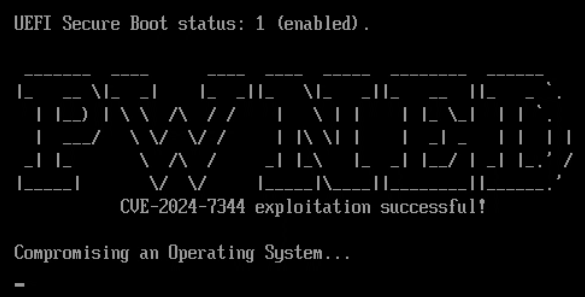
SecureBoot bypassing - CVE 2024-7344

SecureBoot bypassing - CVE 2024-7344

Ring -2 rootkits mitigation

Ring -2 rootkits are very difficult to detect, because they are firmware-level and they operate independently of the OS. Usually they require firmware reflashing or even physical replacement of the hardware.

However, there are some more practical mitigation techniques, and that is to enable hardware protections like BIOS lock (a security feature designed to prevent unauthorized access when the computer is booting) and SMM lock (hardware protection to prevent unauthorized access to SMRAM). Using Secure Boot to prevent unauthorized firmware or bootloader modifications is also an option, however some rootkits (for instance BlackLotus and Bootkitty) can bypass Secure Boot protection. Another option is also to prevent physical access to the system, because BIOS/UEFI rootkits could also be installed via direct hardware access (this requires special hardware device called BIOS firmware programmer).

Unfortunately, security researchers found several vulnerabilities in closed source BIOS firmware code. One of the main problems is, that Secure Boot and Intel Trusted Boot in traditional BIOS'es are vulnerable to rollback attack. While updating BIOS requires that firmware code is digitally signed with a valid signature, an attacker can install one of the previous official versions of the BIOS firmware (with valid digital signature), but this old version contain security vulnerabilities that could be exploited. There are also known UEFI vulnerabilities that could be exploited (for instance LogoFAIL attack). And in 2024 security researchers found out, that Secure Boot was completely compromised on more than 200 device models sold by Acer, Dell, Gigabyte, Intel, and Supermicro, because someone mistakenly published the cryptographic key that forms the root-of-trust anchor between the hardware device and the firmware that runs on it (so called platform key). This was another warning that BIOS/UEFI code is not under the control of the user, and that the users must trust the vendor in order to trust their systems.

Fortunately there is a solution for that. The open source BIOS/UEFI project Dasharo with so called Heads payload, incorporates several measures to protect against SMM rootkits.

Dasharo ensures that System Management RAM (SMRAM), where SMM code executes, is locked down during the boot process. It has an option to enable SMM BIOS write protection. When this is enabled, it allows only SMM code (the privileged code installed by the firmware in the system memory) to write to BIOS flash. It has implemented BIOS/UEFI lock to lock down the firmware after boot, preventing modifications by unauthorized software and has implemented Secure Boot and Measured Boot to detect unauthorized changes to firmware and SMM code (and also operating system's boot scripts!) and with the help of external hardware security module.
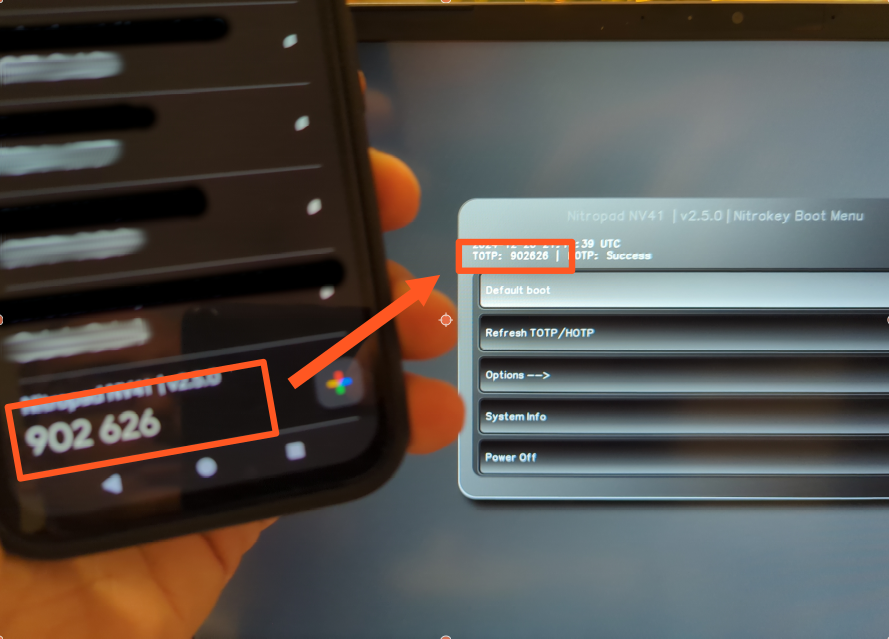
Dasharo with TOTP

Dasharo with TOTP

Dasharo with Heads payload boot firmware and software suite uses a combination of the Trusted Platform Module (TPM), Time-based One-Time Passwords (TOTP), and HMAC-based One-Time Passwords (HOTP) to provide enhanced system integrity verification and secure authentication. Verification of the system could be done with external hardware security module (small USB device), which verifies system's firmware, kernel, and bootloader, and provides a visual confirmation of the verification status.

Ring -3 rootkits

Ring -3 rootkits operate in the Management Engine (ME) or Platform Controller Hub (PCH) firmware, such as Intel's Management Engine (ME) or AMD's Platform Security Processor (PSP). These are embedded microcontrollers within the CPU chipset, designed for out-of-band system management and security features. Since those rootkits reside in firmware, they are also called firmware rootkits.

While Ring -2 rootkits exploit SMRAM and SMI (System Management Interrupts) vulnerabilities, Ring -3 rootkits relies on firmware in chipset microcontrollers (for instance Management Engine). They can access host memory via DMA (direct memory access), they can directly access network interface, can boot the system from the emulated CDROM and are active even in so called S3 sleep (System Power State S3).

Ring -3 rootkit concept was first presented in 2009 by Alexander Tereshkin and Rafal Wojtczuk in a presentation Introducing Ring -3 Rootkits.

The presented that many Intel vPro chipsets have an independent CPU, access to dedicated DRAM memory, special interface to the network card and execution environment called Management Engine (ME). Also, they found that the Intel Q35 chipset has also a standalone web server. So this chipset is a little computer, that can execute programs independently from the main CPU.

Researchers have shown, that Intel ME and similar technologies could be exploited. Intel Active Management Technology (AMT) is a technology for remote management of computers and is running on the Intel Management Engine.

One of the first research on the security of Intel's AMT was published in Vassilios Ververis' master thesis titled Security Evaluation of Intel’s Active Management Technology in 2010. Ververis described several fundamental security weaknesses in Intel's AMT that allow the attacker to remotely control the target machine (over the Internet or a mesh networking) and enables the installation and control of a botnet on the hardware level.

in 2017 Mark Ermolov and Maxim Goryachy presented a talk titled How to Hack a Turned-Off Computer, or Running Unsigned Code in Intel Management Engine, where they have shown how to execute unsigned code even on a powered-down system by exploiting Intel ME.

The critical vulnerabiliy in Intel ME, CVE 2017-5689 - Manually Exploiting Intel AMT Vulnerability (also see Intel-SA-00086 advisory) from 2017 allowed an attacker to gain system privileges remotely (through the Internet). This vulnerability was also known under nickname "Silent Bob is Silent" and was present in Intel CPUs from 2008 (9 years).

In June 2017, the cybercrime group PLATINUM started to exploit Intel's AMT Serial-over-LAN functionality, which allows them to remotely access computers, bypassing the host operating system and its firewalls. The cybercrime group exploited AMT to perform data exfiltration of stolen documents.

Also, in June 2022, the Wizard Spider ransomware group, who was developing Conti ransomware developed proof-of-concept code targeting Intel firmware to carry out persistent, hard-to-detect attacks.. This should be a serious warning, that the danger is not just the theoretical one, but could be (and probably it is) already exploited in the wild.

Ring -3 rootkits mitigation

Ring -3 rootkits enables attackers to maintain deep, persistent, and stealthy control over a system, beyond the reach of traditional security mechanisms. However, there is a possible mitigation, that is to disable ME functionality (at least partially, because completely disabling destroys the CPU), which can be achieved with the special tool ME Cleaner, developed by Nicholas Corna. However, this is possible only for specific Intel CPUs only and might not work in the future anymore.

There are two methods to disable Intel ME on a computer. The first on is so called HECI (soft-disabling; Host Embedded Controller Interface) method, but it is not fully trusted by the security community and it also only partially disables Intel ME. Another option is HAP disabling method, which sets a special HAP bit that acts like a kill-switch. This method completely turns off Intel ME that can be disabled.

Ring -4 rootkits

Ring -4 rootkits are more theoretical, however there are some proofs that they can be successfully deployed. The term Ring -4 is used to describe emerging threats in the privilege hierarchy below known Ring -3 systems.

Those rootkits would target components even deeper within the system, such as the System on Chip (SoC) or physical hardware devices themselves. So let's take a look to some of the exploits that have already happened.

Exploits on baseband processors

Baseband processor is a special processor inside a mobile device or a computer, that manages all the radio functions. Researcher have shown, that firmware code on baseband processors is vulnerable, and some vulnerabilities are known to be already exploited, usually for cyberespionage.

In 2011, security researcher Ralf-Philipp Weinmann from University of Luxembourg had a presentation titled The Baseband Apocalypse, where he has shown how to set up fake base station, attract nearby phones to join the fake network, where he was then able to inject a malicious firmware update into the baseband processor. His malicious firmware would then switched on the phones’ auto-answer feature, which would have let the researcher to silently dial into the phone and remotely listen to nearby conversations.

In 2019 Android security patches included a fix for two dangerous vulnerabilities called QualPwn (CVE-2019-10538 and CVE-2019-10540), that impacted devices with Qualcomm chips. The attack allows to send a specially-crafted packets to a device's WLAN interface, which would create the so called buffer overflow, that allows the attacker to run code with kernel privileges and code execution on the device.

Also in 2019, the security researchers from AdaptiveMobile Security discovered a Simjacker vulnerability, which allows the attacker to send a special crafted SMS to the victim's device, which instructed the SIM card within the phone to take over the mobile phone and perform sensitive commands. The Simjacker attack was exploited by surveillance companies for cyberespionage operations.

Exploits on network interface cards

Malware could also be run on a processor on a network interface card. This has been shown in 2008 by a security researcher Arrigo Triulzi, who presented Project Maux Mk.II. He developed proof-of-concept hardware rootkit that he stored on a network card, called NIC SSH. The tool allows him to connect directly to compromised network, completely bypassing the operating system (and the firewall) to access the computer. More about the tool can be read in my interview with Triulzi from 2009 (Slovenian version is also available).
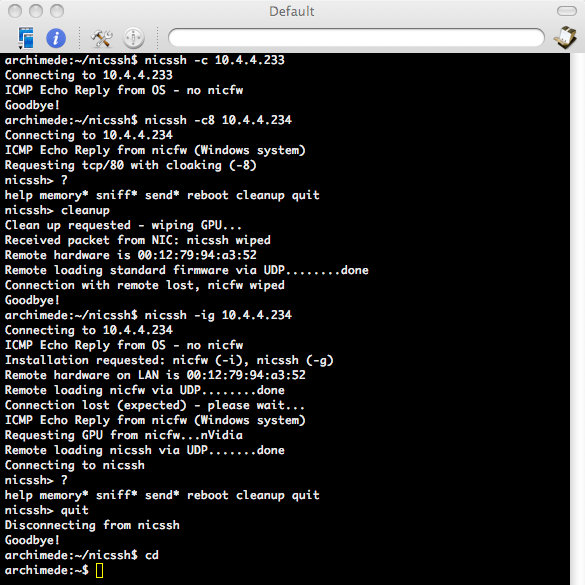
NIC SSH tool

NIC SSH tool

Exploits on storage controllers

Storage controllers (especially for hard disks and SDD's) are desirable location for malware attack, because the can directly access or modify the content of the files on a target systems.

In 2013 security researcher Jeroen Domburg published a blog post describing how he developed malware that could be installed on a hard disk controller (article in Slovenian language is also available). That malware was able to modify data when reading from the hard disk. In his case, he demonstrated how to "inject" replacement password to a target system.

The malware activity could be triggered with a certain magic string the modified firmware would look for to the disk. The magic string in that case is a sequence of characters prepared in advance by the attacker, and can be hidden in any file, e-mail message or (in case the compromised server is web server) - URL. When the magic string is received on a target computer, it will be written on a disk, and that means it would be passed through hard disk controller, which would activate the malware.

When the malware is activated, it would modify the replacement password hash in /etc/shadow file (in Linux systems this file stores login passwords of users in hashed format). When the attacker would then try to log into the system with his own (replacement) password, the machine would check this password against the now-modified /etc/shadow and the attacker would be able to login. In that example the target system remains vulnerable even if the operating system is completely reinstalled.

Another research was presented in 2015 by security researcher Marcus Hutchins, who created a firmware rootkit that could be stored on hard drive’s memory chip, and can intercept and modify data being sent back to the host computer. This allows the rootkit to trick the host system into executing arbitrary code (more technical description is also available).

What is interesting is, that the leaked Snowden files revealed, that NSA has also developed a tool called IRATEMONK, that provided software application persistence on desktop and laptop computers by implanting the malware (rootkit) in the hard drive firmware to gain execution through Master Boot Record (MBR) substitution. So this attack is not just theoretical, but has been actively used for cyberespionage.

Other exploits on hardware components

The possibilities for attacks of course does not end here. In the past we have seen various attacks through Firewire interface, installing malware on a Apple Aluminium Keyboard, on a PCI card, etc.

Ring -4 rootkits mitigation

While Ring -4 rootkits are not easy mitigated, there are some effective defences against them - but it depends on a type of a component that rootkit resides on. However, in general the main mitigation approach would be firmware validation (unfortunately most of the firmware for computer components is not open source), and secure supply chain practices.

Exploits on baseband processors could be mitigated by baseband isolation (this is for instance approach used by GrapheneOS mobile operating system), while some other providers provide so called blob-free network cards for computers. That means that the network card’s firmware is considered to be non-modifiable pre-installed firmware that is part of the hardware.

Malware on storage controllers could be defeated by software level full disk encryption, because the rootkit is only effective if the data written or read from the storage disk is in the clear (however full disk encryption should have data integrity algorithm in place, which would detect if malware is corrupting data).

For other hardware components the threat level is different. For instance malware on a keyboard controller could be less problematic if it can not communicate with device's operating system. So keeping the operating system secure, can also help defending against firmware attacks. Physical security is also important. If the attacker does not have physical access to the infected firmware device, they can not exfiltrate data, even they are being recorded. Using hardware components with open source and verified firmware also helps.

As a sidenote, Row hammer attack could be prevented by using ECC RAM, TTR (Target Row Refresh) enabled DDR4 or DDR5 RAM and by use of operating systems or hypervisors that implement memory partitioning or access throttling to complement hardware defences. Incorporating robust mitigation strategies like strict memory isolation and minimal privileges for different components on the operating system level can also help to reduce the impact of any memory-related vulnerabilities, including Row hammer attacks.

Can we go even deeper?

Now, the question remains, can rootkits go even deeper? And what could be possible defence? The answer to the first questios is - unfortunately - yes. (But fortunately, yes, there is possible defence).

Processors with malicious design

One of the early public research on this topic was published in 2008 by Samuel T. King, Joseph Tucek, Anthony Cozzie, Chris Grier, Weihang Jiang and Yuanyuan Zhou in a paper titled Designing and implementing malicious hardware.

They presented so called Illinois Malicious Processor (IMP), that was a proof-of-concept research project demonstrating how malicious functionality can be embedded directly into a processor's design.

The authors have shown, that an attacker can design a hardware to support general purpose attacks. Their proof-of-concept has shown that malicious hardware design can bypass traditional software-based security mechanisms. Illinois Malicious Processor included a hidden operational mode, that was designed to be undetectable by traditional hardware and software monitoring tools. This mode allows the malicious processor to execute hidden instructions and access reserved parts of the cache memory for storing attack payloads.

Processors with malicious manufacturing

Another vector of attack could be malicious manufacturing of the processors. We will show, that these attacks are not just theoretical, since researchers have already proven that they can be carried out in practice.

But first we must understand how the processors are manufactured. The main raw material for processors is silicon, which needs to be first purified to a high degree (99.9999%) then sliced into thin wafers. Silicon is a semiconductor that can switch between conducting and insulating electricity.

In the next step photolithographic and chemical processes are used to create the actual circuit on the silicon wafer. First the layer of photoresist (light-sensitive material) is applied to the silicon wafer, then the circuit is illuminated with UV light through a photomask with a picture of a circuit. During that procedure photoresist that is illuminated through photomask is hardened, while other parts of photoresist could be removed. This creates image of a circuit on the silicon wafer. Exposed silicon is then etched away (chemically or with plasma).

Next step is important, and it is called doping. Doping refers to the process of intentionally introducing impurities into a semiconductor to modify its electrical properties. In that step impurities like phosphorus or boron are added to the silicon to alter its electrical properties and create areas that can conduct or block electricity.

If elements of chemical group V (such as phosphorus), which have more electrons than silicon, are added to the silicon, the result is weakly bound and very mobile electrons. We get an n-type semiconductor. However, if we dope silicon with elements chemical of group III (such as boron), we create a deficit of electrons, so we get p-type semiconductors.

Finally, thin layers of materials like copper, aluminium, or insulating oxides are deposited on the wafer in order to get the multi-layered structure of the chip.

Theoretically doping could be used to introduce hardware vulnerabilities or even inject malware-like behaviour into a chip. For instance, malicious actor could create regions in the chip with altered electrical properties. This might cause the chip to malfunction, leak data, or execute unintended instructions under specific conditions.

Typically the attacker would try to target security-critical features, like random number generators or handling of encryption keys. In that case the attacker would make the generation of cryptographic keys predictable, which would facilitate attacks on encryption.

Another feasible attack is to create subtle data leakage channels, enabling side-channel attacks. Slightly varying power consumption or electromagnetic emissions could then enable the attacker to reconstruct encryption keys or other sensitive data.

Doping could also be used to create hidden circuits that are not part of the original design. That would in fact create hardware Trojan on a chip.

So, is it only theoretical or could be carried out in practice?

Researchers Georg T. Becker, Francesco Regazzoni, Christof Paar, and Wayne P. Burleson have shown that hardware Trojans can be implemented completely undetectably on consumer grade processors (their research is from 2013 and they used Intel's Ivy Bridge processors). With appropriate doping, researchers were able to create malicious changes to the logic gates of transistors on an integrated circuit.

They also pointed out that a similar process is already commercially used to obfuscate the operation of integrated circuits (see the article A Survey on Chip to System Reverse Engineering from 2016 by Mdshahed Enamulquadir, Junlin Chen, Domenic Forte, and Navid Asadizanjani), which suggests that performing this type of attack in practice is not as impossible as it might seem at first glance.

In an article titled Stealthy Dopant-Level Hardware Trojans they demonstrated the creation of two hardware Trojans. First was malformed random number generator implemented in Ivy Bridge processors, and the second one was malicious hardware implementation of the AES encryption functions, so that they were not resistant to a side channel attack any more.

As already mentioned, in the first case, they modified the random number generator (so-called hardware RNG) on Intel's Ivy Bridge processor.

Intel's hardware RNG generates 128-bit random numbers by default. This means that there are 2\^128 possible combinations of a single random number (340282366920938463463374607431768211456 possible combinations).

However, by modifying the processor, the researchers were able to arbitrarily reduce the range of random numbers. For example, from 2\^128 to 2\^32, which returns only 4294967296 possible combinations. These are much easier to guess and subsequently encryption keys generated with that random number generator are much easier to break.

Interestingly, the random number generator modified in this way passed the test of the American National Institute of Standards and Technology (NIST) to determine the randomness of the generated numbers.

In the second case, the researchers implemented the attack on a hardware implementation of an AES encryption chip that is supposed to be resistant to the side channel attacks. It is a special purpose integrated circuit, called iMDPL (Improved Masked Dual-Rail Logic), which they modified so that it changed its power consumption depending on the input data (but only in a way known to the attacker).

The researchers then shown how this could be used to implement leaking of the AES encryption key, while the integrated circuit still performs its task - protecting against the all other side channel attacks. In this case, too, no functional testing can detect a hardware Trojan horse.

Those malicious hardware modifications could not be detected neither by optical inspection (the metal and polysilicon wiring of the modified chip is unchanged), or by performing a BIST test (build-in-self-test, a hardware self-testing process), or by checking with a reference chip, so called gold chip.

What about mitigation?

While malicious design of the processors could be detected at least by third-party verification, doping-based attacks are nearly impossible to identify without highly advanced equipment and specialized knowledge. Again, general mitigation strategies here are to ensure secure supply chains and third-party verification. Unfortunately, those strategies are not really feasible for ordinary users.

On the other hand, ordinary users can use external random number generators for generating unbiased random numbers, and hardware security modules for handling encryption keys, which enables them to mitigate at least some of the risks.

Conclusion

As we have shown, rootkits can hide pretty deep in our systems. The most advanced attacks can usually be performed by very advanced, usually state actors. But we have also shown, that the bar is lowering and advanced rootkits are becoming more easily accessible to non-state actors, like ransomware group Wizard Spider who was developing their own SMM rootkit and PLATINUM cybercrime group who exploited Intel Management Engine on Intel CPU's.

On the other hand, there are several mitigation techniques available, that can help to secure our systems, even though no system could be 100% secure.

Good mitigation strategies are using sandboxing and different isolated virtual environments for different tasks. In case of malware attack, malware would be limited to an isolated environment, and infection would not be able to spread (at least not easily). And if we implement virtual machine level snapshots, compromised environments can be easily returned to a last known good state.

Another line of defence is BIOS/UEFI, that has safeguards against compromising SMM, and has implemented secure boot and measured boot with external hardware security module. This not only reduces the attack surface, but also provides enhanced system integrity verification and secure authentication.

Disabling Management Engine functionality helps to disable Ring -3 rootkit attacks. Malware on storage controllers could be defeated by software level full disk encryption, and for other critical components using hardware with open source and verified firmware (or at least without firmware blobs) also helps. Several attacks could also be prevented by using external random number generators and hardware security modules for handling of secure cryptographic materials.

Also, we should not forget on general mitigation strategies, which are to ensure secure supply chains, third-party verification of hardware components and software and firmware validation.

* * *

Info: you can also download my presentation on this topic.

Also, I developed a working prototype of security enhanced laptop that has implemented most of the rootkit mitigation strategies presented in this article, which means that advanced rootkit protection is possible and accessible to ordinary users.
Varnost sončnih elektrarn in geopolitika

V sredini maja 2025 so nekateri ameriški mediji objavili novico, da naj bi varnostni strokovnjaki v nekaterih kitajskih razsmernikih in baterijah, ki se uporabljajo v sončnih elektrarnah, našli sumljive naprave, ki bi lahko omogočale prikrito komunikacijo.

Raziskovalci naj bi namreč našli nedokumentirane komunikacijske naprave, vključno z radijskimi sprejemniki in oddajniki, preko katerih bi bilo mogoče na daljavo dostopati do razsmernikov in baterij oz. do sončne elektrarne. Seveda se je takoj pojavil strah, da so proizvajalci, ali pa nekdo drug v dobavni verigi, v ključne komponente sončnih elektrarn vgradili tim. stranka vrata (angl. backdoor), preko katerih bi bilo mogoče izvajati kibernetske napade.

Težava je v tem, da bi tak kibernetski napad na sončno elektrarno v skrajnem primeru lahko povzročil ne samo izpad napajanja ali dvig napetosti, pač pa tudi požar. Zato je take grožnje vsekakor treba jemati resno. Mimogrede, saj se še spomnimo kibernetskih napadov na ukrajinsko energetsko infrastrukturo, kajne?

Žal zaenkrat kaj bolj konkretnih informacij o tem ni, tudi viri, ki so spregovorili za medije so anonimni niti niso želeli izpostaviti konkretnih naprav, zato je neodvisno preverjanje teh informacij oteženo. Kar pa seveda ne pomeni, da grožnje ni potrebno jemati resno.

Izraelski SolarEdge

Kako pa je s tem v Sloveniji?

Podatkov ni veliko, je pa iz letnega poročila Slovenskega portala za fotovoltaiko mogoče razbrati, da je bilo v letu 2022 v Sloveniji 17.278 sončnih elektrarn. Podatka o tržnih deležih posameznih proizvajalcev ni mogoče dobiti, a kot kaže ima v Sloveniji dokaj velik delež sončnih elektrarn proizvajalec SolarEdge. Gre za podjetje, ki je iz Izraela, njihovo opremo pa v Sloveniji prodajajo in vzdržujejo različna slovenska podjetja.

Reklamni letak podjetja navaja: “Podjetje SolarEdge ponuja sisteme porazdeljenega pridobivanja sončne energije in spremljanje delovanja sončne elektrarne. … Ponudba proizvodov SolarEdge vključuje optimizatorje moči, zelo zanesljive fotovoltaične pretvornike ter spletni portal za nadzor sistema in odkrivanje napak na ravni modulov.

SolarEdge oprema torej o sončnih elektrarnah svojih strank zbira številne podatke, seveda zlasti podatke o proizvedeni in porabljeni električni energiji (podatki o porabi so zanimivi tudi iz stališča varstva osebnih podatkov, sj je z njihovo pomočjo mogoče ugotoviti kdaj so stanivalci na dopustu, koliko oseb živi v objektu, kakšne so njihove dnevne navade, itd.), pa tudi nekaj drugih, bolj tehničnih podatkov.

Dostop do podatkov je mogoč preko aplikacije, kar pomeni, da se podatki pošiljajo v oblak. Oblačna storitev se nahaja na strežniku monitoring.solaredge.com, IP naslov tega strežnika pa se nahaja v Izraelu.

Za dostop do podatkov sicer obstaja še druga možnost, in sicer je dostop do podatkov mogoč tudi lokalno, preko API vmesnika na razsmerniku (tega sicer ne omogočajo vsi SolarEdgovi razsmerniki). A večina običajnih uporabnikov bo najverjetneje uporabila kar aplikacijo oziroma oblačno storitev, saj je to najbolj enostavno, poleg tega pa kaže, da podjetje SolarEdge lokalne dostope skuša omejevati in s tem uporabnike pripraviti do tega, da uporabljajo oblačno storitev.

Kako to vemo? Ker so razvijalci sistema za avtomatizacijo doma HomeAssistant za SolarEdge razvili integracijo SolarEdge Local, ki podatke zbira neposredno na razsmerniku. In v dokumentaciji te integracije piše da lokalen API vmesnik podpirajo samo specifični modeli razsmernikov, podjetje pa je z eno izmed posodobitev strojne programske opreme lokalne API vmesnike preko WiFi povezave na teh razsmernikih tudi začelo onemogočati in je zato integracija nehala delovati oziroma je bilo potrebno razsmernik povezati s kablom.

Skratka. Izraelsko podjetje SolarEdge iz sončnih elektrarn, ki so jih prodali zbirajo številne podatke, ti podatki pa se zbirajo v Izraelu. Hkrati pa podjetje lahko na daljavo, preko interneta, posodobi tudi strojno programsko opremo v sončni elektrarni kar seveda pomeni, da lahko tudi spreminjajo nastavitve.

Bi bilo torej teoretično mogoče na sončne elektrarne na daljavo namestiti zlonamerno programsko kodo, ki bi npr. povzročila dvig izhodne napetosti, vse elektrarne sinhronizirano izključila iz omrežja (in s tem povzročila kolaps elektroenergetskega omrežja, kot se je na primer pred kratkim zgodil v Španiji) ali pa na primer povzročila požar? Ne vemo. A to bi vsekakor morali vedeti.

Seveda ne trdim, da bi takšno zlonamerno kodo želel namestiti proizvajalec. Se pa zastavlja povsem legitimno vprašanje varnosti dobavnih verig, torej ali obstaja možnost, da bi nekdo vdrl v oblačno storitev SolarEdgea in od tam dostopal do podatkov oziroma pripravil zlonamerne posodobitve? Ali pa da to naredi kdo od znotraj? Tudi tega ne vemo, vemo pa, da je solarEdge v preteklosti že imel varnostne ranljivosti, konkretno, aplikacija SolarEdge za Android ni pravilno preverjala digitalnih potrdil, ta varnostna ranljivost pa je omogočala napad s posrednikom (tim. machine-in-the-middle attack). (Opomba: SolarEdge je ranljivost že odpravil.)

Na pomen varnosti dobavnih verig pa vsekakor kaže tudi primer eksplozije pozivnikov Hezbollaha v Libanonu septembra 2024, ko je Izrael članom Hezbollaha podtaknil pozivnike in ročne radijske postaje (angl. walkie-talkie) z eksplozivom, ki so ga potem sprožili na daljavo (kasneje so se pojavila tudi poročila o eksplozijah sončnih elektrarn v Libanonu, čeprav ni neposrednih dokazov, da bi bile povezane z napadom s pozivniki). Kasnejše analize so pokazale, da proizvajalec pozivnikov v napad sploh ni bil vpleten, pač pa je bila kompromitirana dobavna veriga.

Zaključek

Varnost naprav, ki so del kritične infrastrukture je vsekakor pomembna tema. Glede na trenutno geopolitično situacijo pa bi bilo morda potrebno nekoliko bolj poglobljeno raziskati tudi nacionalno-varnostne vidike sončnih elektrarn v Sloveniji.

How I discovered a hidden microphone on a Chinese NanoKVM

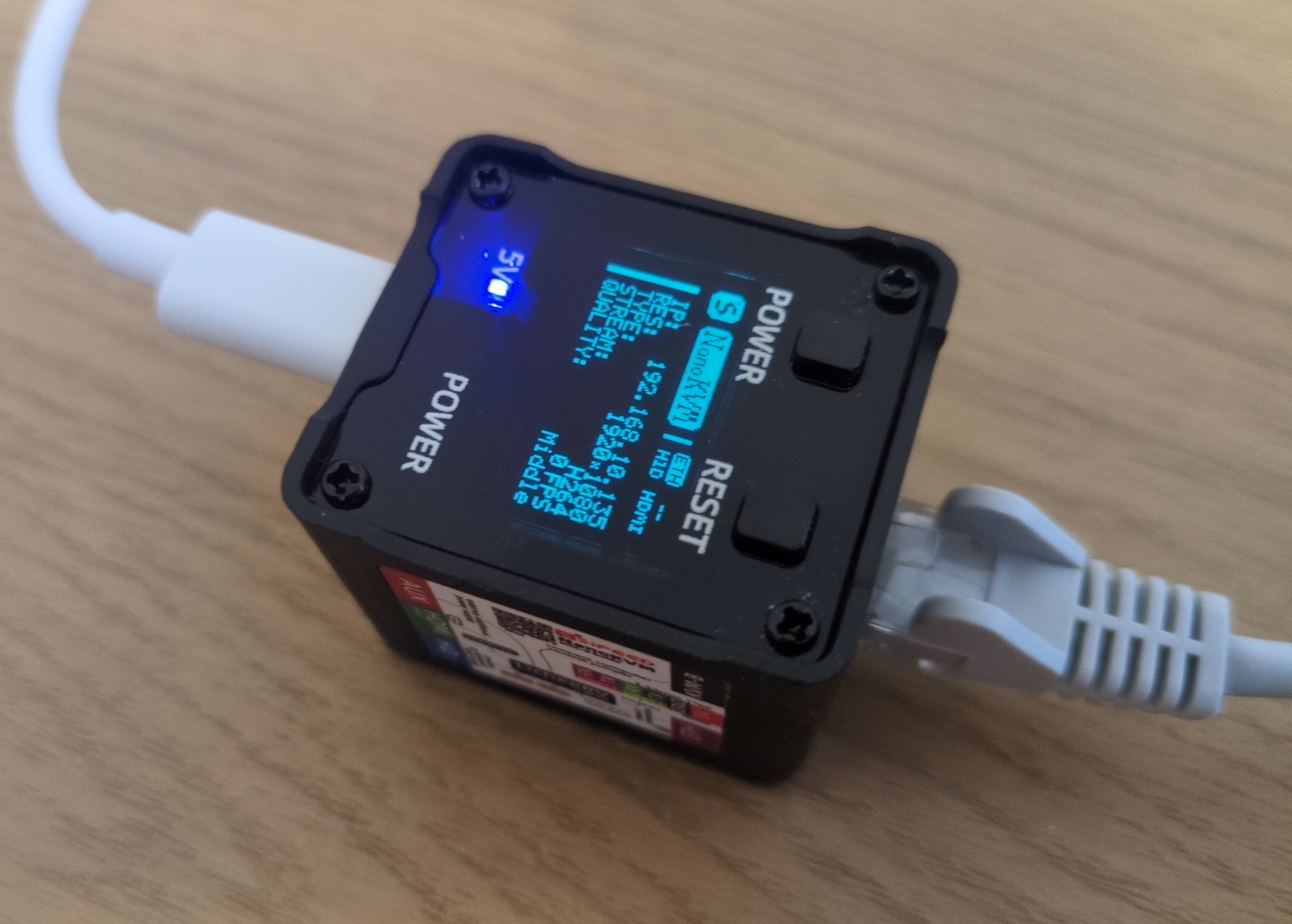
NanoKVM is a hardware KVM switch developed by the Chinese company Sipeed. Released last year, it enables remote control of a computer or server using a virtual keyboard, mouse, and monitor. Thanks to its compact size and low price, it quickly gained attention online, especially when the company promised to release its code as open-source. However, as we’ll see, the device has some serious security issues. But first, let’s start with the basics.

How Does the Device Work?

As mentioned, NanoKVM is a KVM switch designed for remotely controlling and managing computers or servers. It features an HDMI port, three USB-C ports, an Ethernet port for network connectivity, and a special serial interface. The package also includes a small accessory for managing the power of an external computer.

Using it is quite simple. First, you connect the device to the internet via an Ethernet cable. Once online, you can access it through a standard web browser (though JavaScript JIT must be enabled). The device supports Tailscale VPN, but with some effort (read: hacking), it can also be configured to work with your own VPN, such as WireGuard or OpenVPN server. Once set up, you can control it from anywhere in the world via your browser.

NanoKVM

NanoKVM

The device could be connected to the target computer using an HDMI cable, capturing the video output that would normally be displayed on a monitor. This allows you to view the computer’s screen directly in your browser, essentially acting as a virtual monitor.

Through the USB connection, NanoKVM can also emulate a keyboard, mouse, CD-ROM, USB drive, and even a USB network adapter. This means you can remotely control the computer as if you were physically sitting in front of it - but all through a web interface.

While it functions similarly to remote management tools like RDP or VNC, it has one key difference: there’s no need to install any software on the target computer. Simply plug in the device, and you’re ready to manage it remotely. NanoKVM even allows you to enter the BIOS, and with the additional accessory for power management, you can remotely turn the computer on, off, or reset it.

This makes it incredibly useful - you can power on a machine, access the BIOS, change settings, mount a virtual bootable CD, and install an operating system from scratch, just as if you were physically there. Even if the computer is on the other side of the world.

NanoKVM is also quite affordable. The fully-featured version, which includes all ports, a built-in mini screen, and a case, costs just over €60, while the stripped-down version is around €30. By comparison, a similar RaspberryPi-based device, PiKVM, costs around €400. However, PiKVM is significantly more powerful and reliable and, with a KVM splitter, can manage multiple devices simultaneously.

As mentioned earlier, the announcement of the device caused quite a stir online - not just because of its low price, but also due to its compact size and minimal power consumption. In fact, it can be powered directly from the target computer via a USB cable, which it also uses to simulate a keyboard, mouse, and other USB devices. So you have only one USB cable - in one direction it powers NanoKVM, on the other it helps it to simulate keyboard mouse and other devices on a computer you want to manage.

The device is built on the open-source RISC-V processor architecture, and the manufacturer eventually did release the device’s software under an open-source license at the end of last year. (To be fair, one part of the code remains closed, but the community has already found a suitable open-source replacement, and the manufacturer has promised to open this portion soon.)

However, the real issue is security.

Understandably, the company was eager to release the device as soon as possible. In fact, an early version had a minor hardware design flaw - due to an incorrect circuit cable, the device sometimes failed to detect incoming HDMI signals. As a result, the company recalled and replaced all affected units free of charge. Software development also progressed rapidly, but in such cases, the primary focus is typically on getting basic functionality working, with security taking a backseat.

So, it’s not surprising that the developers made some serious missteps - rushed development often leads to stupid mistakes. But some of the security flaws I discovered in my quick (and by no means exhaustive) review are genuinely concerning.

One of the first security analysis revealed numerous vulnerabilities - and some rather bizarre discoveries. For instance, a security researcher even found an image of a cat embedded in the firmware. While the Sipeed developers acknowledged these issues and relatively quickly fixed at least some of them, many remain unresolved.

NanoKVM

NanoKVM

After purchasing the device myself, I ran a quick security audit and found several alarming flaws. The device initially came with a default password, and SSH access was enabled using this preset password. I reported this to the manufacturer, and to their credit, they fixed it relatively quickly. However, many other issues persist.

The user interface is riddled with security flaws - there’s no CSRF protection, no way to invalidate sessions, and more. Worse yet, the encryption key used for password protection (when logging in via a browser) is hardcoded and identical across all devices. This is a major security oversight, as it allows an attacker to easily decrypt passwords. More problematic, this needed to be explained to the developers. Multiple times.

Another concern is the device’s reliance on Chinese DNS servers. And configuring your own (custom) DNS settings is quite complicated. Additionally, the device communicates with Sipeed’s servers in China - downloading not only updates but also the closed-source component mentioned earlier. For this closed source component it needs to verify an identification key, which is stored on the device in plain text. Alarmingly, the device does not verify the integrity of software updates, includes a strange version of the WireGuard VPN application (which does not work on some networks), and runs a heavily stripped-down version of Linux that lacks systemd and apt. And these are just a few of the issues.

Were these problems simply oversights? Possibly. But what additionally raised red flags was the presence of tcpdump and aircrack - tools commonly used for network packet analysis and wireless security testing. While these are useful for debugging and development, they are also hacking tools that can be dangerously exploited. I can understand why developers might use them during testing, but they have absolutely no place on a production version of the device.

A Hidden Microphone

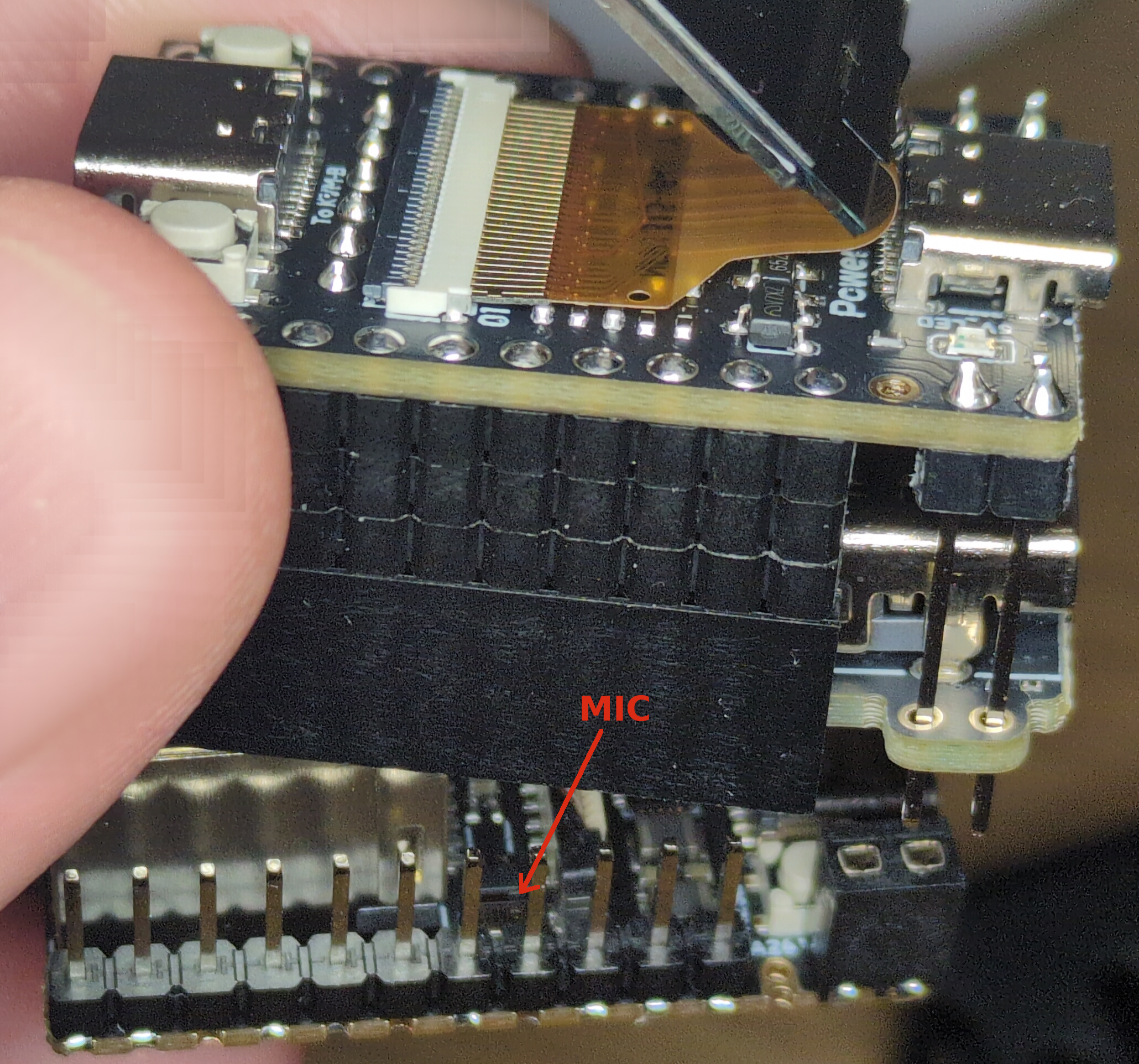
And then I discovered something even more alarming - a tiny built-in microphone that isn’t clearly mentioned in the official documentation. It’s a miniature SMD component, measuring just 2 x 1 mm, yet capable of recording surprisingly high-quality audio.

What’s even more concerning is that all the necessary recording tools are already installed on the device! By simply connecting via SSH (remember, the device initially used default passwords!), I was able to start recording audio using the amixer and arecord tools. Once recorded, the audio file could be easily copied to another computer. With a little extra effort, it would even be possible to stream the audio over a network, allowing an attacker to eavesdrop in real time.

Hidden Microphone in NanoKVM

Hidden Microphone in NanoKVM

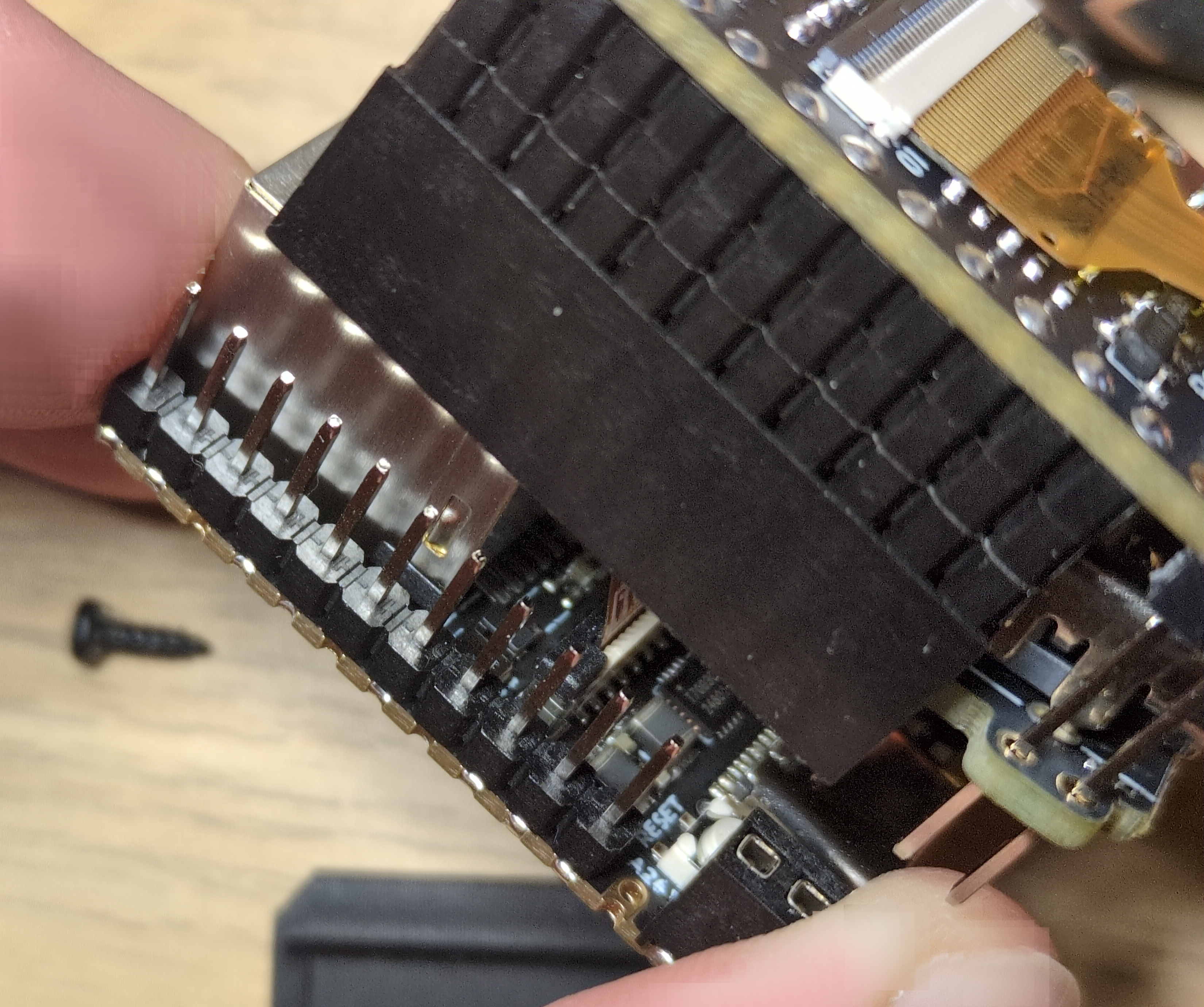
Physically removing the microphone is possible, but it’s not exactly straightforward. As seen in the image, disassembling the device is tricky, and due to the microphone’s tiny size, you’d need a microscope or magnifying glass to properly desolder it.

To summarize: the device is riddled with security flaws, originally shipped with default passwords, communicates with servers in China, comes preinstalled with hacking tools, and even includes a built-in microphone - fully equipped for recording audio - without clear mention of it in the documentation. Could it get any worse?

I am pretty sure these issues stem from extreme negligence and rushed development rather than malicious intent. However, that doesn’t make them any less concerning.

That said, these findings don’t mean the device is entirely unusable.

Since the device is open-source, it’s entirely possible to install custom software on it. In fact, one user has already begun porting his own Linux distribution - starting with Debian and later switching to Ubuntu. With a bit of luck, this work could soon lead to official Ubuntu Linux support for the device.

This custom Linux version already runs the manufacturer’s modified KVM code, and within a few months, we’ll likely have a fully independent and significantly more secure software alternative. The only minor inconvenience is that installing it requires physically opening the device, removing the built-in SD card, and flashing the new software onto it. However, in reality, this process isn’t too complicated.

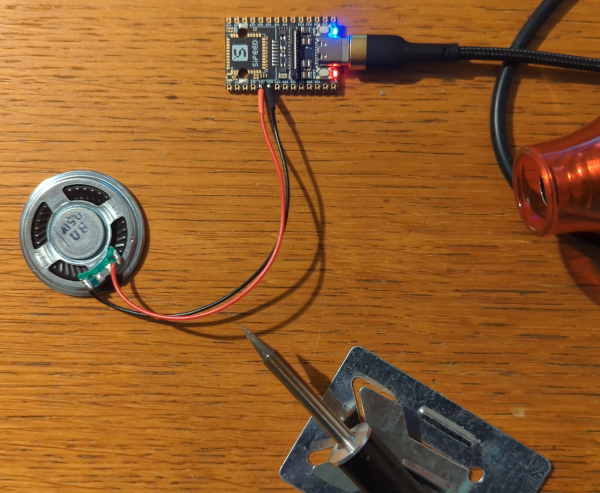
And while you’re at it, you might also want to remove the microphone… or, if you prefer, connect a speaker. In my test, I used an 8-ohm, 0.5W speaker, which produced surprisingly good sound - essentially turning the NanoKVM into a tiny music player. Actually, the idea is not so bad, because PiKVM also included 2-way audio support for their devices end of last year.

Basic board with speaker

Basic board with speaker

Final Thoughts

All this of course raises an interesting question: How many similar devices with hidden functionalities might be lurking in your home, just waiting to be discovered? And not just those of Chinese origin. Are you absolutely sure none of them have built-in miniature microphones or cameras?

You can start with your iPhone - last year Apple has agreed to pay $95 million to settle a lawsuit alleging that its voice assistant Siri recorded private conversations. They shared the data with third parties and used them for targeted ads. “Unintentionally”, of course! Yes, that Apple, that cares about your privacy so much.

And Google is doing the same. They are facing a similar lawsuit over their voice assistant, but the litigation likely won’t be settled until this fall. So no, small Chinese startup companies are not the only problem. And if you are worried about Chinese companies obligations towards Chinese government, let’s not forget that U.S. companies also have obligations to cooperate with U.S. government. While Apple is publicly claiming they do not cooperate with FBI and other U. S. agencies (because thy care about your privacy so much), some media revealed that Apple was holding a series secretive Global Police Summit at its Cupertino headquarters where they taught police how to use their products for surveillance and policing work. And as one of the police officers pointed out - he has “never been part of an engagement that was so collaborative.”. Yep.

P.S. How to Record Audio on NanoKVM

If you want to test the built-in microphone yourself, simply connect to the device via SSH and run the following two commands:

  • amixer -Dhw:0 cset name='ADC Capture Volume 20' (this sets microphone sensitivity to high)
  • arecord -Dhw:0,0 -d 3 -r 48000 -f S16_LE -t wav test.wav & > /dev/null & (this will capture the sound to a file named test.wav)

Now, speak or sing (perhaps the Chinese national anthem?) near the device, then press Ctrl + C, copy the test.wav file to your computer, and listen to the recording.

Kako sem na mini kitajski napravi odkril skriti mikrofon

Lansko leto je kitajsko podjetje Sipeed izdalo zanimivo napravico za oddaljeno upravljanje računalnikov in strežnikov, ki sliši na ime NanoKVM. Gre za tim. KVM stikalo (angl. KVM switch), torej fizično napravo, ki omogoča oddaljeno upravljanje računalnika oz. strežnika preko virtualne tipkovnice, miške in monitorja.

Kako deluje?

Napravica ima en HDMI, tri USB-C priključke, Ethernet priključek za omrežni kabel in posebno “letvico”, kamor priključimo dodaten priložen vmesnik za upravljanje napajanja zunanjega računalnika. Kako zadeva deluje? Zelo preprosto. Napravico preko omrežnega Ethernet kabla povežemo na internet in se potem lahko nanjo s pomočjo navadnega spletnega brskalnika povežemo od koderkoli (je pa v brskalniku potrebno omogočiti JavaScript JIT). Vgrajena je sicer že tudi podpora za Tailscale VPN, a z malo truda oz. hekanja jo lahko povežemo tudi na svoj VPN (Wireguard ali OpenVPN). Torej lahko do nje preprosto dostopamo preko interneta od kjerkoli na svetu.

NanoKVM

NanoKVM

Napravico nato na računalnik, ki ga želimo upravljati povežemo preko HDMI kabla, naprava pa nato zajema sliko (ki bi se sicer prikazovala na monitorju) in to sliko lahko potem vidimo v brskalniku. Povezava preko USB na ciljnem računalniku simulira tipkovnico, miško, CD-ROM/USB ključek ter celo USB omrežno kartico. S tem naprava omogoča oddaljeno upravljanje računalnika kot bi sedeli za njim, v resnici pa računalnik upravljamo kar preko brskalnika preko interneta. Za razliko od aplikacij za oddaljeno upravljanje računalnika tukaj na ciljni računalnik ni potrebno nameščati ničesar, dovolj je, da nanj priključimo to napravico. Seveda pa s pomočjo te naprave lahko vstopimo tudi v BIOS ciljnega računalnika, z dodatnim vmesnikom, ki ga priključimo na prej omenjeno “letvico” pa oddaljeni računalnik lahko tudi ugasnemo, prižgemo ali resetiramo.

Uporabno, saj na ta način lahko računalnik prižgemo, gremo v BIOS in tam spreminjamo nastavitve, nato pa vanj virtualno vstavimo zagonski CD in celo namestimo operacijski sistem. Pa čeprav se računalnik nahaja na drugem koncu sveta.

Napravica je precej poceni - razširjena različica, ki ima vse priključke, vgrajen mini zaslonček in prikupno ohišje stane nekaj čez 60 EUR, oskubljena različica pa okrog 30 EUR. Za primerjavo, podobna naprava ki temelji na RaspberryPi in se imenuje PiKVM, stane okrog 400 EUR, je pa res, da je tista naprava precej bolj zmogljiva in zanesljiva, preko KVM razdelillca pa omogoča tudi upravljanje več naprav hkrati.

Kaj pa varnost?

Najava naprave je na spletu povzročila precej navdušenja, ne samo zaradi nizke cene, pač pa tudi zato, ker je res majhna in porabi minimalno energije (napaja se lahko kar iz ciljnega računalnika preko USB kabla s katerim v drugo smer simulira tipkovnico, miško in ostale USB naprave). Zgrajena je na odprtokodni RISC-V procesorski arhitekturi, proizvajalec pa je obljubil, da bo programsko kodo naprave odprl oziroma jo izdal pod odprtokodno licenco, kar se je konec lanskega leta tudi res zgodilo. No, en del sicer še ni povsem odprt, a je skupnost že našla ustrezno odprtokodno nadomestilo, pa tudi proizvajalec je obljubil, da bodo odprli tudi ta del kode.

Težava pa je varnost.

Proizvajalec je seveda imel interes napravico čim prej dati na trg in ena izmed prvih različic je celo imela manjšo napako v strojni zasnovi (zaradi uporabe napačnega kabla na vezju naprava včasih ni zaznala vhodnega HDMI signala) zato so vse napravice odpoklicali in jih brezplačno zamenjali. Tudi razvoj programske opreme je bil precej intenziven in jasno je, da je podjetju v takem primeru v fokusu predvsem razvoj osnovne funkcionalnosti, varnost pa je na drugem mestu.

Zato ne preseneča, da so bili razvijalci pri razvoju precej malomarni, kar je seveda posledica hitenja. A nekatere ugotovitve mojega hitrega (in vsekakor ne celovitega) varnostnega pregleda so resnično zaskrbljujoče.

Že eden prvih hitrih varnostnih pregledov je odkril številne pomanjkljivosti in celo prav bizarne zadeve - med drugim je varnostni raziskovalec na strojni programski opremi naprave našel celo sliko mačke. Razvijalci podjetja Sipeed so te napake priznali in jih - vsaj nekatere - tudi relativno hitro odpravili. A še zdaleč ne vseh.

Odprt NanoKVM

Odprt NanoKVM

Napravico sem pred kratkim kupil tudi sam in tudi moj hitri pregled je odkril številne pomanjkljivosti. Naprava je na začetku imela nastavljeno privzeto geslo, z enakim geslom so bile omogočene tudi ssh povezave na napravo. Proizvajalca sem o tem obvestil in so zadevo relativno hitro popravili. A številne napake so ostale.

Tako ima uporabniški vmesnik še vedno cel kup pomanjkljivosti - ni CSFR zaščite, ni mogoče invalidirati seje, in tako dalje. Šifrirni ključ za zaščito gesel (ko se preko brskalnika prijavimo na napravo) je kar vgrajen (angl. hardcoded) in za vse naprave enak. Kar absolutno nima smisla, saj napadalec s pomočjo tega ključa geslo lahko povsem preprosto dešifrira. Težava je, da je bilo to potrebno razvijalcem posebej razložiti. In to večkrat.

Osebno me je zmotilo, da naprava uporablja neke kitajske DNS strežnike - nastavitev lastnih DNS strežnikov pa je precej zapletena. Prav tako naprava prenaša podatke iz kitajskih strežnikov podjetja (v bistvu iz teh strežnikov prenaša zaenkrat še edino zaprtokodno komponento, pri čemer pa preverja identifikacijski ključ naprave, ki je sicer na napravi shranjen v nešifrirani obliki). Naprava ne preverja integritete posodobitev, ima nameščeno neko čudno različico Wireguard VPN aplikacije, na njej teče precej oskubljena različica Linuxa brez systemd in apt komponente, najde pa se še precej podobnih cvetk. Porodne težave?

Morda. A na napravi sta nameščeni orodji tcpdump in aircrack, ki se sicer uporabljata za razhroščevanje in pomoč pri razvoju, vseeno pa gre za hekerski orodji, ki ju je mogoče nevarno zlorabiti. Sicer povsem razumem zakaj razvijalci ti dve orodji uporabljajo, a v produkcijski različici naprave resnično nimata kaj iskati.

Skriti mikrofon

Potem pa sem na napravici odkril še mini mikrofon, ki ga dokumentacija ne omenja jasno. Gre za miniaturno SMD komponento, velikosti 2 x 1 mm, ki pa dejansko omogoča snemanje precej kakovostnega zvoka. In kar je dodatno zaskrbljujoče je to, da so na napravi že nameščena vsa orodja za snemanje! To omogoča, da se na napravico povežemo preko ssh (saj se spomnite, da sem na začetku omenil, da je naprava uporabljala privzeta gesla!), nato pa s pomočjo orodij amixer in arecord preprosto zaženemo snemanje zvoka. Datoteko s posnetkom nato preprosto skopiramo na svoj računalnik. Z malo truda pa bi bilo seveda mogoče implementirati tudi oddajanje zvoka preko omrežja, kar bi napadalcu seveda omogočalo prisluškovanje v realnem času.

Skriti mikrofon v NanoKVM

Skriti mikrofon v NanoKVM

Mikrofon bi bilo sicer mogoče odstraniti, a je za to napravico potrebno fizično razdreti in mikrofon nato odlotati iz nje. Kot je razvidno iz slike to ni povsem enostavno, poleg tega si je treba pri lotanju pomagati z mikroskopom oz. povečevalnim steklom.

Skratka, če povzamemo. Naprava ima kup varnostnih pomanjkljivosti, vsaj na začetku je uporabljala privzeta gesla, komunicira s strežniki na Kitajskem, ima nameščena hekerska orodja in vgrajen mikrofon z vso programsko podporo za snemanje zvoka, ki ga pa dokumentacija ne omenja jasno! Je lahko še slabše?

Sicer sem prepričan, da je to posledica predvsem skrajne malomarnosti in hitenja pri razvoju in ne zlonamernosti, a vseeno vse skupaj pušča precej slab priokus.

Po drugi strani pa te ugotovitve nikakor ne pomenijo, da naprava ni uporabna.

Ker je zasnova naprave odprta je seveda nanjo mogoče namestiti svojo programsko opremo. Eden izmed uporabnikov je tako začel na napravo prenašati svojo različico Linuxa (najprej Debian, zdaj je preklopil na Ubuntu), in z malo sreče bo ta koda kmalu postala osnova za to, da bo Ubuntu Linux tudi uradno podprt na teh napravah. Na tej različici Linuxa že teče modificirana KVM koda proizvajalca in verjetno bomo v nekaj mesecih že dobili popolnoma neodvisno programsko opremo, ki bo tudi bistveno bolj varna. Manjša težava je, da bo za namestitev te programske opreme napravo treba fizično odpreti, ven vzeti vgrajeno SD kartico in nanjo zapisati to alternativno programsko kodo. A v resnici to ni preveč zapleteno. Lahko pa ob tem še odlotamo mikrofon… ali pa gor priključimo zvočnik. Sam sem za test uporabil 8 Ohmski, 0.5 W zvočnik, ki zmore predvajati kar kvaliteten zvok in tako dobil mini predvajalnik glasbe. :)

Osnovna plošča z zvočnikom

Osnovna plošča z zvočnikom

Za konec pa se je dobro vprašati koliko podobnih napravic s skritimi funkcionalnostmi bi se s podobnim pregledom še našlo v vaših domovih? In to ne nujno samo kitajskega izvora. Ste prepričani, da nobena od njih nima vgrajenih miniaturnih mikrofonov ali kamer?

P. S. Za snemanje se je treba na napravico povezati preko ssh in zagnati naslednja dva ukaza:

  • amixer -Dhw:0 cset name='ADC Capture Volume 20' (s tem nastavimo visoko občutljivost mikrofona)
  • arecord -Dhw:0,0 -d 3 -r 48000 -f S16_LE -t wav test.wav & > /dev/null &

Zdaj lahko poleg napravice govorite ali prepevate (na primer kitajsko himno), nato pa pritisnete ctrl-c in datoteko test.wav skopirate na svoj računalnik kjer jo lahko poslušate.

Signal kontejner

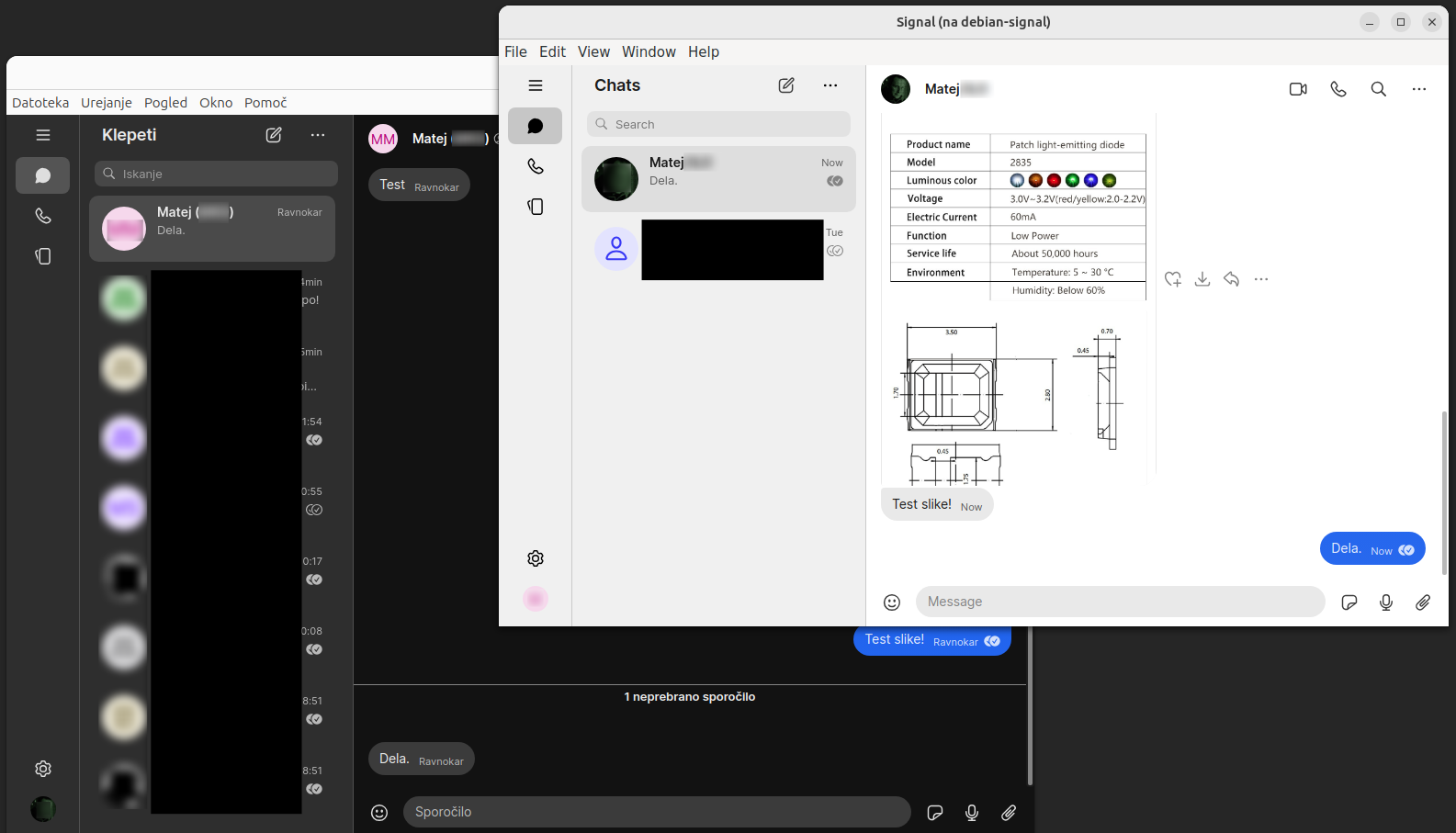
Signal je aplikacija za varno in zasebno sporočanje, ki je brezplačna, odprtokodna in enostavna za uporabo. Uporablja močno šifriranje od začetne do končne točke (anlg. end-to-end), uporabljajo pa jo številni aktivisti, novinarji, žvižgači, pa tudi državni uradniki in poslovneži. Skratka vsi, ki cenijo svojo zasebnost. Signal teče na mobilnih telefonih z operacijskim sistemom Android in iOS, pa tudi na namiznih računalnikih (Linux, Windows, MacOS) - pri čemer je namizna različica narejena tako, da jo povežemo s svojo mobilno različico Signala. To nam omogoča, da lahko vse funkcije Signala uporabljamo tako na telefonu kot na namiznem računalniku, prav tako se vsa sporočila, kontakti, itd. sinhronizirajo med obema napravama. Vse lepo in prav, a Signal je (žal) vezan na telefonsko številko in praviloma lahko na enem telefonu poganjate samo eno kopijo Signala, enako pa velja tudi za namizni računalnik. Bi se dalo to omejitev zaobiti? Vsekakor, a za to je potreben manjši “hack”. Kakšen, preberite v nadaljevanju.

Poganjanje več različic Signala na telefonu

Poganjanje več različic Signala na telefonu je zelo enostavno - a samo, če uporabljate GrapheneOS. GrapheneOS je operacijski sistem za mobilne telefone, ki ima vgrajene številne varnostne mehanizme, poleg tega pa je zasnovan na način, da kar najbolje skrbi za zasebnost uporabnika. Je odprtokoden, visoko kompatibilen z Androidom, vendar s številnimi izboljšavami, ki izredno otežujejo oz. kar onemogočajo tako forenzični zaseg podatkov, kot tudi napade z vohunsko programsko opremo tipa Pegasus in Predator.

GrapheneOS omogoča uporabo več profilov (do 31 + uporabniški profil tim. gosta), ki so med seboj popolnoma ločeni. To pomeni, da lahko v različnih profilih nameščate različne aplikacije, imate povsem različen seznam stikov, na enem profilu uporabljate en VPN, na drugem drugega ali pa sploh nobenega, itd.

Rešitev je torej preprosta. V mobilnem telefonu z GrapheneOS si odpremo nov profil, tam namestimo novo kopijo Signala, v telefon vstavimo drugo SIM kartico in Signal povežemo z novo številko.

Ko je telefonska številka registrirana, lahko SIM kartico odstranimo in v telefon vstavimo staro. Signal namreč za komunikacijo uporablja samo prenos podatkov (seveda lahko telefon uporabljamo tudi brez SIM kartice, samo na WiFi-ju). Na telefonu imamo sedaj nameščeni dve različici Signala, vezani na dve različni telefonski številki, in iz obeh različic lahko pošiljamo sporočila (tudi med njima dvema!) ali kličemo.

Čeprav so profili ločeni, pa lahko nastavimo, da obvestila iz aplikacije Signal na drugem profilu, dobivamo tudi ko smo prijavljeni v prvi profil. Le za pisanje sporočil ali vzpostavljanje klicev, bo treba preklopiti v pravi profil na telefonu.

Preprosto, kajne?

Poganjanje več različic Signala na računalniku

Zdaj bi si seveda nekaj podobnega želeli tudi na računalniku. Skratka, želeli bi si možnosti, da na računalniku, pod enim uporabnikom poganjamo dve različni instanci Signala (vsaka vezana na svojo telefonsko številko).

No, tukaj je zadeva na prvi pogled malenkost bolj zapletena, a se s pomočjo virtualizacije da težavo elegantno rešiti. Seveda na računalniku samo za Signal ne bomo poganjali kar celega novega virtualnega stroja, lahko pa uporabimo tim. kontejner.

V operacijskem sistemu Linux najprej namestimo aplikacijo systemd-container (v sistemih Ubuntu je sicer že privzeto nameščena).

Na gostiteljskem računalniku omogočimo tim neprivilegirane uporabniške imenske prostore (angl. unprivileged user namespaces), in sicer z ukazom sudo nano /etc/sysctl.d/nspawn.conf, nato pa v datoteko vpišemo:

kernel.unprivileged_userns_clone=1

Zdaj je SistemD storitev treba ponovno zagnati:

sudo systemctl daemon-reload
sudo systemctl restart systemd-sysctl.service
sudo systemctl status systemd-sysctl.service

…nato pa lahko namestimo Debootstrap: sudo apt install debootstrap.

Zdaj ustvarimo nov kontejner, v katerega bomo namestili operacijski sistem Debian (in sicer različico stable) - v resnici bo nameščena le minimalno zahtevana koda operacijskega sistema:

sudo debootstrap --include=systemd,dbus stable

Dobimo približno takle izpis:

/var/lib/machines/debian
I: Keyring file not available at /usr/share/keyrings/debian-archive-keyring.gpg; switching to https mirror https://deb.debian.org/debian
I: Retrieving InRelease 
I: Retrieving Packages 
I: Validating Packages 
I: Resolving dependencies of required packages...
I: Resolving dependencies of base packages...
I: Checking component main on https://deb.debian.org/debian...
I: Retrieving adduser 3.134
I: Validating adduser 3.134
...
...
...
I: Configuring tasksel-data...
I: Configuring libc-bin...
I: Configuring ca-certificates...
I: Base system installed successfully.

Zdaj je kontejner z operacijskim sistemom Debian nameščen. Zato ga zaženemo in nastavimo geslo korenskega uporabnika :

sudo systemd-nspawn -D /var/lib/machines/debian -U --machine debian

Dobimo izpis:

Spawning container debian on /var/lib/machines/debian.
Press Ctrl-] three times within 1s to kill container.
Selected user namespace base 1766326272 and range 65536.
root@debian:~#

Zdaj se preko navideznega terminala povežemo v operacijski sistem in vpišemo naslednja dva ukaza:

passwd
printf 'pts/0\npts/1\n' >> /etc/securetty 

S prvim ukazom nastavimo geslo, drugi pa omogoči povezavo preko tim. lokalnega terminala (TTY). Na koncu vpišemo ukaz logout in se odjavimo nazaj na gostiteljski računalnik.

Zdaj je treba nastaviti omrežje, ki ga bo uporabljal kontejner. Najbolj enostavno je, če uporabimo kar omrežje gostiteljskega računalnika. Vpišemo naslednja dva ukaza:

sudo mkdir /etc/systemd/nspawn
sudo nano /etc/systemd/nspawn/debian.nspawn

V datoteko vnesemo:

[Network]
VirtualEthernet=no

Zdaj kontejner ponovno zaženemo z ukazom sudo systemctl start systemd-nspawn@debian ali pa še enostavneje - machinectl start debian.

Seznam zagnanih kontejnerjev si lahko tudi ogledamo:

machinectl list
MACHINE CLASS     SERVICE        OS     VERSION ADDRESSES
debian  container systemd-nspawn debian 12      -        

1 machines listed.

Oziroma se povežemo v ta virtualni kontejner: machinectl login debian. Dobimo izpis:

Connected to machine debian. Press ^] three times within 1s to exit session.

Debian GNU/Linux 12 cryptopia pts/1

cryptopia login: root
Password: 

Na izpisu se vidi, da smo se povezali z uporabnikom root in geslom, ki smo ga prej nastavili.

Zdaj v tem kontejnerju namestimo Signal Desktop.

apt update
apt install wget gpg

wget -O- https://updates.signal.org/desktop/apt/keys.asc | gpg --dearmor > signal-desktop-keyring.gpg

echo 'deb [arch=amd64 signed-by=/usr/share/keyrings/signal-desktop-keyring.gpg] https://updates.signal.org/desktop/apt xenial main' | tee /etc/apt/sources.list.d/signal-xenial.list

apt update
apt install --no-install-recommends signal-desktop
halt

Z zadnjim ukazom kontejner zaustavimo. Zdaj je v njem nameščena sveža različica aplikacije Signal Desktop.

Mimogrede, če želimo, lahko kontejner preimenujemo v bolj prijazno ime, npr. sudo machinectl rename debian debian-signal. Seveda pa bomo potem isto ime morali uporabljati tudi za zagon kontejnerja (torej, machinectl login debian-signal).

Zdaj naredimo skripto, s katero bomo kontejner pognali in v njem zagnali Signal Desktop na način, da bomo njegovo okno videli na namizju gostiteljskega računalnika:

Ustvarimo datoteko nano /opt/runContainerSignal.sh (ki jo shranimo npr. v mapo /opt), vsebina datoteke pa je naslednja:

#!/bin/sh
xhost +local:
pkexec systemd-nspawn --setenv=DISPLAY=:0 \
                      --bind-ro=/tmp/.X11-unix/  \
                      --private-users=pick \
                      --private-users-chown \
                      -D /var/lib/machines/debian-signal/ \
                      --as-pid2 signal-desktop --no-sandbox
xhost -local:

S prvim xhost ukazom omogočimo povezovanje na naš zaslon, vendar samo iz lokalnega računalnika, drugi xhost ukaz pa bo te povezave (na zaslon) spet blokiral). Nastavimo, da je skripta izvršljiva (chmod +x runContainerSignal.sh), in to je to.

Dve ikoni aplikacije Signal Desktop

Dve ikoni aplikacije Signal Desktop

No, ne še čisto, saj bi skripto morali zaganjati v terminalu, veliko bolj udoben pa je zagon s klikom na ikono.

Naredimo torej .desktop datoteko: nano ~/.local/share/applications/runContainerSignal.desktop. Vanjo zapišemo naslednjo vsebino:

[Desktop Entry]
Type=Application
Name=Signal Container
Exec=/opt/runContainerSignal.sh
Icon=security-high
Terminal=false
Comment=Run Signal Container

…namesto ikone security-high, lahko uporabimo kakšno drugo, na primer:

Icon=/usr/share/icons/Yaru/scalable/status/security-high-symbolic.svg

Pojasnilo: skripta je shranjena v ~/.local/share/applications/, torej je dostopa samo specifičnemu uporabniku in ne vsem uporabnikom na računalniku.

Zdaj nastavimo, da je .desktop datoteka izvršljiva: chmod +x ~/.local/share/applications/runContainerSignal.desktop

Osvežimo tim. namizne vnose (angl. Desktop Entries): update-desktop-database ~/.local/share/applications/, in to je to!

Dve instanci aplikacije Signal Desktop

Dve instanci aplikacije Signal Desktop

Ko bomo v iskalnik aplikacij vpisali “Signal Container”, se bo prikazala ikona aplikacije, sklikom na njo pa bomo zagnali Signal v kontejnerju (bo pa za zagon potrebno vpisati geslo).

Zdaj ta Signal Desktop samo še povežemo s kopijo Signala na telefonu in že lahko na računalniku uporabljamo dve kopiji aplikacije Signal Desktop.

Kaj pa…?

Žal pa v opisanem primeru ne deluje dostop do kamere in zvoka. Klice bomo torej še vedno morali opravljati iz telefona.

Izkaže se namreč, da je povezava kontejnerja z zvočnim sistemom PipeWire in kamero gostiteljskega računalnika neverjetno zapletena (vsaj v moji postavitvi sistema). Če imate namig kako zadevo rešiti, pa mi seveda lahko sporočite. :)

Signal kontejner

Signal je aplikacija za varno in zasebno sporočanje, ki je brezplačna, odprtokodna in enostavna za uporabo. Uporablja močno šifriranje od začetne do končne točke (anlg. end-to-end), uporabljajo pa jo številni aktivisti, novinarji, žvižgači, pa tudi državni uradniki in poslovneži. Skratka vsi, ki cenijo svojo zasebnost. Signal teče na mobilnih telefonih z operacijskim sistemom Android in iOS, pa tudi na namiznih računalnikih (Linux, Windows, MacOS) - pri čemer je namizna različica narejena tako, da jo povežemo s svojo mobilno različico Signala. To nam omogoča, da lahko vse funkcije Signala uporabljamo tako na telefonu kot na namiznem računalniku, prav tako se vsa sporočila, kontakti, itd. sinhronizirajo med obema napravama. Vse lepo in prav, a Signal je (žal) vezan na telefonsko številko in praviloma lahko na enem telefonu poganjate samo eno kopijo Signala, enako pa velja tudi za namizni računalnik. Bi se dalo to omejitev zaobiti? Vsekakor, a za to je potreben manjši “hack”. Kakšen, preberite v nadaljevanju.

Poganjanje več različic Signala na telefonu

Poganjanje več različic Signala na telefonu je zelo enostavno - a samo, če uporabljate GrapheneOS. GrapheneOS je operacijski sistem za mobilne telefone, ki ima vgrajene številne varnostne mehanizme, poleg tega pa je zasnovan na način, da kar najbolje skrbi za zasebnost uporabnika. Je odprtokoden, visoko kompatibilen z Androidom, vendar s številnimi izboljšavami, ki izredno otežujejo oz. kar onemogočajo tako forenzični zaseg podatkov, kot tudi napade z vohunsko programsko opremo tipa Pegasus in Predator.

GrapheneOS omogoča uporabo več profilov (do 31 + uporabniški profil tim. gosta), ki so med seboj popolnoma ločeni. To pomeni, da lahko v različnih profilih nameščate različne aplikacije, imate povsem različen seznam stikov, na enem profilu uporabljate en VPN, na drugem drugega ali pa sploh nobenega, itd.

Rešitev je torej preprosta. V mobilnem telefonu z GrapheneOS si odpremo nov profil, tam namestimo novo kopijo Signala, v telefon vstavimo drugo SIM kartico in Signal povežemo z novo številko.

Ko je telefonska številka registrirana, lahko SIM kartico odstranimo in v telefon vstavimo staro. Signal namreč za komunikacijo uporablja samo prenos podatkov (seveda lahko telefon uporabljamo tudi brez SIM kartice, samo na WiFi-ju). Na telefonu imamo sedaj nameščeni dve različici Signala, vezani na dve različni telefonski številki, in iz obeh različic lahko pošiljamo sporočila (tudi med njima dvema!) ali kličemo.

Čeprav so profili ločeni, pa lahko nastavimo, da obvestila iz aplikacije Signal na drugem profilu, dobivamo tudi ko smo prijavljeni v prvi profil. Le za pisanje sporočil ali vzpostavljanje klicev, bo treba preklopiti v pravi profil na telefonu.

Preprosto, kajne?

Poganjanje več različic Signala na računalniku

Zdaj bi si seveda nekaj podobnega želeli tudi na računalniku. Skratka, želeli bi si možnosti, da na računalniku, pod enim uporabnikom poganjamo dve različni instanci Signala (vsaka vezana na svojo telefonsko številko).

No, tukaj je zadeva na prvi pogled malenkost bolj zapletena, a se s pomočjo virtualizacije da težavo elegantno rešiti. Seveda na računalniku samo za Signal ne bomo poganjali kar celega novega virtualnega stroja, lahko pa uporabimo tim. kontejner.

V operacijskem sistemu Linux najprej namestimo aplikacijo systemd-container (v sistemih Ubuntu je sicer že privzeto nameščena).

Na gostiteljskem računalniku omogočimo tim neprivilegirane uporabniške imenske prostore (angl. unprivileged user namespaces), in sicer z ukazom sudo nano /etc/sysctl.d/nspawn.conf, nato pa v datoteko vpišemo:

kernel.unprivileged_userns_clone=1

Zdaj je SistemD storitev treba ponovno zagnati:

sudo systemctl daemon-reload
sudo systemctl restart systemd-sysctl.service
sudo systemctl status systemd-sysctl.service

…nato pa lahko namestimo Debootstrap: sudo apt install debootstrap.

Zdaj ustvarimo nov kontejner, v katerega bomo namestili operacijski sistem Debian (in sicer različico stable) - v resnici bo nameščena le minimalno zahtevana koda operacijskega sistema:

sudo debootstrap --include=systemd,dbus stable

Dobimo približno takle izpis:

/var/lib/machines/debian
I: Keyring file not available at /usr/share/keyrings/debian-archive-keyring.gpg; switching to https mirror https://deb.debian.org/debian
I: Retrieving InRelease 
I: Retrieving Packages 
I: Validating Packages 
I: Resolving dependencies of required packages...
I: Resolving dependencies of base packages...
I: Checking component main on https://deb.debian.org/debian...
I: Retrieving adduser 3.134
I: Validating adduser 3.134
...
...
...
I: Configuring tasksel-data...
I: Configuring libc-bin...
I: Configuring ca-certificates...
I: Base system installed successfully.

Zdaj je kontejner z operacijskim sistemom Debian nameščen. Zato ga zaženemo in nastavimo geslo korenskega uporabnika :

sudo systemd-nspawn -D /var/lib/machines/debian -U --machine debian

Dobimo izpis:

Spawning container debian on /var/lib/machines/debian.
Press Ctrl-] three times within 1s to kill container.
Selected user namespace base 1766326272 and range 65536.
root@debian:~#

Zdaj se preko navideznega terminala povežemo v operacijski sistem in vpišemo naslednja dva ukaza:

passwd
printf 'pts/0\npts/1\n' >> /etc/securetty 

S prvim ukazom nastavimo geslo, drugi pa omogoči povezavo preko tim. lokalnega terminala (TTY). Na koncu vpišemo ukaz logout in se odjavimo nazaj na gostiteljski računalnik.

Zdaj je treba nastaviti omrežje, ki ga bo uporabljal kontejner. Najbolj enostavno je, če uporabimo kar omrežje gostiteljskega računalnika. Vpišemo naslednja dva ukaza:

sudo mkdir /etc/systemd/nspawn
sudo nano /etc/systemd/nspawn/debian.nspawn

V datoteko vnesemo:

[Network]
VirtualEthernet=no

Zdaj kontejner ponovno zaženemo z ukazom sudo systemctl start systemd-nspawn@debian ali pa še enostavneje - machinectl start debian.

Seznam zagnanih kontejnerjev si lahko tudi ogledamo:

machinectl list
MACHINE CLASS     SERVICE        OS     VERSION ADDRESSES
debian  container systemd-nspawn debian 12      -        

1 machines listed.

Oziroma se povežemo v ta virtualni kontejner: machinectl login debian. Dobimo izpis:

Connected to machine debian. Press ^] three times within 1s to exit session.

Debian GNU/Linux 12 cryptopia pts/1

cryptopia login: root
Password: 

Na izpisu se vidi, da smo se povezali z uporabnikom root in geslom, ki smo ga prej nastavili.

Zdaj v tem kontejnerju namestimo Signal Desktop.

apt update
apt install wget gpg

wget -O- https://updates.signal.org/desktop/apt/keys.asc | gpg --dearmor > signal-desktop-keyring.gpg

echo 'deb [arch=amd64 signed-by=/usr/share/keyrings/signal-desktop-keyring.gpg] https://updates.signal.org/desktop/apt xenial main' | tee /etc/apt/sources.list.d/signal-xenial.list

apt update
apt install --no-install-recommends signal-desktop
halt

Z zadnjim ukazom kontejner zaustavimo. Zdaj je v njem nameščena sveža različica aplikacije Signal Desktop.

Mimogrede, če želimo, lahko kontejner preimenujemo v bolj prijazno ime, npr. sudo machinectl rename debian debian-signal. Seveda pa bomo potem isto ime morali uporabljati tudi za zagon kontejnerja (torej, machinectl login debian-signal).

Zdaj naredimo skripto, s katero bomo kontejner pognali in v njem zagnali Signal Desktop na način, da bomo njegovo okno videli na namizju gostiteljskega računalnika:

Ustvarimo datoteko nano /opt/runContainerSignal.sh (ki jo shranimo npr. v mapo /opt), vsebina datoteke pa je naslednja:

#!/bin/sh
xhost +local:
pkexec systemd-nspawn --setenv=DISPLAY=:0 \
                      --bind-ro=/tmp/.X11-unix/  \
                      --private-users=pick \
                      --private-users-chown \
                      -D /var/lib/machines/debian-signal/ \
                      --as-pid2 signal-desktop --no-sandbox
xhost -local:

S prvim xhost ukazom omogočimo povezovanje na naš zaslon, vendar samo iz lokalnega računalnika, drugi xhost ukaz pa bo te povezave (na zaslon) spet blokiral). Nastavimo, da je skripta izvršljiva (chmod +x runContainerSignal.sh), in to je to.

Dve ikoni aplikacije Signal Desktop

Dve ikoni aplikacije Signal Desktop

No, ne še čisto, saj bi skripto morali zaganjati v terminalu, veliko bolj udoben pa je zagon s klikom na ikono.

Naredimo torej .desktop datoteko: nano ~/.local/share/applications/runContainerSignal.desktop. Vanjo zapišemo naslednjo vsebino:

[Desktop Entry]
Type=Application
Name=Signal Container
Exec=/opt/runContainerSignal.sh
Icon=security-high
Terminal=false
Comment=Run Signal Container

…namesto ikone security-high, lahko uporabimo kakšno drugo, na primer:

Icon=/usr/share/icons/Yaru/scalable/status/security-high-symbolic.svg

Pojasnilo: skripta je shranjena v ~/.local/share/applications/, torej je dostopa samo specifičnemu uporabniku in ne vsem uporabnikom na računalniku.

Zdaj nastavimo, da je .desktop datoteka izvršljiva: chmod +x ~/.local/share/applications/runContainerSignal.desktop

Osvežimo tim. namizne vnose (angl. Desktop Entries): update-desktop-database ~/.local/share/applications/, in to je to!

Dve instanci aplikacije Signal Desktop

Dve instanci aplikacije Signal Desktop"

Ko bomo v iskalnik aplikacij vpisali “Signal Container”, se bo prikazala ikona aplikacije, sklikom na njo pa bomo zagnali Signal v kontejnerju (bo pa za zagon potrebno vpisati geslo).

Zdaj ta Signal Desktop samo še povežemo s kopijo Signala na telefonu in že lahko na računalniku uporabljamo dve kopiji aplikacije Signal Desktop.

Kaj pa…?

Žal pa v opisanem primeru ne deluje dostop do kamere in zvoka. Klice bomo torej še vedno morali opravljati iz telefona.

Izkaže se namreč, da je povezava kontejnerja z zvočnim sistemom PipeWire in kamero gostiteljskega računalnika neverjetno zapletena (vsaj v moji postavitvi sistema). Če imate namig kako zadevo rešiti, pa mi seveda lahko sporočite. :)

Varnost in zanesljivost aplikacije Telegram

Včeraj zvečer je odjeknila novica, da so v Franciji aretirali ustanovitelja in izvršnega direktorja Telegrama Pavla Durova. Francoske oblasti mu očitajo, da ni sprejel zadostnih ukrepov za omejevanje kriminalnega delovanja na platformi, zaradi česar so kriminalci Telegram uporabljali za pranje denarja, trgovino z drogami in deljenje pedofilskih vsebin.

Ob tem se je pojavilo precej špekulacij, da je ustanovitelj Telegrama tarča zato, ker je Telegram “preveč” varen. Zanimivo je, da Durov že dlje časa vodi kampanjo proti Signalu, kjer Signal skuša predstaviti kot ne-varen, Telegram pa kot edino pravo aplikacijo za varno komuniciranje.

Precej intenzivno kampanjo proti Signalu je Durov nazadnje zagnal maja letos, na kar je v svojem zapisu na Twitterju opozoril tudi Matthew Green, ki sicer velja za enega najbolj znanih kriptografov in varnostnih strokovnjakov. Durov je takrat skušal aplikacijo Signal prikazati kot varnostno nezanesljivo, pri širjenju teh dezinformacij pa je pomagal tudi Elon Musk.

Matthew Green je Twitterju lepo razložil, da je Signalov kriptografski protokol superioren in dejansko eden najboljših na svetu. Aplikacija Signal je odprtokodna, uporabniško zelo prijazna, kriptografsko varna, poleg tega pa še zelo ščiti zasebnost. Po novem pa tudi povečuje anonimnost svojih uporabnikov, saj omogoča anonimne identitete.

Telegram pa je po drugi strani varnostno precej šibak, privzeto ne omogoča šifriranja, več varnostnih raziskovalcev pa je odkrilo, da je bilo uporabnike Telegrama mogoče dokaj preprosto geolocirati. Varnostni raziskovalci so v Telegramovem šifrirnem protokolu odkrili tudi zanimivo napako, ki je varnost šifriranja močno zmanjšala. Napaka je zanimiva predvsem zato, ker se zdi, da je precej verjetno namerna. Napaka je bila sicer kasneje odpravljena, slab priokus pa ostaja.

Durov je v javnih nastopih večkrat poudarjal, da naj bi bil Telegram trn v peti ruskim tajnim službam (Durov je namreč državljan Rusije in Telegram so najprej razvijali v Rusiji).

Pa vendar - aplikacija Signal je v Rusiji blokirana, Telegram pa ne. Še več, Oleg Matveychev, znan tudi kot “kremeljski propagandist”, sicer pa član ruske Dume in namestnik predsednika parlamentarnega odbora za informacijsko politiko, informacijsko tehnologijo in komunikacije, je marca 2022 izrecno izjavil, da v Rusiji Telegrama ne bodo blokirali, saj da je “politično nevtralen”. Le zakaj?

Za strokovnjake iz področja varnosti so trditve Durova (in Muska) popolnoma absurdne. Žal pa take kampanje širjenja dezinformacij običajne uporabnike lahko zmedejo. Zakaj se torej znova in znova pojavljajo?

Najverjetneje je cilj teh kampanj prepričati aktiviste, da prenehajo uporabljati varen Signal in začnejo uporabljati ne-varen Telegram. Zakaj, si seveda lahko le mislimo.

In ravno zato je pomembno, da se zavajanja Telegrama javno izpostavi.

Zaznavanje tihih SMS sporočil

Ko sem se pred dobrimi tremi meseci vrnil v Makedonijo, sem v svojem telefonu aktiviral lokalno SIM kartico. A še preden sem uspel svoj predplačniški račun napolniti in aktivirati paket mobilnega interneta, sem na svoj telefon dobil zanimivo obvestilo. Aplikacija, ki jo pomagam razvijati, mi je poslala obvestilo, da sem na telefon prejel tim. tihi SMS.

Silent SMS detector

Silent SMS detector.

V Makedoniji uporabljam predplačniško SIM kartico, vendar pa izključno za mobilni internet. Klasične telefonije praktično ne uporabljam, svoje makedonske telefonske številke nisem delil z nikomer, za vsakdanjo komunikacijo pa uporabljam Signal registriran na svojo slovensko telefonsko številko. Zato me je obvestilo o prejemu tihega SMS sporočila na mojo makedonsko številko malce presenetilo. Še posebej, ker sem tihi SMS prejel iz - madžarske telefonske številke.

Kaj so tiha SMS sporočila?

Tiho SMS sporočilo (angl. silent SMS) je poseben tip sporočila, ki ga mobilni telefon prejemnika sicer sprejme, a ga uporabniku ne prikaže. Tiha SMS sporočila so tako nevidna za prejemnika, kar pomeni, da jih je na prejemnikov telefon mogoče pošiljati brez njegove vednosti.

V resnici pa pri tem ne gre za kakšno posebno zlorabo neke varnostne ranljivosti, pač pa so tim. tiha SMS sporočila (uporablja se tudi izraz binarna SMS sporočila) del dveh mobilnih telekomunikacijskih standardov, 3GPP 23.040 (originalno GSM 03.40) in 3GPP 23.038 (originalno GSM 03.38).

Kaj je torej mogoče narediti s tihimi SMS sporočili? Napadalec, ki na neko telefonsko številko pošlje tiho SMS sporočilo, lahko ugotovi, ali je ta telefonska številka aktivna v omrežju. Ker pa sprejem tihega SMS sporočila mobilni telefon prisili v aktivno komunikacijo z mobilnim omrežjem, to pomeni, da ob prejemu tihega SMS sporočila mobilni telefon izmenja podatke z najbližjo (dostopno) bazno postajo, s čimer razkrije svojo lokacijo. Pošiljanje tihih SMS sporočil tako lahko razkrije tudi lokacijo mobilnega telefona, zato se tiha SMS sporočila uporabljajo tudi za prikrito sledenje uporabnikov mobilne telefonije. V preteklosti je tako nemška policija tiha SMS sporočila uporabljala za sledenje osumljencev kaznivih dejanj.

Kaj se je (najverjetneje) zgodilo?

Obstaja več vrst tihih SMS sporočil, in vseh brez specializirane opreme ni mogoče zaznati. Kljub temu pa je nekatera tiha (binarna) SMS sporočila mogoče zaznati. Aplikacija, ki jo pomagam razvijati (na telefonu sem imel nameščeno razvojno različico aplikacije), je na mojem telefonu zaznala sprejem enega izmed takih sporočil.

Zakaj bi nekdo na mojo makedonsko predplačniško telefonsko številko želel poslati tihi SMS? Ena možnost je, da bi nekdo želel preveriti kdaj bo moja tukajšnja telefonska številka spet povezana v mobilno omrežje. Povedano drugače - nekdo bi želel preveriti kdaj sem se vrnil nazaj iz Slovenije.

Druga možnost pa je, da nekdo - morda kakšna prevarantska kriminalna združba - naključno preverja katere mobilne številke so aktivne in potem to informacijo uporablja za izvajanje phishing napadov.

Podatki iz dekodiranega tihega SMS sporočila so pokazali, da je pošiljateljeva telefonska številka iz Madžarske. To mi je bilo zanimivo, saj te države nisem še nikoli obiskal. Vsebina sporočila je bila šestmestna (najverjetneje naključna) številka. Iskanje po spletu je nato pokazalo, da je leta 2021 nekdo iz te telefonske številke različnim uporabnikom pošiljal navadna SMS poročila z naključnimi šestmestnimi številkami. Najverjetneje zato, da je ugotavljal ali so ciljne telefonske številke aktivne.

Dekodirani podatki tihega SMS sporočila

Dekodirani podatki tihega SMS sporočila.

Glede na navedeno lahko sklepam, da je bil tihi SMS, ki sem ga prejel del kakšne prevarantske (phishing) kampanje, v okviru katere ena izmed kriminalnih združb skuša ugotoviti katere telefonske številke so aktivne in katere ne. Ker je bilo pošiljanje običajnih SMS sporočil zaznano, pa so zdaj verjetno preklopili na pošiljanje tihih SMS sporočil. Sploh glede na dejstvo, da je bilo prejeto tiho SMS sporočilo tipa Class-0 in ne Type-0, a o tem malo kasneje.

Aplikacija

Aplikacija, ki jo pomagam razvijati, se imenuje Silent SMS detector in je dostopna na mojem Github računu. Gre za nadaljevanje razvoja aplikacije Android Silent SMS Ping, ki je bila razvita leta 2016, omogočala pa je pošiljanje in zaznavo tihih SMS sporočil (sicer samo točno določenega tipa).

Aplikacija se nato dlje časa ni več razvijala, originalni avtor pa je Github skladišče aplikacije dokončno arhiviral leta 2020.

V začetku leta 2023 je bilo aplikacijo še vedno mogoče namestiti preko skladišča F-Droid, vendar pa je Virustotal analiza pokazala, da je namestitvena APK datoteka na F-Droid okužena.

V začetku 2023 smo se nato s kolegi odločili, da aplikacijo posodobimo. Najprej smo posodobili SDK (na verzijo 33) in Javo (na verzijo 11), posodobili dovoljenja aplikacije, izboljšali obvestila in pričeli z implementacijo novega dizajna.

Obvestilo Silent SMS detectorja

Obvestilo Silent SMS detectorja.

Glavni del sprememb programske kode je prispeval znanec iz IRC-a, Jure, ki ima že kar nekaj izkušenj z razvojem različnih aplikacij, na novo pa smo oblikovali tudi ikone aplikacije.

Vrste SMS sporočil

Obstaja več vrst SMS sporočil in aplikacija Silent SMS detector zna zaznavati samo določene vrste.

  • Class 0 SMS: Ta SMS sporočila se prikažejo neposredno na zaslonu mobilnega telefona, vendar se ne shranijo na telefon. Za ta SMS sporočila se uporablja tudi izraz Flash SMS. Določeni parametri takega tipa SMS sporočila povzročijo, da se sporočilo na telefonu ne prikaže (niti se ne shrani na telefon), pošiljatelj pa vseeno prejme potrdilo o prejemu. Class-0 sporočila tako ob uporabi ustreznih parametrov služijo kot tiha SMS sporočila. Aplikacija Silent SMS detector ta sporočila lahko zazna.

  • Class 1 SMS: Gre za običajno SMS sporočilo. To SMS sporočilo se shrani na mobilni telefon ali SIM kartico.

  • Class 2 SMS: To sporočilo je namenjeno prenosu podatkov na SIM kartici. Gre za pošiljanje tim. tehničnih podatkov s strani mobilnega operaterja. Potrdilo o prejemu pomeni, da so bili podatki uspešno prenešeni na SIM kartico.

  • Class 3 SMS: Gre za običajna SMS sporočila, ki pa so posredovana na zunanjo napravo.

  • Type 0 SMS: Gre za prava tiha SMS sporočila, ki na telefonu ne sprožijo nobenega dogodka, vendar pa pošiljatelju vrnejo potrdilo o prejemu. Ta SMS sporočila imajo ti. TP_PID polje nastavljeno na vrednost 0x40. Namen teh sporočil je izključno eden - sledenje uporabnikom.

Maja 2010 je Google v kodi Androida naredil spremembo, ki povzroči, da Type-0 SMS sporočila ostanejo popolnoma skrita pred uporabnikom. To pomeni, da se ne prikažejo, se ne shranijo na telefonu in uporabnika ne obvestijo o prejemu. Teoretično bi bilo torej mogoče ta sporočila zaznati s spremembo Android kode. Vendar pa so raziskave pokazale, da prejem Type-0 sporočil v Androidovih dnevniških zapisnikih (angl. log) sprožijo zapis (GsmInboundSmsHandler: Received short message type 0, dont display it or store it. Send ACK.). Žal je za to potrebno imeti odklenjeno Android napravo (angl. rooted device). Aplikacija Silent SMS detector teh sporočil ne zmore zaznati, bi pa ob ustrezni spremembi programske kode in odklenjenem (tim. “rootanem”) Androidnem telefonu to bilo mogoče.

Kaj torej aplikacija dela (in česa ne)?

Aplikacija omogoča pošiljanje določene vrste tihih SMS sporočil (tim. SMS ping), s katerimi lahko ugotovimo ali je prejemnikova SIM kartica oz. telefonska številka aktivna v omrežju ali ne.

Hkrati pa ta aplikacija lahko zazna sprejem takega tihega SMS sporočila in o tem obvesti uporabnika. O tem tihem SMS sporočilu prikaže tudi cel kup podatkov, ki jih je mogoče uporabiti za tim. analitiko groženj (angl. threat analytics).

Aplikacija teče na običajnih Androidnih mobilnih telefonih in ne zahteva odklenjene naprave (angl. rooted device).

Se je pa potrebno zavedati kaj obvestilo, da smo prejeli tihi SMS pomeni in česa ne pomeni. Prejem tihega SMS ne pomeni, da je vaša telefonska številka tarča kakšnega napada. Tiha SMS sporočila se pošiljajo iz različnih (tudi povsem tehničnih) razlogov, zato prejem tihega SMS sporočila ni nujno indikator, da vam skuša kdo slediti.

Ta sporočila se namreč uporabljajo za pošiljanje binarnih podatkov, kot na primer tonov zvonenja, slik, WAP Push sporočil ter za Over The Air (OTA) programiranje in za pošiljanje konfiguracijskih podatkov. Preko tihega SMS sporočila tako na primer lahko dobite nastavitve za gostovanje (angl. roaming), itd. Na večini kartic SIM so namreč shranjene nastavitve, ki določajo prednostna omrežja. Operaterski seznam omrežij PLMN (Public Land Mobile Network), tako imenovani OPLMN, namreč operater domačega omrežja pogosto posodablja kar preko radijske povezave (tim. OTA). Do tega običajno pride, ko z vključenim mobilnim telefonom vstopite v novo državo in imate vključeno gostovanje. V tem primeru bo operater na vaš mobilni telefon poslal binarni SMS, Silent SMS detector pa ga bo zaznal in vas o tem obvestil. Seveda pa to ne pomeni, da vašo SIM kartico nekdo skuša locirati ali da vam nekdo skuša slediti.

Kot smo pokazali, pa po drugi strani obstaja več vrst tihih SMS sporočil in naša aplikacija zaznava samo določen tip le-teh. Če torej obvestila aplikacije niste prejeli, to ne pomeni, da na vašo telefonsko številko nekdo ni poslal tihega SMS sporočila (npr. kakšnega drugega tipa) ali da ni skušal izvesti kakšne druge oblike sledenja. Odsotnost obvestila torej ne pomeni, da vas nekdo ne spremlja.

Morda niste vedeli, a tudi vaša SIM kartica lahko naokrog samostojno pošilja SMS sporočila brez vaše vednosti. Leta 2021 je namreč raziskovalec David Allen Burgess ugotovil, da SIM kartice v nekaterih primerih pošiljajo SMS sporočila, ne da bi operacijski sistem telefona to sploh zaznal. O tem ni javno dostopne dokumentacije, uporabniki teh sporočil ne vidijo, operaterji pa o tem ne govorijo.

Burgess je do odkritja prišel pri preiskavi primera prometne nesreče, kjer je tožilstvo trdilo, da je do nesreče prišlo zaradi nepremišljene vožnje, saj naj bi voznik tik pred nesrečo pošiljal SMS sporočila. A izkazalo se je, da je SMS sporočila brez vednosti lastnika pošiljala njegova SIM kartica, preko SMS sporočila pa je pošiljala serijsko IMEI številko trenutnega telefona in telefona v katerega je bila vstavljena pred tem, ter še nekatere druge tehnične podatke. To vse kaže na to, da se v ozadju mobilne telefonije dogaja marsikaj, česar običajni uporabniki brez specializiranih znanj in opreme ne zmorejo zaznati. Mimogrede, to tudi pomeni, da si SIM kartica lahko zapomni v kateri mobilni telefon je bila vstavljena, kar pomeni, da menjavanje telefonov ni ravno učinkovita taktika zaščite pred sledenjem.

Če se želite popolnoma izogniti sledenju je pravzaprav edina možnost, da mobilni telefon izključite oziroma na njem vklopite tim. letalski način. Seveda pa to močno poslabša uporabniško izkušnjo, niti ni preveč praktično, zato ni pričakovati, da bodo uporabniki, ki se želijo izogniti sledenju okrog hodili z ugasnjenimi mobilnimi telefoni. Smisel in namen mobilnega telefona je vendarle v tem, da je prižgan. :) Je pa res, da obstajajo tudi druge strategije in tehnične rešitve s katerimi lahko otežimo sledenje in nadzor nad svojim mobilnim telefonom, a o tem kdaj drugič.

Aplikacija Silent SMS detector je tako predvsem zanimiv prikaz tehnologije, saj z njo lahko dobite vsaj delen vpogled v to kaj se dogaja “v ozadju”. Silent SMS detector vam namreč prikaže (nekatera) SMS sporočila, ki bi vam sicer ostala skrita. To pa je kar precej kul, kajne?

Aplikacijo si lahko namestite iz mojega Github skladišča, kdor ima čas, voljo in znanje, pa lahko pomaga tudi pri nadaljnjem razvoju in testiranju. Kot smo pokazali, bi bilo z nekaj dodatnega truda mogoče zaznavati tudi Type-0 tiha SMS sporočila, verjetno pa bi se dalo implementirati še kakšno drugo zanimivo funkcijo.

Dva tedna po prejemu prvega tihega sporočila sem obiskal Bolgarijo in za en dan izključil svojo makedonsko SIM kartico. Ko sem se vrnil domov in ponovno vključil mobilni telefon, sem čez slabih 20 minut prejel nov tihi SMS in sicer iz iste (madžarske) telefonske številke kot prvič. Drugačna je bila le naključna koda v poslanem sporočilu. Sem pa potem nazaj na pošiljateljevo telefonsko številko poslal navaden SMS z vprašanjem kaj se dogaja in od takrat naprej tihih SMS sporočil ne dobivam več… :)

Umetna inteligenca in slovenski jezik

Medijske predstavitve orodij umetne inteligence so pogosto senzacionalistične in negativistične, saj novinarji in splošna javnost v splošnem slabše razumejo delovanje novih tehnologij. Umetna inteligenca seveda prinaša tudi mnoge nevarnosti, vendar so te pogosto predstavljene skozi prizmo popularne kulture, zlasti filmov, kjer umetna inteligenca skoraj praviloma predstavlja grožnjo človeštvu. Kot je nekoč zapisal Arthur C. Clarke, “vsaka dovolj napredna tehnologija je neločljiva od magije”. Magija pa praviloma pomeni nekaj slabega, kajne?

V resnici pa na tehnologije umetne inteligence lahko gledamo kot na orodje. Orodje, ki je lahko uporabljeno za nekaj dobrega, ali orodje, ki je lahko uporabljeno za nekaj slabega. V tokratnem prispevku si bomo pogledali, kako je tehnologije umetne inteligence mogoče uporabiti za ohranjanje in digitalizacijo slovenskega jezika.

Jezikovni viri in tehnologije za slovenski jezik

Za razvoj in preživetje jezika je v današnjem času zelo pomemben razvoj jezikovnih tehnologij.

Skupina slovenskih raziskovalcev je zato leta 2019 pričela delati na projektu Razvoj slovenščine v digitalnem okolju, v okviru katerega razvijajo metode za analizo jezika, metode večjezičnosti ter metode za izboljšanje bralne pismenosti v digitalnem okolju.

Vse razvite tehnologije so na voljo pod odprtimi licencami, raziskovalci pod vodstvom Simona Kreka, med katerimi so tudi moji sodelavci, pa so jih postavili na demonstracijskem portalu slovenščina.eu. Na hitro si poglejmo, kaj so pripravili.

Prepoznavanje govora

Na demonstracijskem portalu je sicer na voljo več modulov, osebno sem se odločil preskusiti Razpoznavalnik, ki omogoča avtomatsko transkripcijo govora.

Demonstracijska spletna stran ima omejitev, in sicer omogoča samo transkripcijo 300 sekund (5 minut) govora, a za testiranje je to povsem dovolj. Kdor želi več, si lahko vso potrebno kodo brezplačno prenese in namesti iz Githuba.

Za test sem pognal avtomatsko transkripcijo mojega predavanja iz leta 2017 z naslovom Phonebusters - kako varni so v resnici mobilni telefoni (objavljeno je na portalu Videolectures.net.

Iz videoposnetka je bilo najprej treba izločiti zvok ter nato odrezati prvih 5 minut govora, kar lahko preprosto storimo z orodjem ffmpeg:

ffmpeg -i predavanje.mp4 -ac 2 -f wav predavanje.wav

ffmpeg -ss 1 -t 300 -i predavanje.wav predavanje300.wav

Datoteko predavanje300.wav nato naložimo na Razpoznavalnik, in čarovnija se lahko začne.

Razpoznavalnik na slovenscina.eu

Razpoznavalnik na slovenscina.eu.

Rezultat sploh ni slab, a poglejmo, če se ga da še izboljšati.

Za hitro rešitev za izboljšanje bomo zaprosili kar umetno inteligenco, tokrat ChatGPT.

ChatGPT smo zaprosili za pomoč pri povečanju razumljivosti besedila

ChatGPT smo zaprosili za pomoč pri povečanju razumljivosti besedila.

Pri tem je potrebno povedati, da kot nadomestek ChatGPT že obstajajo kvalitetne odprtokodne alternative, ki jih lahko poganjamo na lastni infrastrukturi. Vendar pa jih je potrebno namestiti, zato bo za hiter test ChatGPT povsem zadostoval.

Poravnan in izboljšan tekst

Poravnan in izboljšan tekst.

Kot vidimo, je besedilo tokrat še bistveno bolj berljivo in pravzaprav potrebno res minimalnih popravkov.

Za konec pa lahko storimo še nekaj drugega. Besedilo, ki ga je izboljšal ChatGPT prekopiramo v Wikifier, ki je še eno izmed orodij umetne inteligence, ki ga razvijajo moji sodelavci iz Laboratorija za umetno inteligenco.

Wikifier besedilo analizira in iz njega izlušči ključne besede (in to v več jezikih), na podlagi česar lahko potem besedilo samodejno klasificiramo oz. ugotovimo tematiko predavanja.

Klasifikacija besedila z Wikifierjem

Klasifikacija besedila z Wikifierjem.

Na koncu besedilo prekopiramo še v prevajalnik na slovenscina.eu in ga prevedemo v angleščino.

Samodejni prevod besedila v angleščino

Samodejni prevod besedila v angleščino.

Za prevod v šoli morda res ne bi dobili čiste petice, vendar pa je za tiste, ki slovenskega jezika ne razumejo povsem zadovoljiv, da se seznanijo z vsebino predavanja.

Vse to z zgolj nekaj kliki in z brezplačnimi orodji!

In prihodnost?

V bližnji prihodnosti si ni težko zamisliti sistema, ki bi imel ta orodja že povsem integrirana in bi vsak videoposnetek samodejno podnaslovil, hkrati pa ponudil še možnost prikaza podnapisov v angleškem jeziku. In to na vašem telefonu.

Namesto ChatGPT bi lahko že danes uporabili Vicuna, ki dosega 90% kvalitete GPT-4 in je odprtokoden, za ostale jezike pa si lahko ogledamo Massively Multilingual Speech (MMS) projekt, ki že sedaj podpira transkribiranje več kot 1100 jezikov. In da, Wikifier trenutno podpira že 138 jezikov.

S takšnimi projekti je prihodnost slovenskega jezika svetla. Hkrati pa vsi ti projekti kažejo, da so orodja umetne inteligence lahko v praksi zelo uporabna tudi za običajne smrtnike.

Je sistem mogoče zlorabiti oziroma ali prinaša kakšne nevarnosti? Gotovo da. Enako kot tudi avtomobili in avtobusi prinašajo številne nevarnosti. A prednosti odtehtajo in zato se danes ne pogovarjamo o prepovedi avtomobilov in avtobusov, čeprav se zavedamo nevarnosti prometnih nesreč.

Podobno velja tudi za umetno inteligenco. Gotovo je potrebna regulacija (za kar bo med drugim poskrbel tudi Artificial Intelligence Act, ki ga pripravlja EU). A tehnologije umetne inteligence prinašajo številne koristi, in prav je, da spodbujamo uporabo tehnologije za dobre namene, omejujemo pa njene zlorabe.

Dostop do HomeAssistant preko VPN

Problem: v lokalnem omrežju je postavljen HomeAssistant, ki je dostopen preko spletnega vmesnika, na njem pa teče tudi medijski strežnik (ki ga v HomeAssistantu najdemo pod Media sources), za katerega bi želeli, da omogoča souporabo datotek preko omrežja. HomeAssistant je iz varnostnh razlogov dostopen samo preko lokalnega omrežja. Ker ni dostopen preko interneta, na njem tudi ne moremo poganjati VPN strežnika. Kljub temu pa bi želeli, da je dostop do spletnega vmesnika in souporabe datotek dostopen napravam “v divjini”. Torej mobilnim telefonom in računalnikom v drugih omrežjih. Rešitev? Uporaba VPN in posredniškega strežnika na ločeni napravi. Kako? Berite dalje.

Kot rečeno, je rešitev uporaba posebne naprave, mini računalnika, ki je povezan v VPN omrežje (Wireguard, OpenVPN ali kaj tretjega), ki služi kot vmesnik med napravami v VPN omrežju in napravami v našem lokalnem omrežju. Za to napravo smo izbrali napravico OrangePi PC Plus, na kateri teče Armbian Linux operacijski sistem. Na to napravo smo namestili OpenVPN in Wireguard odjemalca (naprava je povezana na dve različni VPN omrežji) ter omogočili ssh dostop.

Še nekaj pojasnil za lažje razumevanje omrežne arhitekture: LAN omrežje ima IP naslove v območju 192.168.200.0/24, VPN omrežje pa ima IP naslove v območju 10.10.6.0/24.

Nastavitev Nginx posredniškega strežnika

Najprej je na napravo treba namestiti nginx spletni strežnik nato pa urediti datoteko z nastavitvami spletnega strežnika: sudo nano /etc/nginx/sites-enabled/default.

Vpišemo naslednje nastavive:

# Redirection to HomeAssistant on LAN

server {
	listen 8123 default_server;
	listen [::]:8123 default_server;

	root /var/www/html;
	index index.html index.htm;
	server_name _;
        location / {
                # Enter the LAN IP of your local HomeAssistant device:
                proxy_pass http://192.168.200.xxx:8123/;
                proxy_http_version 1.1;
                proxy_set_header Upgrade $http_upgrade;
                proxy_set_header Connection 'upgrade';
                proxy_set_header Host $host;
                proxy_cache_bypass $http_upgrade;
                proxy_redirect     off;
        }
}

Datoteko shranimo in preverimo če so nastavitve pravilne (sudo nginx -t) ter ponovno zaženemo Nginx spletni strežnik (sudo service nginx restart), po potrebi pa tudi omogočimo njegov samodejni zagon ob ponovnem zagonu sistema (sudo service nginx enable).

Če bomo sedaj iz VPN omrežja odprli spletno stran te Armbian naprave (npr. http://10.10.6.2:8123/), bo naš spletni zahtevek posredovan na HomeAssistant napravo v LAN omrežju. S tem je spletni vmesnik HomeAssistant naprave postal dostopen napravam v VPN omrežju, saj Armbian naprava služi kot nekakšen posrednik med obema omrežjema. Če imamo npr. na telefonu stalno vključenega VPN odjemalca, lahko sedaj do lokalne HomeAssistant naprave varno dostopamo od koderkoli.

Prvi del problema smo tako rešili. Sledi nastavitev dostopa do medijskega strežnika.

Nastavitev dostopa do medijskega strežnika preko SFTP

Eden izmed najbolj znanih protokolov za izmenjavo datotek v lokalnih omrežjih je tim SMB protokol, znan tudi kot Samba protokol. Storitev SMB teče na preko TCP vratih 445 in 139 in načeloma bi lahko na Armbian napravi uredili samo posredovanje teh vrat iz VPN v LAN omrežje. Žal SMB protokol do različice 3.0 ne podpira šifriranja, na kasnejših različicah pa ga je potrebno posebej vključiti in konfigurirati. Zato je bolj smiselno, da omogočimo dostop do deljene mape preko SFTP protokola (Secure File Transfer Protocol), ki omogoča močno šifriranje. Žal pa HomeAssistant ne omogoča SFTP dostopa.

Rešitev? Nastavitev SFTP dostopa do HomeAssistanta preko Armbian naprave in Sambe!

Prvi korak je namestitev podpore deljenja datotek na medijskem strežniku na napravi HomeAssistant preko omrežja. Pri tem bomo uporabili dodatek Samba share.

Samba share je storitev, ki omogoča deljenje datotek preko omrežja in sicer med sistemi Windows in Linux preko omrežja. Deljenje datotek poteka preko SMB/CIFS protokola (Server Message Block/Common Internet File System), ki je standardni protokol za deljenje datotek v okolju Windows.

V HomeAssistantu gremo najprej na Settings - Add-ons ter namestimo dodatek Samba share.

Nato v zavihku Configuration tega zavihka vnesemo uporabniško ime, geslo in delovno skupino ter določimo dovoljena omrežja ter (po potrebi) nedostopne datoteke. Dodatek nato ponovno zaženemo.

Zdaj bi morala biti v LAN omrežju že vidna skupna deljena mapa na napravi HomeAssistant. Potrebno jo je le še narediti dostopno iz VPN omrežja.

To naredimo tako, da na Armbian napravi najprej namestimo podporo za SMB/CIFS protokol: sudo apt install cifs-utils.

Na tej Linux napravi sedaj v posebno datoteko vpišemo uporabniško ime in geslo za dostop do mape v skupni uporabi na napravi HomeAssistant:

sudo nano /root/.smbcredentials

Vanjo vpišemo uporabniško ime in geslo iz Samba share dodatka iz HomeAssistant:

username=smb_username
password=smb_password

Nastavimo (zaklenemo) ustrezne pravice na tej mapi: chmod 400 /root/.smbcredentials ter ustvarimo lokalno mapo na katero bomo priklopili deljeno mapo na HomeAssistant: sudo mkdir /media/homeassistant.

Sedaj oddaljeno deljeno mapo ročno priklopimo (pišemo seveda ustrezen IP naslov HomeAssistant naprave):

sudo mount -t cifs -o rw,vers=3.0,credentials=/root/.smbcredentials,file_mode=0777,dir_mode=0777 //192.168.200.xxx/media /media/homeassistant

Če želimo, da se bo ta Samba share mapa samodejno povezala ob vsakem zagonu Armbian naprave, pa je potrebno podatke za povezavo vpisati v datoteko /etc/fstab.

Če se sedaj na Armbian napravo povežemo preko SFTP protokola in odjadramo na mapo /media/homeassistant, bomo tako pravzaprav videli vsebino Media sources mape na HomeAssistantu!

Na ta način lahko datoteke preko vmesne Armbian naprave preprosto prenašamo iz VPN omrežja preko SFTP in nato naprej na LAN omrežje preko SMB/CIFS. S tem pa smo uspešno rešili tudi naš drugi problem.

❌